





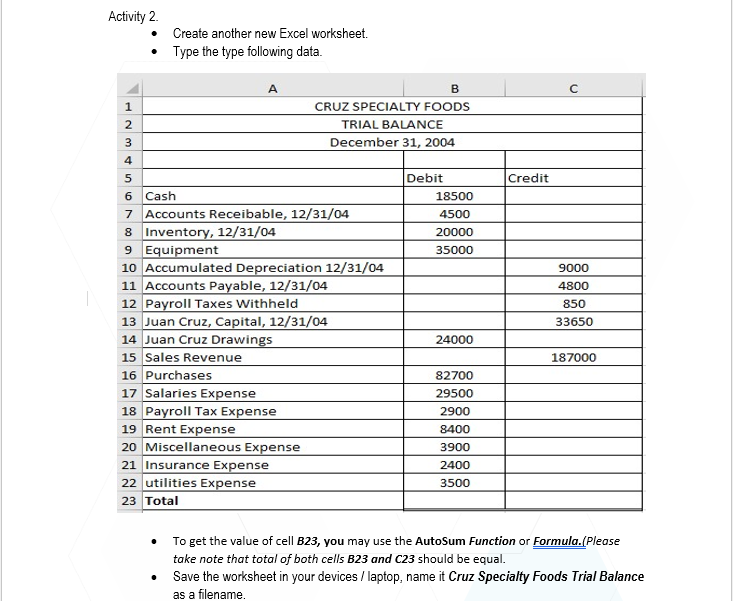
Question: Activity 2. Create another new Excel worksheet. . Type the type following data. A B C 1 CRUZ SPECIALTY FOODS 2 TRIAL BALANCE 3 December
Activity 2. Create another new Excel worksheet. .
Activity 2. Create another new Excel worksheet. . Type the type following data. A B C 1 CRUZ SPECIALTY FOODS 2 TRIAL BALANCE 3 December 31, 2004 Debit Credit 6 Cash 18500 Accounts Receiballi 4500 Inventory, 12/31/04 20000 9 Equipment 35000 10 Accumulated Depreciation 12/31/04 9000 11 Accounts Payable, 12/31/04 4800 12 Payroll Taxes Withheld 850 13 Juan Cruz, Capital, 12/31/04 33650 14 Juan Cruz Drawings 24000 15 Sales Revenue 187000 16 Purchases 82700 17 Salaries Expense 29500 18 Payroll Tax Expense 2900 19 Rent Expense 8400 20 Miscellaneous Expense 3900 21 Insurance Expense 2400 22 utilities Expense 3500 23 Total . To get the value of cell B23, you may use the AutoSum Function or Formula.(Please take note that total of both cells B23 and C23 should be equal. Save the worksheet in your devices / laptop, name it Cruz Specialty Foods Trial Balance as a filename

Step by Step Solution

There are 3 Steps involved in it

1 Expert Approved Answer
Step: 1 Unlock blur-text-image
Question Has Been Solved by an Expert!

Get step-by-step solutions from verified subject matter experts

Step: 2 Unlock
Step: 3 Unlock

Students Have Also Explored These Related Accounting Questions!