







Question: Adapt this Arduino code to function in the same way in MATLAB. This Arduino code is from ParkFun Electronics, and the goal is to use
Adapt this Arduino code to function in the same way in MATLAB. This Arduino code is from ParkFun Electronics, and the goal is to use 3 buttons plugged to play musical notes on a buzzer. The code is SIK_Circuit_2B-DigitalTrumpet
//set the pins for the button and buzzer int firstKeyPin = 2; int secondKeyPin = 3; int thirdKeyPin = 4;
int buzzerPin = 10;
void setup() { //set the button pins as inputs pinMode(firstKeyPin, INPUT_PULLUP); pinMode(secondKeyPin, INPUT_PULLUP); pinMode(thirdKeyPin, INPUT_PULLUP);
//set the buzzer pin as an output pinMode(buzzerPin, OUTPUT); }
void loop() {
if (digitalRead(firstKeyPin) == LOW) { //if the first key is pressed tone(buzzerPin, 262); //play the frequency for c; 262Hz } else if (digitalRead(secondKeyPin) == LOW) { //if the second key is pressed tone(buzzerPin, 330); //play the frequency for e; 330Hz } else if (digitalRead(thirdKeyPin) == LOW) { //if the third key is pressed tone(buzzerPin, 392); //play the frequency for g; 392Hz } else { noTone(buzzerPin); //if no key is pressed turn the buzzer off } }
The way the Arduino board (its an Uno), is:
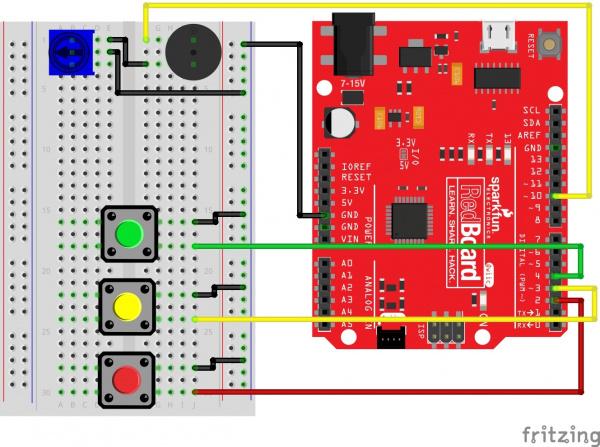
fritzing AREFL GNDE YES ET mm HOE RESET I ITAL (PU) EEEEE13 ELECTRONICE Gvic sparkfun Red Bc ard LEARN. SHAR HACK IVO ISP ANALOGN 7-15V IOREF RESET 5V GND VINN EGND A1 A2 A fritzing AREFL GNDE YES ET mm HOE RESET I ITAL (PU) EEEEE13 ELECTRONICE Gvic sparkfun Red Bc ard LEARN. SHAR HACK IVO ISP ANALOGN 7-15V IOREF RESET 5V GND VINN EGND A1 A2 A
Step by Step Solution
There are 3 Steps involved in it

Get step-by-step solutions from verified subject matter experts
 Study Help