







Question: - Add 3 books in the code to kickstart. - After every operation, the status should be updated. For example, if a book is borrowed,
Add books in the code to kickstart.
After every operation, the status should be updated. For example, if a book is borrowed, its status should be shown as
"Borrowed"
When is selected, the program should ask for the username dont authenticate right now
See the demo and then create the program
You can take any logical assumption for anything not mentioned or clear in sample screenshots.
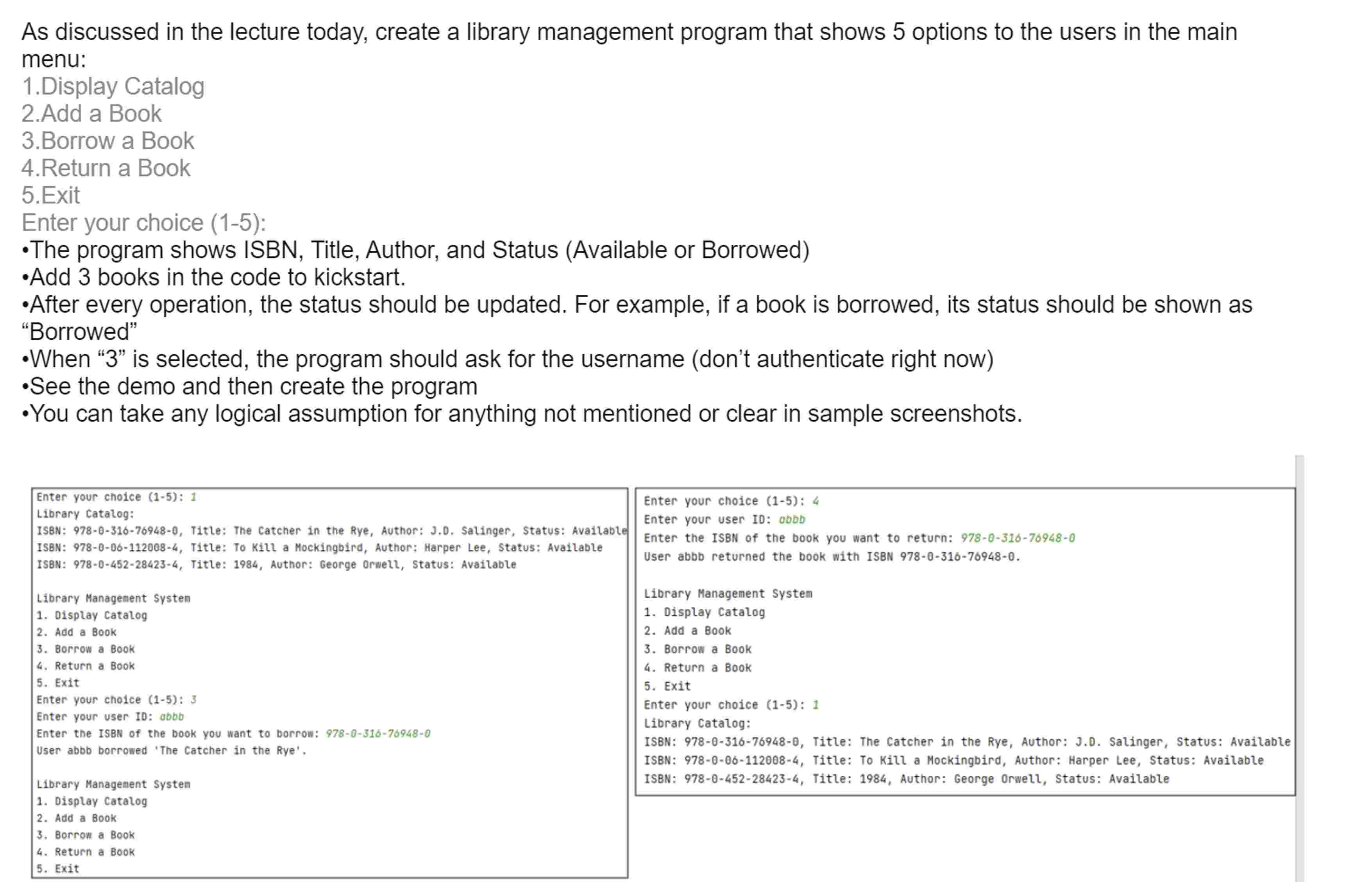
Enter your choice :
Library Catalog:
ISBN: Title: The Catcher in the Rye, Author: J Salinger, Status: Available
ISBN: Title: To Kill a Mockingbird, Author: Harper Lee, Status: Available
ISBN: Title: Author: George Orwell, Status: Available
Library Management System
Oisplay Catalog
Add a Book
Borrow a Book
Return a Book
Exit
Enter your choice :
Enter your user ID: abbb
Enter the ISBN of the book you want to borrow:
User abbb borrowed 'The Catcher in the Rye',
Library Management Systen
Display Catalog
Add a Book
Borrow a Book
Return a Book
Exit
Enter your choice :
Enter your user ID: aDDD
Enter the ISBN of the book you want to return:
User abbb returned the book with ISBN
Library Management Systen
Display Catalog
Add a Book
Borrow a Book
Return a Book
Exit
Enter your choice :
Library Catalog:
ISBN: Title: The Catcher in the Rye, Author: Salinger, Status: Available
ISBN: Title: To Kill a Mockingbird, Author: Harper Lee, Status: Available
ISBN: Title: Author: George Orwell, Status: Available
Step by Step Solution
There are 3 Steps involved in it
1 Expert Approved Answer
Step: 1 Unlock

Question Has Been Solved by an Expert!
Get step-by-step solutions from verified subject matter experts
Step: 2 Unlock
Step: 3 Unlock
 Study Help