







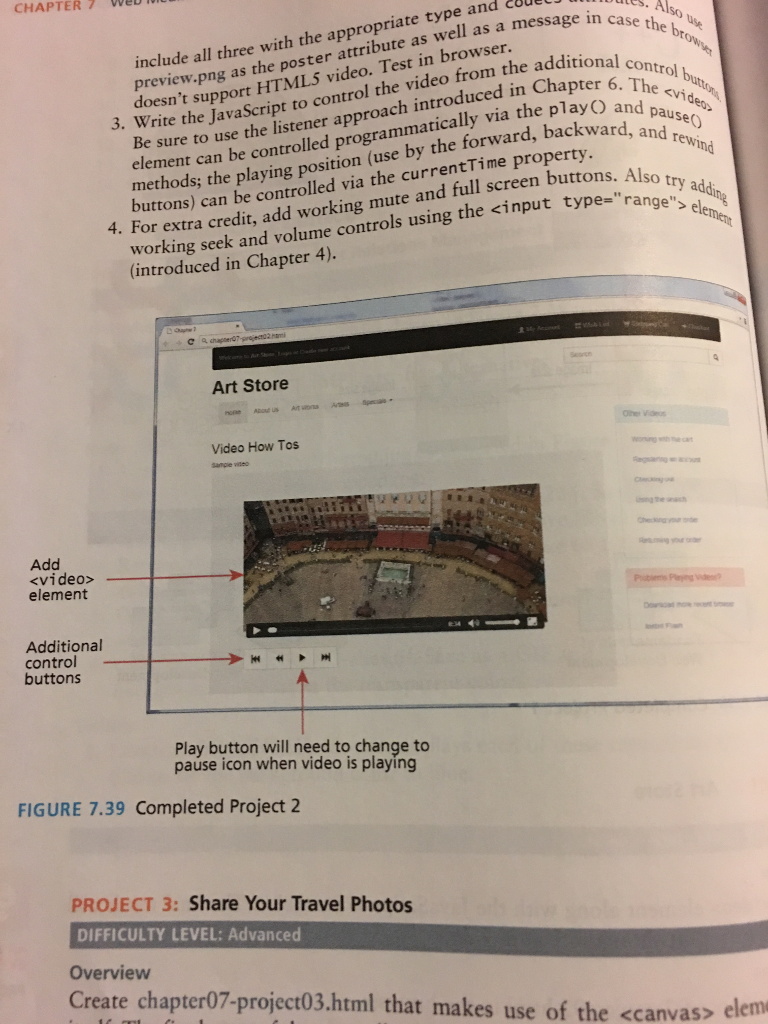
Question: Add a element that will play either sample.mp4, sample.webm, or sample.ogv in the element. Be sure to include all three with the appropriate type and
Add a
Write the JavaScript to control the video from the additional control buttons. Be sure to use the listener approach. The
HTML code is
Art Store
Video How Tos
Sample video
video goes here
Other Videos
- Working with the cart
- Registering an account
- Checking out
- Using the search
- Checking your order
- Returning your order
Problems Playing Videos?
- Download more recent browser
- Install Flash
CSS code is
/* body { padding-top: 70px; } */
h1 { font-size: 3em; font-weight: bold; margin-top: 0;}
div#topHeaderRow {
font-size: 0.9em; /* height: 2em; background-color: yellow; line-height: 2em; */ }
.price { font-size: 1.4em; color: red; font-weight: bold;}
.similarTitle { font-weight: bold; font-size: 0.9em; }
.cartText { font-size: 0.75em; }
footer { margin-top: 1em; background-color: #E7E7E7;
}
.tight-form-group { margin-bottom: 5px; }
#copyrightRow { background-color: #3A3A3A; padding: 0.75em 0 0.75em 0; margin-top: 5px;}
I know you can't access the photos, but I named the photo files. If there's a way to figure this out I'd really appreciate it. Need help ASAP thanks so much in advance.
CHAPTER 7 Weu preview.png as the poster attribute as well as a message in c rite the JavaScript to control the video from the addition ent can be controlled programmatically via the play include all three with the appropriate type and cBue oesn't support HTMLS video. Test in browser. e sure to use the listener approach introduced in Chap e br 6, O and pauseo 3. Wr apter backward, and rewind by the forward, backwa methods; the playing position (use rty. s) can be controlled via the currentTime prope mute and full screen buttons. Also working seekan volume controls using the
Step by Step Solution
There are 3 Steps involved in it

Get step-by-step solutions from verified subject matter experts
 Study Help