



Question: Add an Event Handler Visual Studio automates the registering of the event handler with the control's event. It also prepares the method handling signature, all
Add an Event Handler
Visual Studio automates the registering of the event handler with the control's event. It also prepares the method handling signature, all you need to do is write the C# code to handle the event (harder sometimes than it sounds).
Activity: Handle the Button Click Event
In Design View, select the Button and view its properties
Click the Lightning Bolt in the Property Window to see a list of all possible Button Events (there are a lot)
Double-click the empty drop down box next to the Click event
Visual Studio Editor window will open with the cursor positioned in the newly created event handler method
Write the C# code to translate the textBox1's text into the selected language and then replace the current text with its translated version.
It has become pretty easy to leverage web services from Window Form applications.. See BING Desktop Translator using C# and VB.NET for C# code to do the translation.
A test App Id you may use today is
Language codes for Spanish, French, and German
Since this is only a prototype, if you are short on time hard code the traslation to display "Hola como estas"
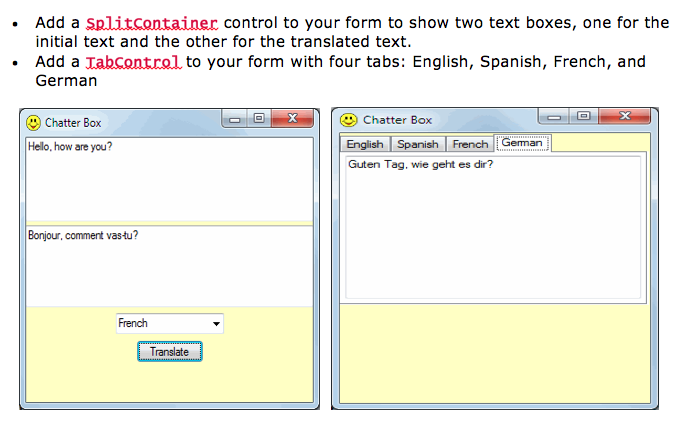
. Add a Splitcontainer control to your form to show two text boxes, one for the initial text and the other for the translated text. . Add a Tabcontrol to your form with four tabs: English, Spanish, French, and German Chatter Box Hello, how are you? Chatter Box English Spanish French Geman Guten Tag. wie geht es dir? Bonjour, comment vas-tu? French Translate
Step by Step Solution
There are 3 Steps involved in it

Get step-by-step solutions from verified subject matter experts