



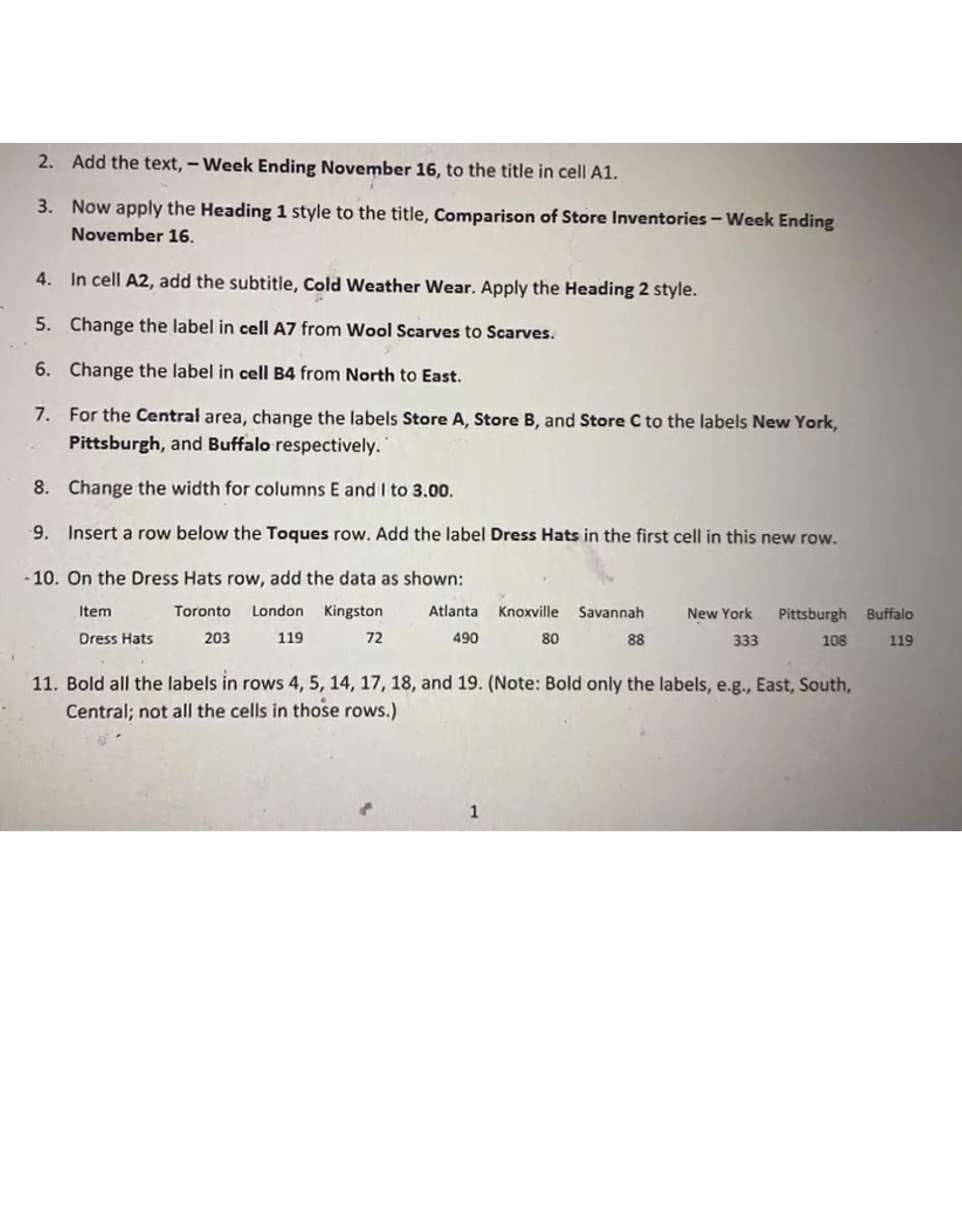
Question: Add the text, - Week Ending November 1 6 , to the title in cell A 1 . Now apply the Heading 1 style to
Add the text, Week Ending November to the title in cell A
Now apply the Heading style to the title, Comparison of Store Inventories Week Ending November
In cell A add the subtitle, Cold Weather Wear. Apply the Heading style.
Change the label in cell from Wool Scarves to Scarves.
Change the label in cell B from North to East.
For the Central area, change the labels Store A Store B and Store C to the labels New York, Pittsburgh, and Buffalo respectively.
Change the width for columns and I to
Insert a row below the Toques row. Add the label Dress Hats in the first cell in this new row.
On the Dress Hats row, add the data as shown:
tableItemToronto,London,Kingston,Atlanta,Knoxville,Savannah,New York,Pittsburgh,BuffaloDress Hats,
Bold all the labels in rows and Note: Bold only the labels, eg East, South, Central; not all the cells in those rows. I need the exactsolution to the whole questions
I am sending a pic of all ques
Step by Step Solution
There are 3 Steps involved in it
1 Expert Approved Answer
Step: 1 Unlock

Question Has Been Solved by an Expert!
Get step-by-step solutions from verified subject matter experts
Step: 2 Unlock
Step: 3 Unlock