







Question: Advanced Visual Basic .NET programming Search Tables E APPOINTMENT 16 CUENTO I COUNSELOR CUENT TB VID Fiesta COUNSELOR TI VOD Fiestane Lastlane Daterih Gender Contact
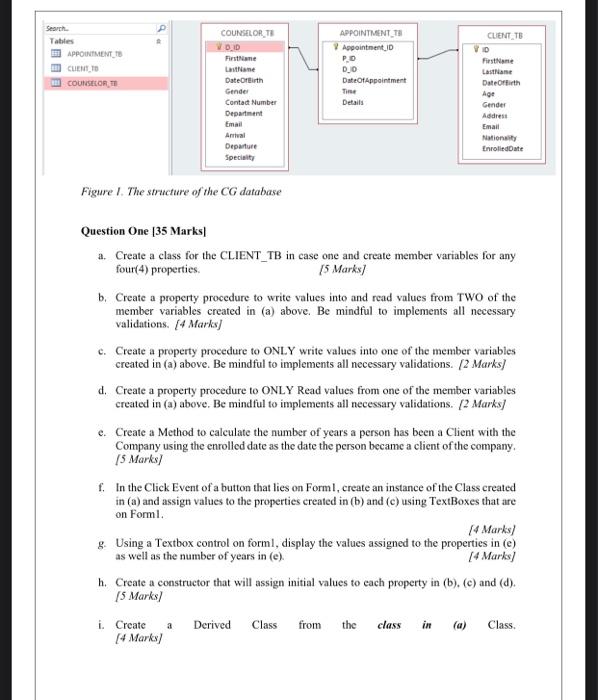
Search Tables E APPOINTMENT 16 CUENTO I COUNSELOR CUENT TB VID Fiesta COUNSELOR TI VOD Fiestane Lastlane Daterih Gender Contact Number Department Email APPOINTMENT TH Appointment ID PO 0.0 DateOfAppointment Tie Details DateOffith Age Gender Address Email Nationality Enrolled Date Departure Specialty Figure 1. The structure of the CG database Question One [35 Marks a. Create a class for the CLIENT_TB in case one and create member variables for any four(4) properties 5 Marks] b. Create a property procedure to write values into and read values from TWO of the member variables created in (a) above. Be mindful to implements all necessary validations. [4 Marks) c. Create a property procedure to ONLY write values into one of the member variables created in (a) above. Be mindful to implements all necessary validations. [2 marks] d. Create a property procedure to ONLY Read values from one of the member variables created in (a) above. Be mindful to implements all necessary validations. [2 marks] e. Create a Method to calculate the number of years a person has been a Client with the Company using the enrolled date as the date the person became a client of the company, (5 Marks/ f. In the Click Event of a button that lies on Forml, create an instance of the Class created in (a) and assign values to the properties created in (b) and (c) using TextBoxes that are on Forml. (4 Marks/ g. Using a Textbox control on forml, display the values assigned to the properties in (e) as well as the number of years in (e). [4 Marks) h. Create a constructor that will assign initial values to each property in (b). (e) and (d). 15 Marks) i. Create Derived Class from the class Class [4 Marks/ a in
Step by Step Solution
There are 3 Steps involved in it

Get step-by-step solutions from verified subject matter experts
 Study Help