





Question: After the first part, use the same program and modify it using #2 directions, thank you 2. Create a C++ Program: When the program starts,
 After the first part, use the same program and modify it

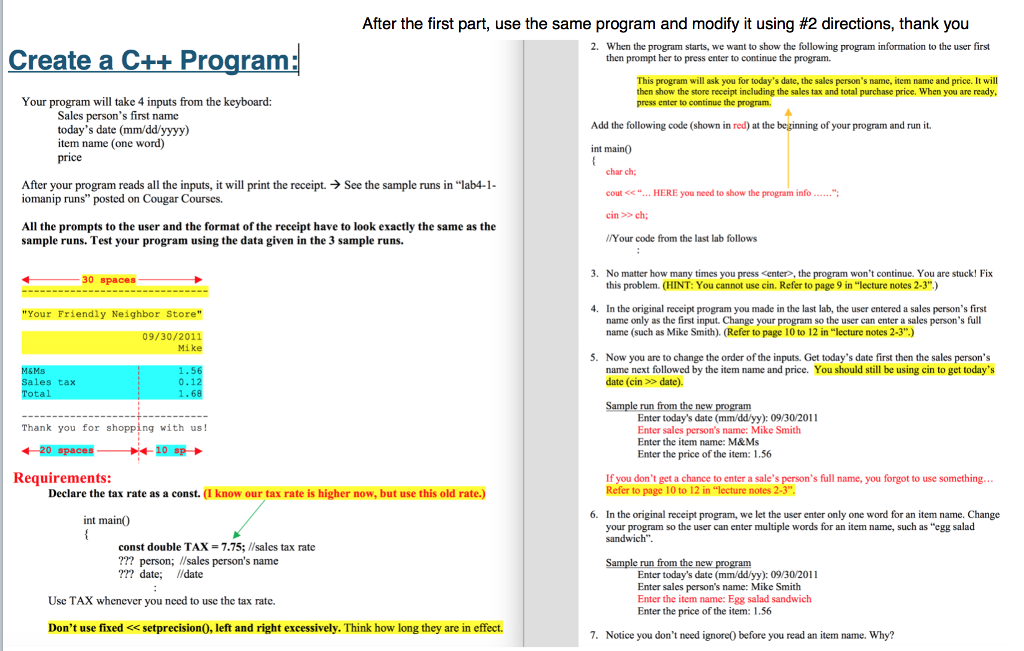
After the first part, use the same program and modify it using #2 directions, thank you 2. Create a C++ Program: When the program starts, we want to show the following program information to the user first then prompt her to press enter to continue the program. This program will ask you for today's date, the sales person's name, item name and price. It will then show the store receipt including the sales tax and total purchase price. When you are ready, press enter to continue the program. Your program will take 4 inputs from the keyboard: Sales person's first name today's date (mm/dd/yyyy) item name (one word) price Add the following code (shown in red) at the of your program and run it int main0 char ch; cout > ch; /Your code from the last lab follows After your program reads all the inputs, it will print the receipt. >See the sample runs in "lab4-1 iomanip runs" posted on Cougar Courses. All the prompts to the user and the format of the receipt have to look exactly the same as the sample runs. Test your program using the data given in the 3 sample runs. 3. No matter how many times you press , the program won't continue. You are stuck! Fix this problem. (HINT: You cannot use cin. Refer to page 9 in "lecture notes 2-3".) 30 spaces 4. In the original receipt program you made in the last lab, the user entered a sales person's first name only as the first input. Change your program so the user can enter a sales person's full name (such as Mike Smith). (Refer to page 10 to 12 in "lecture notes 2-3".) "Your Friendly Neighbor Store" 09/30/2011 Mike 5. Now you are to change the order of the inputs. Get today's date first then the sales person's name next followed by the item name and price. date (cin > date). You should still be using cin to get today's M&Ms Sales tax Tot 0.12 68 Sample run from the new program Enter today's date (mm/ddlyy): 09/30/2011 Enter sales person's name: Mike Smith Enter the item name: M&Ms Enter the price of the item: 1.56 Thank you for shopping with us! Requirements: If you don't get a chance to enter a sale's person's full name, you forgot to use something... Refer to page 10 to 12 in "lecture notes 2-3", Declare the tax rate as a const. (I know our tax rate is higher now, but use this old rate.) 6. In the original receipt program, we let the user enter only one word for an item name. Change your program so the user can enter multiple words for an item name, such as "egg salad sandwich" int maino const double TAX-7.75;//sales tax rate ??? person; /sales person's name ??? date; lidate Enter today's date (mm/dd/yy): 09/30/2011 Enter sales person's name: Mike Smith Enter the item name: Egg salad sandwich Enter the price of the item:156 Use TAX whenever you need to use the tax rate Don't use fixed

Step by Step Solution

There are 3 Steps involved in it

1 Expert Approved Answer
Step: 1 Unlock blur-text-image
Question Has Been Solved by an Expert!

Get step-by-step solutions from verified subject matter experts

Step: 2 Unlock
Step: 3 Unlock

Students Have Also Explored These Related Databases Questions!