







Question: After your initial calculations for Question 2 above, you find out that there has been a change in the regulation. The State of Georgia now
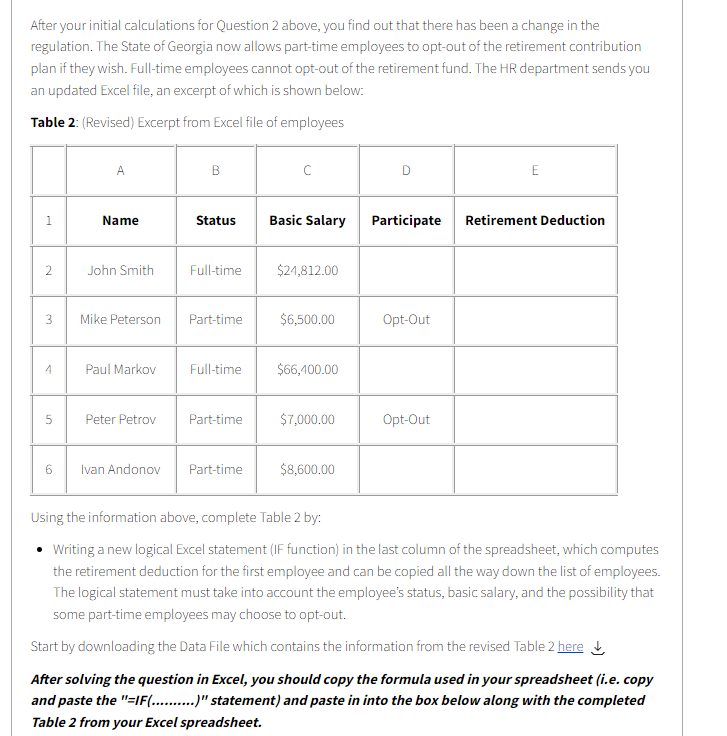
After your initial calculations for Question 2 above, you find out that there has been a change in the regulation. The State of Georgia now allows part-time employees to opt-out of the retirement contribution plan if they wish. Full-time employees cannot opt-out of the retirement fund. The HR department sends you an updated Excel file, an excerpt of which is shown below: Table 2: (Revised) Excerpt from Excel file of employees A B D E 1 Name Status Basic Salary Participate Retirement Deduction 2 John Smith Full-time $24,812.00 3 Mike Peterson Part-time $6,500.00 Opt-Out 4 Paul Markov Full-time $66,100.00 5 Peter Petrov Part-time $7,000.00 Opt-Out 6 Ivan Andonov Part-time $8,600.00 Using the information above, complete Table 2 by: Writing a new logical Excel statement (IF function) in the last column of the spreadsheet, which computes the retirement deduction for the first employee and can be copied all the way down the list of employees. The logical statement must take into account the employee's status, basic salary, and the possibility that some part-time employees may choose to opt-out. Start by downloading the Data File which contains the information from the revised Table 2 here After solving the question in Excel, you should copy the formula used in your spreadsheet (i.e. copy and paste the "=IF(.........)" statement) and paste in into the box below along with the completed Table 2 from your Excel spreadsheet. After your initial calculations for Question 2 above, you find out that there has been a change in the regulation. The State of Georgia now allows part-time employees to opt-out of the retirement contribution plan if they wish. Full-time employees cannot opt-out of the retirement fund. The HR department sends you an updated Excel file, an excerpt of which is shown below: Table 2: (Revised) Excerpt from Excel file of employees A B D E 1 Name Status Basic Salary Participate Retirement Deduction 2 John Smith Full-time $24,812.00 3 Mike Peterson Part-time $6,500.00 Opt-Out 4 Paul Markov Full-time $66,100.00 5 Peter Petrov Part-time $7,000.00 Opt-Out 6 Ivan Andonov Part-time $8,600.00 Using the information above, complete Table 2 by: Writing a new logical Excel statement (IF function) in the last column of the spreadsheet, which computes the retirement deduction for the first employee and can be copied all the way down the list of employees. The logical statement must take into account the employee's status, basic salary, and the possibility that some part-time employees may choose to opt-out. Start by downloading the Data File which contains the information from the revised Table 2 here After solving the question in Excel, you should copy the formula used in your spreadsheet (i.e. copy and paste the "=IF(.........)" statement) and paste in into the box below along with the completed Table 2 from your Excel spreadsheet
Step by Step Solution
There are 3 Steps involved in it

Get step-by-step solutions from verified subject matter experts
 Study Help