Question: Ahaniming Edit View Insert Format Tools Table Window Help Network Technical Document Si 3 1 8 4 David Bordet 2 0 5 . 3 .

Ahaniming
Edit
View
Insert
Format
Tools
Table
Window
Help
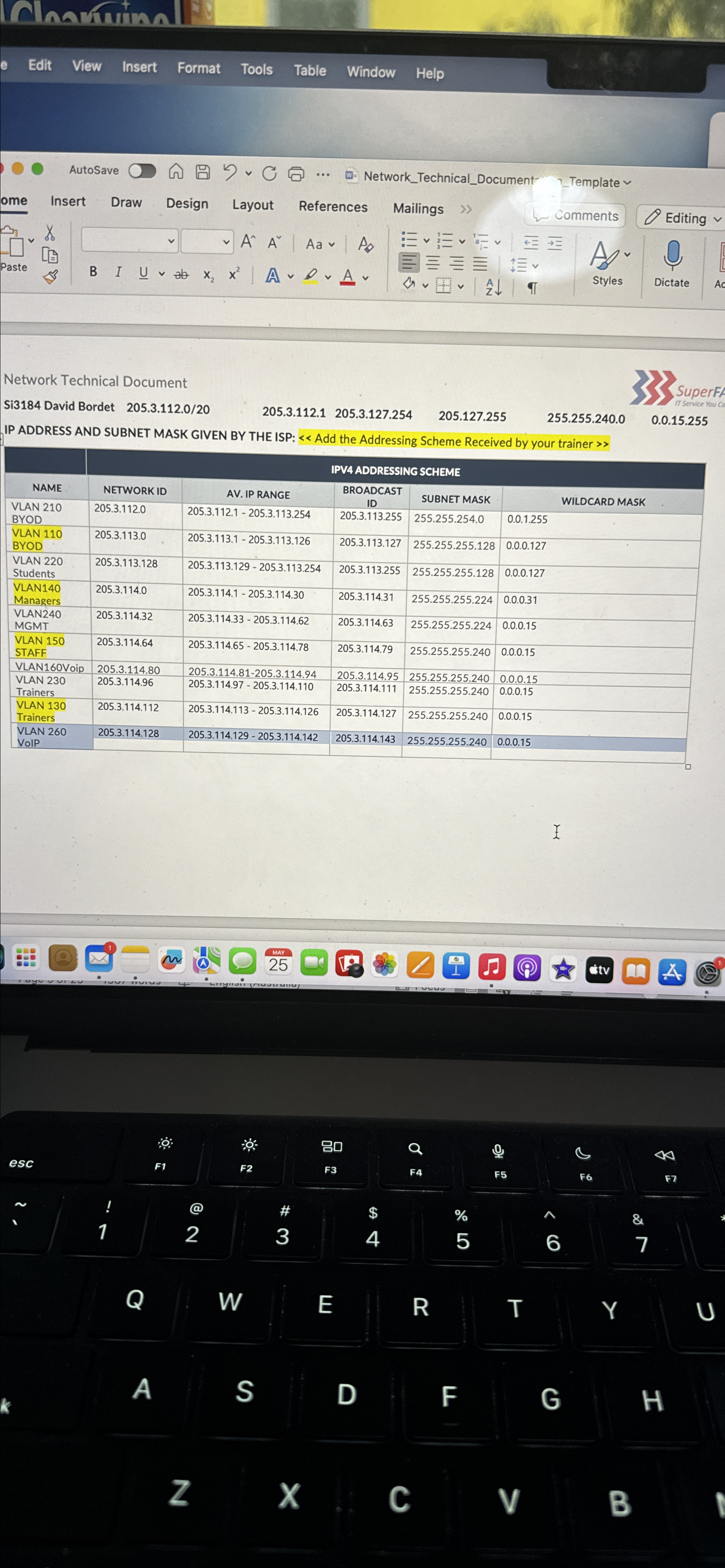
Network Technical Document
Si3184 David Bordet 205.3.112.0/20
205.3.112.1205.3.127.254
205.127.255
255.255.240.0
SuperF
0.0.15.255
IP ADDRESS AND SUBNET MASK GIVEN BY THE ISP: Add the Addressing Scheme Received by your trainer >>
\table[[NAME,IPV4 ADDRESSING SCHEME],[NETWORK ID,AV. IP RANGE,\table[[BROADCAST],[ID]],SUBNET MASK,WILDCARD MASK],[\table[[VLAN 210],[BYOD]],205.3.112.0,205.3.112.1-205.3.113.254,205.3.113.255,255.255.254.0,0.0.1.255],[\table[[VLAN 110],[BYOD]],205.3.113.0,205.3.113.1-205.3.113.126,205.3.113.127,255.255.255.128,0.0.0.127],[\table[[VLAN 220],[Students]],205.3.113.128,205.3.113.129-205.3.113.254,205.3.113.255,255.255.255.128,0.0.0.127],[\table[[VLAN140],[Managers]],205.3.114.0,205.3.114.1-205.3.114.30,205.3.114.31,255.255.255.224,0.0.0.31],[\table[[VLAN240],[MGMT]],205.3.114.32,205.3.114.33-205.3.114.62,205.3.114.63,255.255.255.224,0.0.0.15],[\table[[VLAN 150],[STAFF]],205.3.114.64,205.3.114.65-205.3.114.78,205.3.114.79,255.255.255.240,0.0.0.15],[VLAN160Voip,205.3.114.80,205.3.114.81-205.3.114.94,205.3.114.95,255.255.255.240,0.0.0.15],[\table[[VLAN 230],[Trainers]],205.3.114.96,205.3.114.97-205.3.114.110,205.3.114.111,255.255.255.240,0.0.0.15],[\table[[VLAN 130],[Trainers]],205.3.114.112,205.3.114.113-205.3.114.126,205.3.114.127,255.255.255.240,0.0.0.15],[\table[[VLAN 260],[VoIP]],205.3.114.128,205.3.114.129-205.3.114.142,205.3.114.143,255.255.255.240,0.0.0.15]]
 Ahaniming Edit View Insert Format Tools Table Window Help Network Technical

Step by Step Solution

There are 3 Steps involved in it

1 Expert Approved Answer
Step: 1 Unlock blur-text-image

Question Has Been Solved by an Expert!

Get step-by-step solutions from verified subject matter experts

Step: 2 Unlock
Step: 3 Unlock

Students Have Also Explored These Related Databases Questions!