







Question: All data is case sensitive. Be sure to insert the data in the order provided so all ID's match expectations. Table: AlphaDepartment AlphaDepartment Data
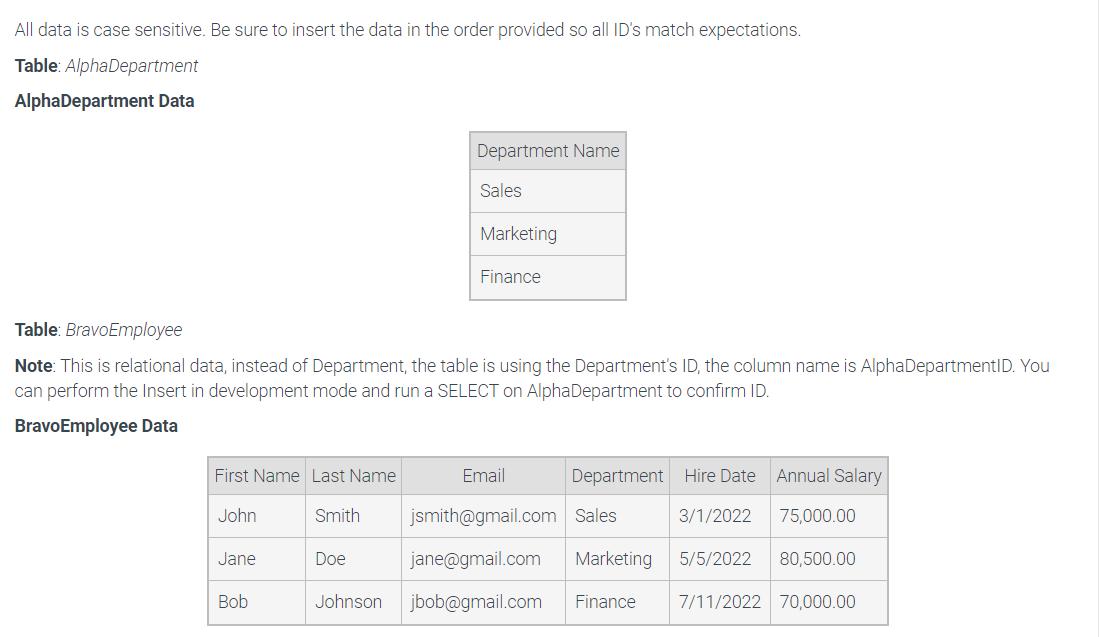
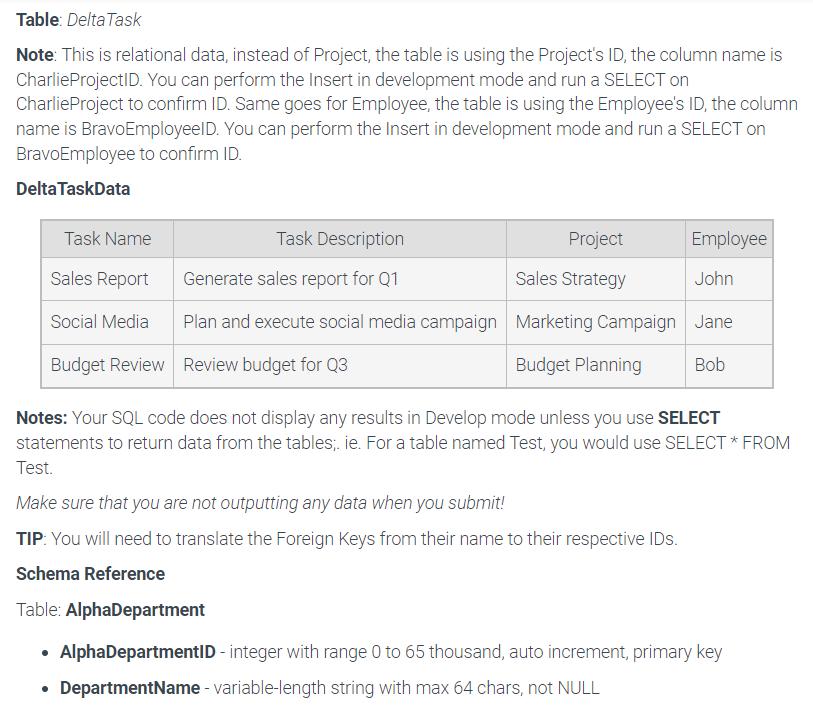
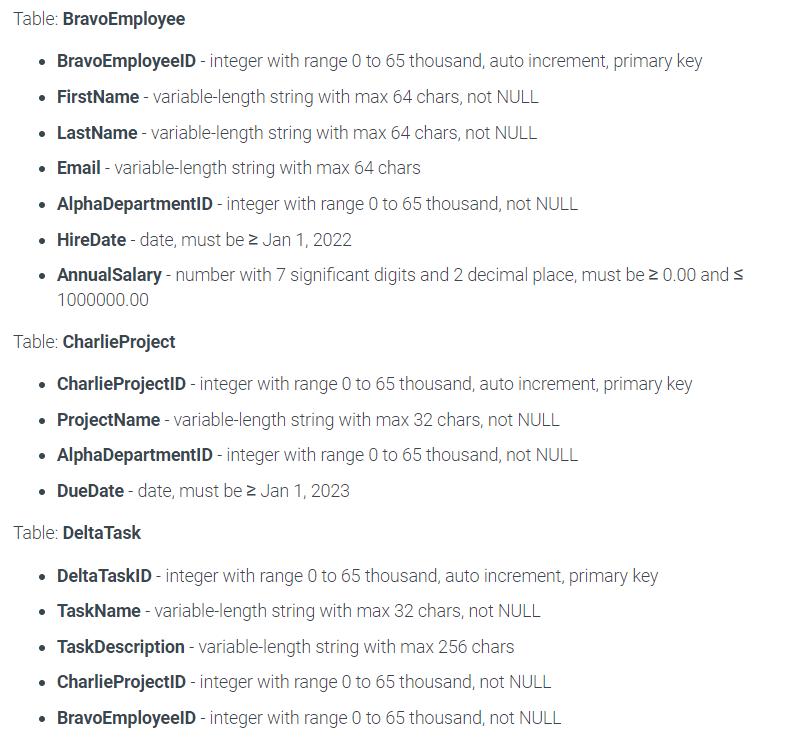
All data is case sensitive. Be sure to insert the data in the order provided so all ID's match expectations. Table: AlphaDepartment AlphaDepartment Data First Name Last Name John Jane Table: BravoEmployee Note: This is relational data, instead of Department, the table is using the Department's ID, the column name is AlphaDepartmentID. You can perform the Insert in development mode and run a SELECT on AlphaDepartment to confirm ID. BravoEmployee Data Bob Smith Department Name Doe Sales Marketing Finance Email jsmith@gmail.com Sales jane@gmail.com Marketing Finance Johnson jbob@gmail.com Department Hire Date Annual Salary 3/1/2022 75,000.00 5/5/2022 80,500.00 7/11/2022 70,000.00 Table: Delta Task Note: This is relational data, instead of Project, the table is using the Project's ID, the column name is CharlieProjectID. You can perform the Insert in development mode and run a SELECT on CharlieProject to confirm ID. Same goes for Employee, the table is using the Employee's ID, the column name is BravoEmployeelD. You can perform the Insert in development mode and run a SELECT on BravoEmployee to confirm ID. Delta TaskData Task Name Sales Report Social Media Budget Review Project Sales Strategy Task Description Employee Generate sales report for Q1 John Plan and execute social media campaign Marketing Campaign Jane Review budget for Q3 Budget Planning Bob Notes: Your SQL code does not display any results in Develop mode unless you use SELECT statements to return data from the tables;. ie. For a table named Test, you would use SELECT * FROM Test. Make sure that you are not outputting any data when you submit! TIP: You will need to translate the Foreign Keys from their name to their respective IDs. Schema Reference Table: AlphaDepartment AlphaDepartmentID - integer with range 0 to 65 thousand, auto increment, primary key DepartmentName - variable-length string with max 64 chars, not NULL Table: BravoEmployee BravoEmployeeID - integer with range 0 to 65 thousand, auto increment, primary key FirstName - variable-length string with max 64 chars, not NULL LastName - variable-length string with max 64 chars, not NULL Email - variable-length string with max 64 chars AlphaDepartmentID - integer with range 0 to 65 thousand, not NULL HireDate - date, must be 2 Jan 1, 2022 AnnualSalary - number with 7 significant digits and 2 decimal place, must be 0.00 and 1000000.00 Table: CharlieProject Charlie ProjectID - integer with range 0 to 65 thousand, auto increment, primary key ProjectName - variable-length string with max 32 chars, not NULL AlphaDepartmentID - integer with range 0 to 65 thousand, not NULL DueDate - date, must bez Jan 1, 2023 Table: Delta Task Delta TaskID - integer with range 0 to 65 thousand, auto increment, primary key TaskName - variable-length string with max 32 chars, not NULL TaskDescription - variable-length string with max 256 chars Charlie ProjectID - integer with range 0 to 65 thousand, not NULL BravoEmployeeID - integer with range 0 to 65 thousand, not NULL All data is case sensitive. Be sure to insert the data in the order provided so all ID's match expectations. Table: AlphaDepartment AlphaDepartment Data First Name Last Name John Jane Table: BravoEmployee Note: This is relational data, instead of Department, the table is using the Department's ID, the column name is AlphaDepartmentID. You can perform the Insert in development mode and run a SELECT on AlphaDepartment to confirm ID. BravoEmployee Data Bob Smith Department Name Doe Sales Marketing Finance Email jsmith@gmail.com Sales jane@gmail.com Marketing Finance Johnson jbob@gmail.com Department Hire Date Annual Salary 3/1/2022 75,000.00 5/5/2022 80,500.00 7/11/2022 70,000.00 Table: Delta Task Note: This is relational data, instead of Project, the table is using the Project's ID, the column name is CharlieProjectID. You can perform the Insert in development mode and run a SELECT on CharlieProject to confirm ID. Same goes for Employee, the table is using the Employee's ID, the column name is BravoEmployeelD. You can perform the Insert in development mode and run a SELECT on BravoEmployee to confirm ID. Delta TaskData Task Name Sales Report Social Media Budget Review Project Sales Strategy Task Description Employee Generate sales report for Q1 John Plan and execute social media campaign Marketing Campaign Jane Review budget for Q3 Budget Planning Bob Notes: Your SQL code does not display any results in Develop mode unless you use SELECT statements to return data from the tables;. ie. For a table named Test, you would use SELECT * FROM Test. Make sure that you are not outputting any data when you submit! TIP: You will need to translate the Foreign Keys from their name to their respective IDs. Schema Reference Table: AlphaDepartment AlphaDepartmentID - integer with range 0 to 65 thousand, auto increment, primary key DepartmentName - variable-length string with max 64 chars, not NULL Table: BravoEmployee BravoEmployeeID - integer with range 0 to 65 thousand, auto increment, primary key FirstName - variable-length string with max 64 chars, not NULL LastName - variable-length string with max 64 chars, not NULL Email - variable-length string with max 64 chars AlphaDepartmentID - integer with range 0 to 65 thousand, not NULL HireDate - date, must be 2 Jan 1, 2022 AnnualSalary - number with 7 significant digits and 2 decimal place, must be 0.00 and 1000000.00 Table: CharlieProject Charlie ProjectID - integer with range 0 to 65 thousand, auto increment, primary key ProjectName - variable-length string with max 32 chars, not NULL AlphaDepartmentID - integer with range 0 to 65 thousand, not NULL DueDate - date, must be 2 Jan 1, 2023 Table: Delta Task Delta TaskID - integer with range 0 to 65 thousand, auto increment, primary key TaskName - variable-length string with max 32 chars, not NULL TaskDescription - variable-length string with max 256 chars Charlie ProjectID - integer with range 0 to 65 thousand, not NULL BravoEmployeeID - integer with range 0 to 65 thousand, not NULL
Step by Step Solution
There are 3 Steps involved in it
You have provided images showing a task related to inserting data into database tables ensuring foreign key relationships are respected and that the d... View full answer

Get step-by-step solutions from verified subject matter experts
 Study Help