







Question: All HTML elements can have attributes Attributes provide additional information about elements . Attributes are always specified in the start tag Attributes usually come
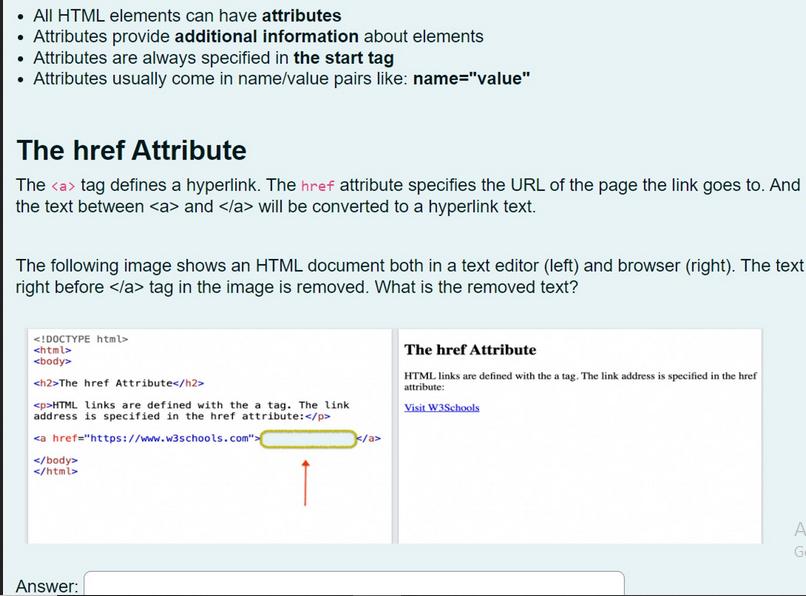
All HTML elements can have attributes Attributes provide additional information about elements . Attributes are always specified in the start tag Attributes usually come in name/value pairs like: name="value" The href Attribute The tag defines a hyperlink. The href attribute specifies the URL of the page the link goes to. And the text between and will be converted to a hyperlink text. The following image shows an HTML document both in a text editor (left) and browser (right). The text right before tag in the image is removed. What is the removed text? The href Attribute HTML links are defined with the a tag. The link address is specified in the href attribute: Answer: The href Attribute HTML links are defined with the a tag. The link address is specified in the href attribute: Visit W3Schools A G
Step by Step Solution
3.32 Rating (155 Votes )
There are 3 Steps involved in it
It seems like the text ... View full answer

Get step-by-step solutions from verified subject matter experts
 Study Help