Question: all the information needed to figure the problems are in the question. what goes in L1 is the cashier daily report L2 is some formula,
all the information needed to figure the problems are in the question. what goes in L1 is the "cashier daily report" L2 is some formula, I just need help figuring it out 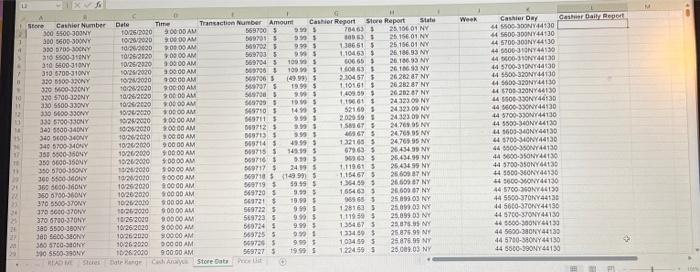

13 11 21 22 25 12 124 125 26 20 xvf Cashier Number 300 5500-300NY 300 5600-300NY 300 5705-300NY NY 310 5500-310NY 5500-110NY 140 310 5600-310NY 310 6700-310NY 320 5500-320NY SONY 320 5600-320NY 320 5700-320NY 330 5500-330NY the essen 330 5600-330NY 6000-340NY 330 5700-330NY 150 343 110 340 5400-340NY 340 5700-340NY PAREMAN 0000-350NY www 0600-350NY Biasan 355 S 350 350 5700-350NY SP 300 5500-360NY www 360 5600-360NY 360 6700-360NY 370 5500-370NY 370 6000-370NY 370 6700-370NY 380 5500-380NY 380 5600-380NY 360 5700-380NY 390 5500-390NY A Store READ ME Stures Date 9:00:00 AM 9:00:00 AM Transaction Number Amount 569700 $ 509701 S 10/26/2020 10/20/2020 10/26/2000 10/26/2020 1005/2320 10/26/2920 Cashier Report 9.99 $ 9.99 $ 9.99$ 9.99 $ 109.99 9:00:00 AM 569702 $ 9:00:00 AM 569703 $ 9:00:00 AM 569704 $ 3.00:00 AM 009706 So 10000 PARA 00:00 AM 9:00:00 AM 509706 * 569737 (49.99) SAM 19.99 $ expe 2.99 $ 9:00:00 AM 569700 P BAK 10.50 00:00 AM 549709 24-2020 10/29/2020 16/24/2020 10/28/2000 108/2020 10/28/2020 1924-2020 10/20/2020 1004/2020 10/28/2020 10040ton 10/20/2020 10/26/2020 10/20/2020 00 10/20/2020 Maram 10/20/2020 Sep 10000 AM *00:00 AM 549710 14.99 S w 1:00:00 AM 549711 $ 2:00:00 A AM 3:00:00 AM 069712 Coun H 9.99 9.99 $ 9.59 1 49.99 $ 549713 COMO 569714 DATA 549715 9:00:00 AM 9:00:00 AM Params 10/20/2020 10/26/2000 149.99 549715 $:00:00 AM X 5.39 3 24.99 S 10/20/2000 $:00:00 AM 10/20/2020 9:00:00 AM 10/20/2020 10/20/2020 10/26/2000 9:00:00 AM 9:00:00 AM $:00:00 AM $:00:00 AM 009716 140717 3 569718 $ (14999) S 569719 $ 19.59 569720 9.99 $ 549721 $ 19.59 $ 999 1 9.99 $ 9.99 $ 999 1 9.99 1 19.99 1026/2000 569722 $ 9:00:00 AM 569723 $ 10/26/2020 10/26/2020 9:00:00 AM 560724 10/26/2020 9:00:00 AM 10/26-2020 00000 AM 569725 5697265 569727 $ 10/26/2000 9:00:00 AM Date Range Cash Anaya Store Data Price Lit Time $ 1 S Store Report 70463 S 800633 1.30661 $ 1,104631 606 65 $ 1.60863 1 2.304 67 $ 1,101.61 $ 1.409.09 1 1.19661 52169 3 2.029 59 1.58567 46567 S P 132165 $ 679.63 5 969635 1.11961 $ 1.15467 $ 1.364.59 $ 155463 $ 96965 128163 1.119.59 $ 1354.67 5 1334.59 $ 1.034.59 $ 1.224.59 S State 25.106 01 NY 25.156 01 NY 25,156.01 NY 26 186 93 NY 26 186 93 NY 2616 93 NY 26.186 93 NY 26 282 47 NY 26.282 87 NY 26.282 87 NY 26 282 87 NY 26.282 87 NY 24 323.09 NY 24.323.09 NY 24.323.09 NY 24.769.95 NY 24.765.95 NY 24.769.95 NY 26.434.99 NY 26.434.99 NY 25.434.99 NY 26.609 87 NY 26.609 87 NY 26.609 67 NY 25.099 03 NY 25.099 03 NY 25.899.03 NY 25,876.95 NY 25.876.99 NY 25.876.95 NY 25.009.03 NY www 1 Week Cashier Daily Report Cashier Day 44 5500-300NY44130 44 5600-300NY44130 44 5700-300NY44130 44 5000-310NY44130 Baden 44 0600-310NY44130 44 5700-310NY44130 44 5500-320NY44130 44 5600-320NY44130 44 6700-320NY44130 SMAN 44 5600-330NY44130 P 44 0600-330NY44130) 44 5700-330NY44130 44 5500-340NY44130 44 1600-340NY44130 5700-340NY44130 44 44 0000-350NY44130 44 5000-350NY44130 44 5700-350NY44130 44 5600-360NY44130 44 0600-00NY44130 44 5700-360NV44130 44 5500-370NY44130 44 5600-370NY44130 44 5700-370NY44130 44 0000-300NY44133 44 5600 44 5700-380NY44130 44 5500-390NY44130 34. In cell L1, type the column heading "Cashier Daily Report". In this column, show only one instance of each repeating value in the Cashier Report column. The Cashier Report column is showing the amount of cash the cashier reported in the company system each day (Hint: the sort order of the dataset is critical to produce an accurate result). Adjust the column width to accommodate the column heading 35. In cell M1, type the column heading "Price Check". For this column, use the VLOOKUP function to look for the value in the Amount column in the Price List worksheet. The function should look for an exact match. Note that values can be negative in the Amount column for retums, but there are no negative values in the Price List worksheet 36. In cell N1, type the column heading "Price Alert". For this column, use the IF function to produce an output of 1 if the output of the VLOOKUP function in column M is an error code. Otherwise, the function should show an output of zero. 37. Add a PivotTable to the workbook that identifies the state, store, cashier number, date, time and amount where a return was booked at a price that does not match the values in the Price List worksheet. This PivotTable should appear in a separate worksheet with the worksheet tab label Return Alert 13 11 21 22 25 12 124 125 26 20 xvf Cashier Number 300 5500-300NY 300 5600-300NY 300 5705-300NY NY 310 5500-310NY 5500-110NY 140 310 5600-310NY 310 6700-310NY 320 5500-320NY SONY 320 5600-320NY 320 5700-320NY 330 5500-330NY the essen 330 5600-330NY 6000-340NY 330 5700-330NY 150 343 110 340 5400-340NY 340 5700-340NY PAREMAN 0000-350NY www 0600-350NY Biasan 355 S 350 350 5700-350NY SP 300 5500-360NY www 360 5600-360NY 360 6700-360NY 370 5500-370NY 370 6000-370NY 370 6700-370NY 380 5500-380NY 380 5600-380NY 360 5700-380NY 390 5500-390NY A Store READ ME Stures Date 9:00:00 AM 9:00:00 AM Transaction Number Amount 569700 $ 509701 S 10/26/2020 10/20/2020 10/26/2000 10/26/2020 1005/2320 10/26/2920 Cashier Report 9.99 $ 9.99 $ 9.99$ 9.99 $ 109.99 9:00:00 AM 569702 $ 9:00:00 AM 569703 $ 9:00:00 AM 569704 $ 3.00:00 AM 009706 So 10000 PARA 00:00 AM 9:00:00 AM 509706 * 569737 (49.99) SAM 19.99 $ expe 2.99 $ 9:00:00 AM 569700 P BAK 10.50 00:00 AM 549709 24-2020 10/29/2020 16/24/2020 10/28/2000 108/2020 10/28/2020 1924-2020 10/20/2020 1004/2020 10/28/2020 10040ton 10/20/2020 10/26/2020 10/20/2020 00 10/20/2020 Maram 10/20/2020 Sep 10000 AM *00:00 AM 549710 14.99 S w 1:00:00 AM 549711 $ 2:00:00 A AM 3:00:00 AM 069712 Coun H 9.99 9.99 $ 9.59 1 49.99 $ 549713 COMO 569714 DATA 549715 9:00:00 AM 9:00:00 AM Params 10/20/2020 10/26/2000 149.99 549715 $:00:00 AM X 5.39 3 24.99 S 10/20/2000 $:00:00 AM 10/20/2020 9:00:00 AM 10/20/2020 10/20/2020 10/26/2000 9:00:00 AM 9:00:00 AM $:00:00 AM $:00:00 AM 009716 140717 3 569718 $ (14999) S 569719 $ 19.59 569720 9.99 $ 549721 $ 19.59 $ 999 1 9.99 $ 9.99 $ 999 1 9.99 1 19.99 1026/2000 569722 $ 9:00:00 AM 569723 $ 10/26/2020 10/26/2020 9:00:00 AM 560724 10/26/2020 9:00:00 AM 10/26-2020 00000 AM 569725 5697265 569727 $ 10/26/2000 9:00:00 AM Date Range Cash Anaya Store Data Price Lit Time $ 1 S Store Report 70463 S 800633 1.30661 $ 1,104631 606 65 $ 1.60863 1 2.304 67 $ 1,101.61 $ 1.409.09 1 1.19661 52169 3 2.029 59 1.58567 46567 S P 132165 $ 679.63 5 969635 1.11961 $ 1.15467 $ 1.364.59 $ 155463 $ 96965 128163 1.119.59 $ 1354.67 5 1334.59 $ 1.034.59 $ 1.224.59 S State 25.106 01 NY 25.156 01 NY 25,156.01 NY 26 186 93 NY 26 186 93 NY 2616 93 NY 26.186 93 NY 26 282 47 NY 26.282 87 NY 26.282 87 NY 26 282 87 NY 26.282 87 NY 24 323.09 NY 24.323.09 NY 24.323.09 NY 24.769.95 NY 24.765.95 NY 24.769.95 NY 26.434.99 NY 26.434.99 NY 25.434.99 NY 26.609 87 NY 26.609 87 NY 26.609 67 NY 25.099 03 NY 25.099 03 NY 25.899.03 NY 25,876.95 NY 25.876.99 NY 25.876.95 NY 25.009.03 NY www 1 Week Cashier Daily Report Cashier Day 44 5500-300NY44130 44 5600-300NY44130 44 5700-300NY44130 44 5000-310NY44130 Baden 44 0600-310NY44130 44 5700-310NY44130 44 5500-320NY44130 44 5600-320NY44130 44 6700-320NY44130 SMAN 44 5600-330NY44130 P 44 0600-330NY44130) 44 5700-330NY44130 44 5500-340NY44130 44 1600-340NY44130 5700-340NY44130 44 44 0000-350NY44130 44 5000-350NY44130 44 5700-350NY44130 44 5600-360NY44130 44 0600-00NY44130 44 5700-360NV44130 44 5500-370NY44130 44 5600-370NY44130 44 5700-370NY44130 44 0000-300NY44133 44 5600 44 5700-380NY44130 44 5500-390NY44130 34. In cell L1, type the column heading "Cashier Daily Report". In this column, show only one instance of each repeating value in the Cashier Report column. The Cashier Report column is showing the amount of cash the cashier reported in the company system each day (Hint: the sort order of the dataset is critical to produce an accurate result). Adjust the column width to accommodate the column heading 35. In cell M1, type the column heading "Price Check". For this column, use the VLOOKUP function to look for the value in the Amount column in the Price List worksheet. The function should look for an exact match. Note that values can be negative in the Amount column for retums, but there are no negative values in the Price List worksheet 36. In cell N1, type the column heading "Price Alert". For this column, use the IF function to produce an output of 1 if the output of the VLOOKUP function in column M is an error code. Otherwise, the function should show an output of zero. 37. Add a PivotTable to the workbook that identifies the state, store, cashier number, date, time and amount where a return was booked at a price that does not match the values in the Price List worksheet. This PivotTable should appear in a separate worksheet with the worksheet tab label Return Alert




