







Question: All the required files for this question is attached in google drive:https://drive.google.com/drive/folders/1Lrv9xUapIcHdGpvy9OlhtCqcVnjqDdny?usp=sharing Question 2: Sending Secret Messages (30 points) The first computers were human beings
All the required files for this question is attached in google drive:https://drive.google.com/drive/folders/1Lrv9xUapIcHdGpvy9OlhtCqcVnjqDdny?usp=sharing
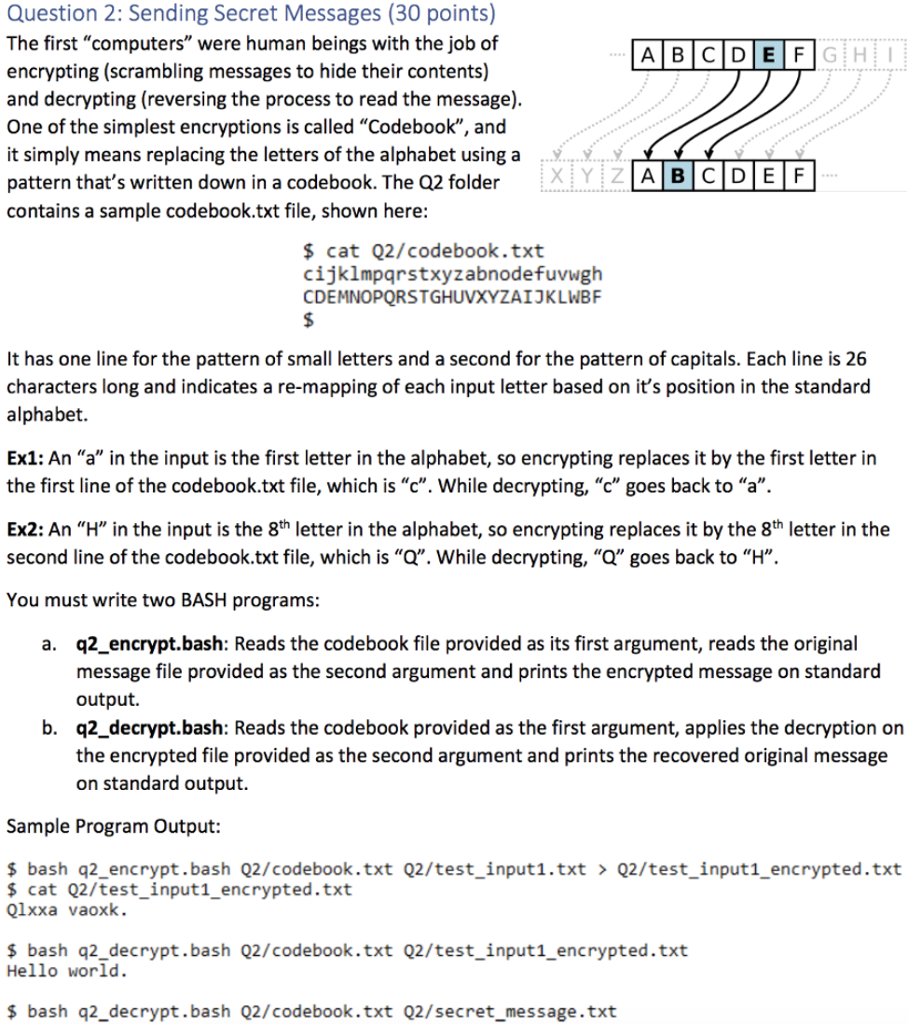
Question 2: Sending Secret Messages (30 points) The first "computers" were human beings with the job of encrypting (scrambling messages to hide their contents) and decrypting (reversing the process to read the message). One of the simplest encryptions is called "Codebook", and it simply means replacing the letters of the alphabet using a pattern that's written down in a codebook. The Q2 folder contains a sample codebook.txt file, shown here: cat Q2/codebook.txt cijklmpqrstxyzabnodefuvwgh CDEMNOPQRSTGHUVXYZAIKLWBF It has one line for the pattern of small letters and a second for the pattern of capitals. Each line is 26 characters long and indicates a re-mapping of each input letter based on it's position in the standard alphabet. Ex1: An "a" in the input is the first letter in the alphabet, so encrypting replaces it by the first letter in the first line of the codebook.txt file, which is "c". While decrypting, "c" goes back to "a". Ex2: An "H" in the input is the 8th letter in the alphabet, so encrypting replaces it by the 8th letter in the second line of the codebook.txt file, which is "a". While decrypting, "Q" goes back to "H",. You must write two BASH programs: a. q2 encrypt.bash: Reads the codebook file provided as its first argument, reads the original message file provided as the second argument and prints the encrypted message on standard output. b. q2 decrypt.bash: Reads the codebook provided as the first argument, applies the decryption on the encrypted file provided as the second argument and prints the recovered original message on standard output. Sample Program Output: s bash q2_encrypt.bash Q2/codebook.txt Q2/test_input1.txt Q2/test input1_encrypted.txt cat Q2/test_input1_encrypted.txt Qlxxa vaoxk. s bash q2_decrypt.bash Q2/codebook.txt Q2/test_input1_encrypted.txt Hello world. s bash q2_decrypt.bash Q2/codebook.txt Q2/secret_message.txt Question 2: Sending Secret Messages (30 points) The first "computers" were human beings with the job of encrypting (scrambling messages to hide their contents) and decrypting (reversing the process to read the message). One of the simplest encryptions is called "Codebook", and it simply means replacing the letters of the alphabet using a pattern that's written down in a codebook. The Q2 folder contains a sample codebook.txt file, shown here: cat Q2/codebook.txt cijklmpqrstxyzabnodefuvwgh CDEMNOPQRSTGHUVXYZAIKLWBF It has one line for the pattern of small letters and a second for the pattern of capitals. Each line is 26 characters long and indicates a re-mapping of each input letter based on it's position in the standard alphabet. Ex1: An "a" in the input is the first letter in the alphabet, so encrypting replaces it by the first letter in the first line of the codebook.txt file, which is "c". While decrypting, "c" goes back to "a". Ex2: An "H" in the input is the 8th letter in the alphabet, so encrypting replaces it by the 8th letter in the second line of the codebook.txt file, which is "a". While decrypting, "Q" goes back to "H",. You must write two BASH programs: a. q2 encrypt.bash: Reads the codebook file provided as its first argument, reads the original message file provided as the second argument and prints the encrypted message on standard output. b. q2 decrypt.bash: Reads the codebook provided as the first argument, applies the decryption on the encrypted file provided as the second argument and prints the recovered original message on standard output. Sample Program Output: s bash q2_encrypt.bash Q2/codebook.txt Q2/test_input1.txt Q2/test input1_encrypted.txt cat Q2/test_input1_encrypted.txt Qlxxa vaoxk. s bash q2_decrypt.bash Q2/codebook.txt Q2/test_input1_encrypted.txt Hello world. s bash q2_decrypt.bash Q2/codebook.txt Q2/secret_message.txt
Step by Step Solution
There are 3 Steps involved in it

Get step-by-step solutions from verified subject matter experts
 Study Help