





Question: All we need to do now is use the dictionary to translate' each codon in the list. We'll start by defining a new variable that
 All we need to do now is use the dictionary to
translate' each codon in the list. We'll start by defining a new

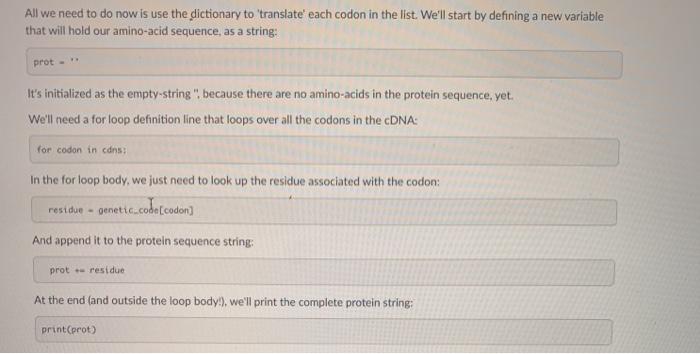
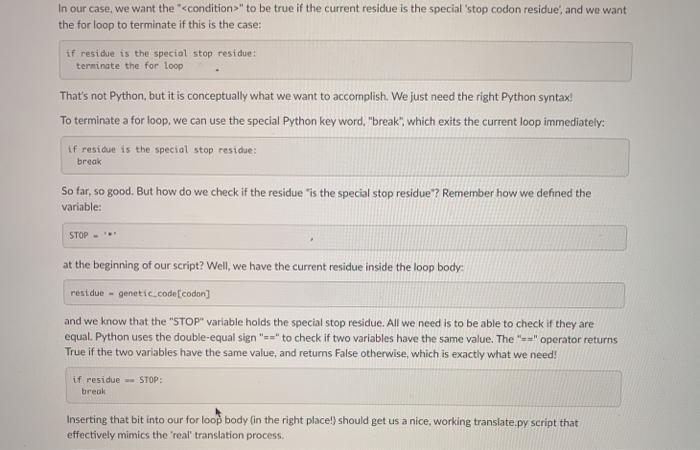
All we need to do now is use the dictionary to translate' each codon in the list. We'll start by defining a new variable that will hold our amino-acid sequence, as a string: prot. It's initialized as the empty-string" because there are no amino acids in the protein sequence, yet. We'll need a for loop definition line that loops over all the codons in the cDNA: for codon in cans In the for loop body, we just need to look up the residue associated with the codon: residue - genetic code codon And append it to the protein sequence string: prot residue At the end (and outside the loop body), we'll print the complete protein string: printproto In our case, we want the *" to be true if the current residue is the special 'stop codon residue, and we want the for loop to terminate if this is the case: if residue is the special stop residue: terminate the for loop That's not Python, but it is conceptually what we want to accomplish. We just need the right Python syntax! To terminate a for loop, we can use the special Python key word, "break", which exits the current loop immediately: if residue is the special stop residue: break So far, so good. But how do we check if the residue "is the special stop residue? Remember how we defined the variable: STOP at the beginning of our script? Well, we have the current residue inside the loop body: residue - genetic.code(codon] and we know that the "STOP" variable holds the special stop residue. All we need is to be able to check if they are equal. Python uses the double-equal sign"=>" to check if two variables have the same value. The "+" operator returns True if the two variables have the same value, and returns False otherwise, which is exactly what we need! if residue -- STOP: break Inserting that bit into our for loop body in the right place!) should get us a nice working translate.py script that effectively mimics the real translation process

Step by Step Solution

There are 3 Steps involved in it

1 Expert Approved Answer
Step: 1 Unlock blur-text-image
Question Has Been Solved by an Expert!

Get step-by-step solutions from verified subject matter experts

Step: 2 Unlock
Step: 3 Unlock

Students Have Also Explored These Related Databases Questions!