







Question: Always write your codes in Notepad++ first, and then copy and paste them into Oracle to test them. While using Notepad++, click Language -> S
Always write your codes in Notepad++ first, and then copy and paste them into Oracle to test them. While using Notepad++, click Language -> S -> SQL. This can help you catch syntax errors.
Your team submission should include two files:
1) a Notepad++ file (.sql) containing your codes, and
2) a Word file (.doc/.docx) showing screen shots of your codes AND results from Oracle.
9. Truncate the EMPLOYEES table. Then verify that the table structure remains intact.
10. Delete the EMPLOYEES table so that it can be restored. Restore the table. Then delete the table permanently so that it is not moved to the recycle bin.
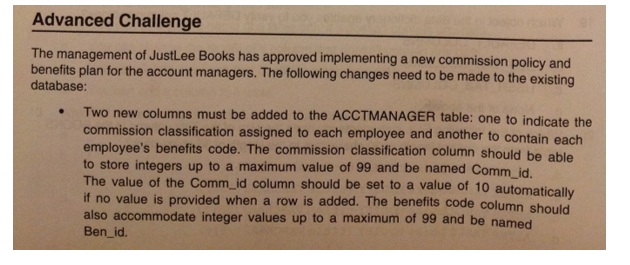
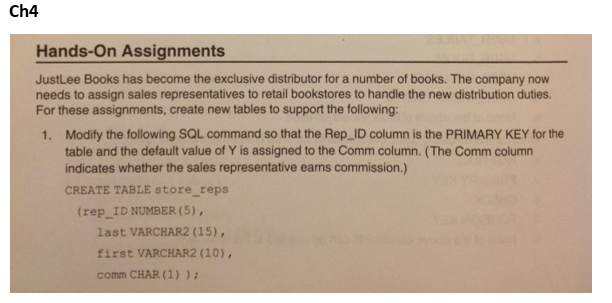
2. Change the STORE_REPS table so that null values cant be entered in the first and last name columns.
4. Add a column named Base_salary with a datatype of NUMBER(7,2) to the STORE_REPS table. Ensure that the amount entered is above zero.
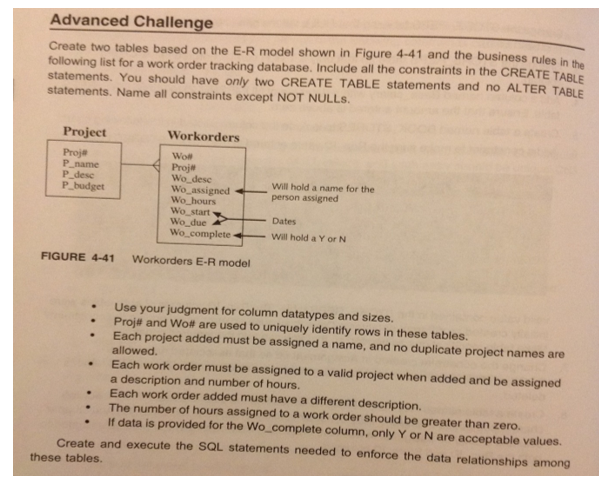
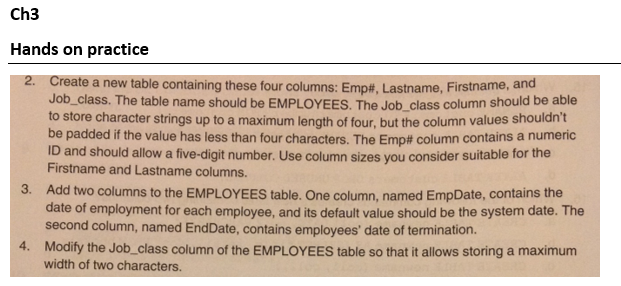
Ch3 Hands on practice 2. Create a new table containing these four columns: Emp#, Lastname, Firstname, and Job class. The table name should be EMPLOYEES. The Job class column should be able to store character strings up to a maximum length of four, but the column values shouldnt be padded if the value has less than four characters. The Emp# column contains a numeric ID and should allow a five-digit number. Use column sizes you consider suitable for the Firstname and Lastname columns. Add two columns to the EMPLOYEES table. One column, named EmpDate, contains the date of employment for each employee, and its default value should be the system date. The second column, named EndDate, contains employees' date of termination. Modify the Job_class column of the EMPLOYEES table so that it allows storing a maximum width of two characters 3. 4
Step by Step Solution
There are 3 Steps involved in it

Get step-by-step solutions from verified subject matter experts
 Study Help