







Question: I am working on my final project in an SQL class using MYSQL. I am working my way through it but it is going slow
I am working on my final project in an SQL class using MYSQL. I am working my way through it but it is going slow so I think that I may need a little bit of help to finish in time. If I could get a list of the MYSQL commands for this assignment I would really appretiate it. Here are the instructions:
Overview
Database management plays an integral role in nearly every area of business. Databases house customer, accounting, employee, and other types of data. These different data sets must all be efficiently stored in order to make the information accessible. Companies rely on database engineers and administrators to ensure that their records are accurate, updated, and available at all times. This course covers structured query language (SQL) and how it can be used to manage database schemas, manipulate data, and analyze data. For your final project, you will apply the skills you learned in order to demonstrate your mastery of the key concepts necessary for effective database management. These are skills you will be able to apply to your future courses as well as your career in managing information systems.
In this assignment, you will demonstrate your mastery of the following course outcomes:
Communicate concepts and applications of relational database management systems and structured query language effectively to internal stakeholders
Create databases for meeting specifications using appropriate structured query language statements
Manipulate data for single and multiple tables within a database for meeting specifications using proper structured query language statements
Develop queries to extract requested information from databases using appropriate structured query language statements
Prompt
Imagine yourself as a newly hired database engineer for a social media messaging application startup. The initial release of the messaging app was a success, and the management team would like for you to enhance the database to support two new features in the app.
The first feature is to enhance the user profile with one new property to capture more information about the users. This will allow the organization to provide more targeted advertisements based on the users profiles. The second feature is to allow users to send one or more pictures in messages. The current database schema does not support this feature, so you will need to create tables, keys, and constraints to support attaching pictures to messages.
These modifications to the database can have a profound impact on the user experience, so you must test the changes before the new features can be released to the public. You will populate the database with new records to test new user property, and you will add new message records that include zero, one, or more images. Finally, you will create some queries that will provide the organization with useful insights on how the new features are used.
The management team has requested a written report detailing the changes that you made, the SQL statements that you executed, and the analysis of the new data being collected. The report, in the form of a Microsoft Word document, must include screenshots of all of the SQL statements that you executed to modify the database schema, manipulate the data, and analyze the new data being collected. Each screenshot must be accompanied with a written explanation of the SQL statement.
Specifically, the following critical elements must be addressed:
Database Management: In this section, you will modify the database schema to support the new features for the application. The database specifications are provided in an accompanying document.
Create tables for the database using appropriate SQL statements. Provide screenshots of the statements and the results of their execution.
Assign primary keys and required foreign keys for the new tables using appropriate SQL statements. Provide screenshots of the statements and
the results of their execution.
Alter the table by adding a new column using appropriate SQL statements. Provide screenshots of the statements and the results of their
execution.
For all of your screenshots, effectively explain each part of the associated SQL statements and their results to internal stakeholders. Be sure your
explanations are logically organized and clearly communicated to meet the needs of the internal stakeholders.
Data Manipulation: In this section, you will add, update, and delete records to test the changes that you made to the database. The data set changes are provided in an accompanying document.
Insert new records into tables using appropriate SQL statements. Provide screenshots of the statements and the results of their execution.
Update existing records using appropriate SQL statements. Provide screenshots of the statements and the results of their execution.
Delete existing records using appropriate SQL statements. Provide screenshots of the statements and the results of their execution.
For all your screenshots, provide explanations of each part of the associated SQL statements and their results. Be sure your explanations are
logically organized and clearly communicated to meet the needs of the internal stakeholders.
Data Retrieval: In this section, you will query the database to retrieve information about the application. The query descriptions are provided in an accompanying document.
Retrieve data from multiple tables by using the appropriate WHERE clauses. Provide screenshots of the statements and the results of their execution.
Retrieve data from multiple tables by using the appropriate JOIN statement. Provide screenshots of the statements and the results of their execution.
Write a query that aggregates results, group results, and includes appropriate column aliases. Provide screenshots of the statements and the results of their execution.
For all of your screenshots, provide explanations of each part of the associated SQL statements and their results. Be sure your explanations are logically organized and clearly communicated to meet the needs of the internal stakeholders.
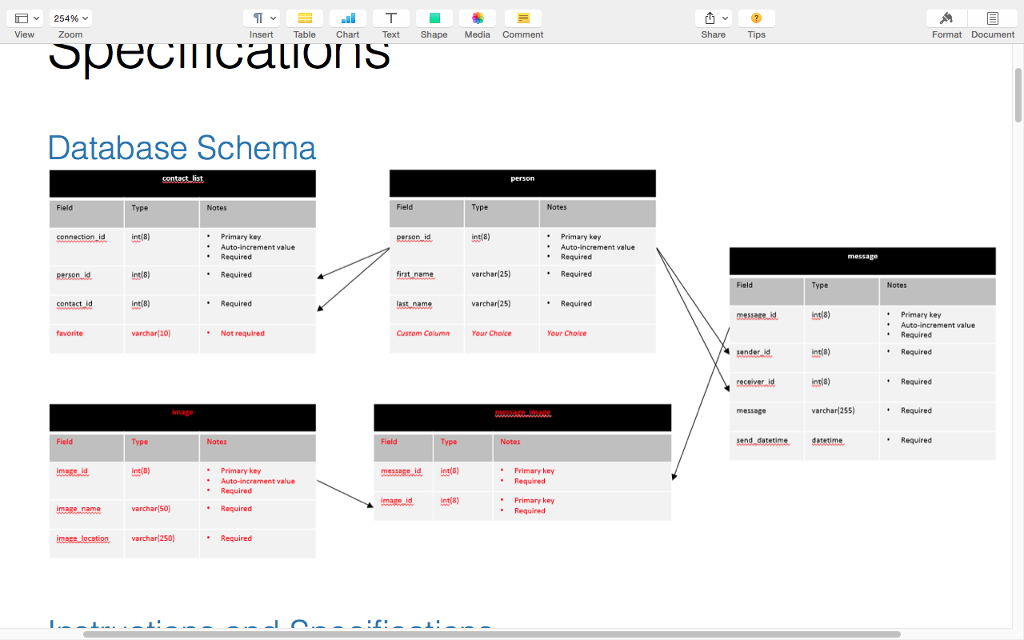
Database Schema
Instructions and Specifications
For this assignment, you will need to do your work in Codio in the Personal Playground unit. If the Terminal does not appear in the Personal Playground, select Tools and then Terminal. Once youre in the terminal, type mysql to start the MySQL command line interface. You will need to provide all of the SQL commands that you created and executed to complete the assignment. You can do this by copying and saving your SQL commands to a .sql file or .txt file using a plain text editor like NotePad or Sublime Text. Please refer to the FAQs and Troubleshooting Guide for details on how to create this file. Alternatively, you can create the SQL statements in the plain text editor first and then copy and paste the SQL statements into the MySQL command line interface.
In addition to submitting your work as a .sql file or .txt file, you will need to submit a Word document with screenshots and explanations of your work. For each SQL statement that you construct in the steps below, you must provide the screenshot of your SQL statement, the screenshot of the results of executing the SQL statement, and a written explanation of the SQL statement. The written explanation of the SQL statement should explain the different parts of your SQL statement.
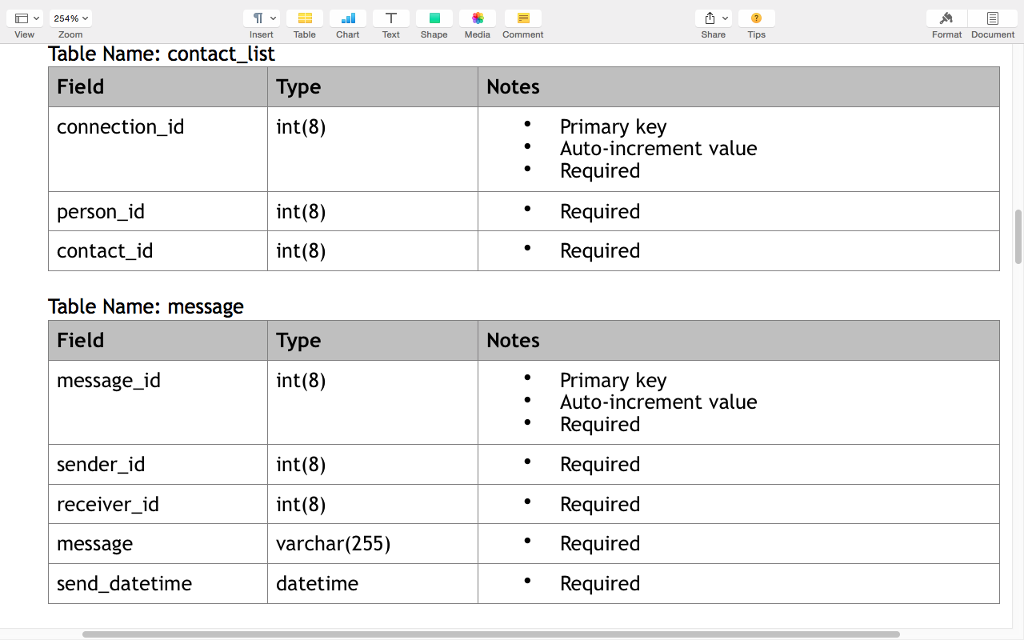
The following tables have already been created for you. Each table is already populated with some records.
Table Name: person
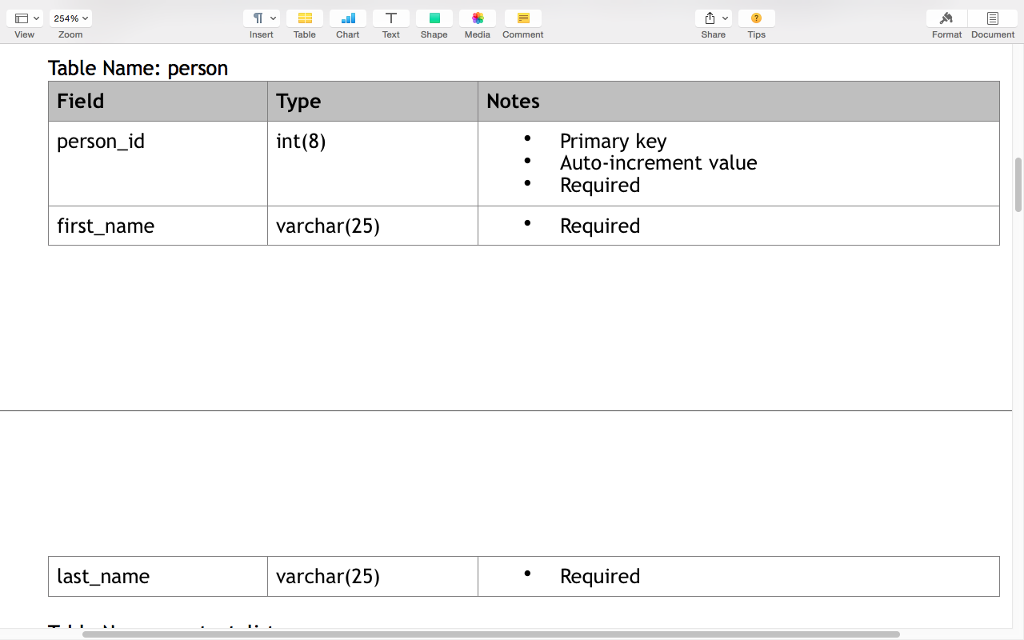
Table Name: contact_list
Table Name: message
Task 1: Insert Record to the Person Table
Construct the SQL statement to add yourself to the Person table. Note: You are required to add yourself as a new record in the person table. Use your first name and last name for one of the new records that you are inserting.
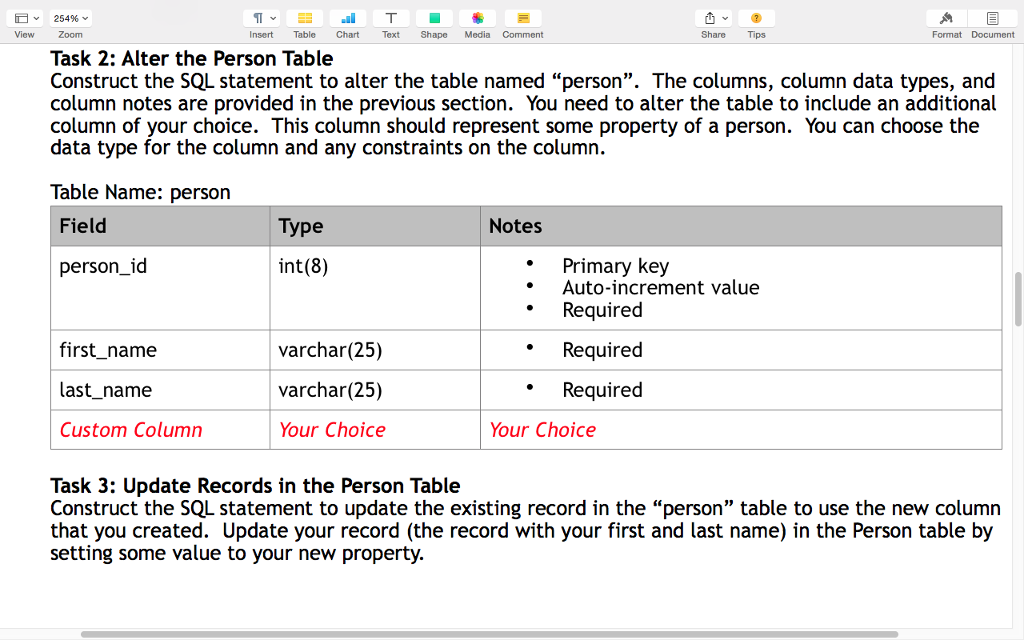
Task 2: Alter the Person Table
Construct the SQL statement to alter the table named person. The columns, column data types, and column notes are provided in the previous section. You need to alter the table to include an additional column of your choice. This column should represent some property of a person. You can choose the data type for the column and any constraints on the column.
Table Name: person
Task 3: Update Records in the Person Table
Construct the SQL statement to update the existing record in the person table to use the new column that you created. Update your record (the record with your first and last name) in the Person table by setting some value to your new property.
Task 4: Delete Records from Person Table
Construct the SQL statement to delete the record(s) from the person table where the first name is Diana and the last name is Taurasi.
Task 5: Alter the Contact List Table
Construct the SQL statement to alter the table named contact_list. The columns, column data types, and column notes are provided in the previous section. You need to alter the table to include an additional column named favorite with a data type of varchar(10). This column is not required.
Table Name: contact_list
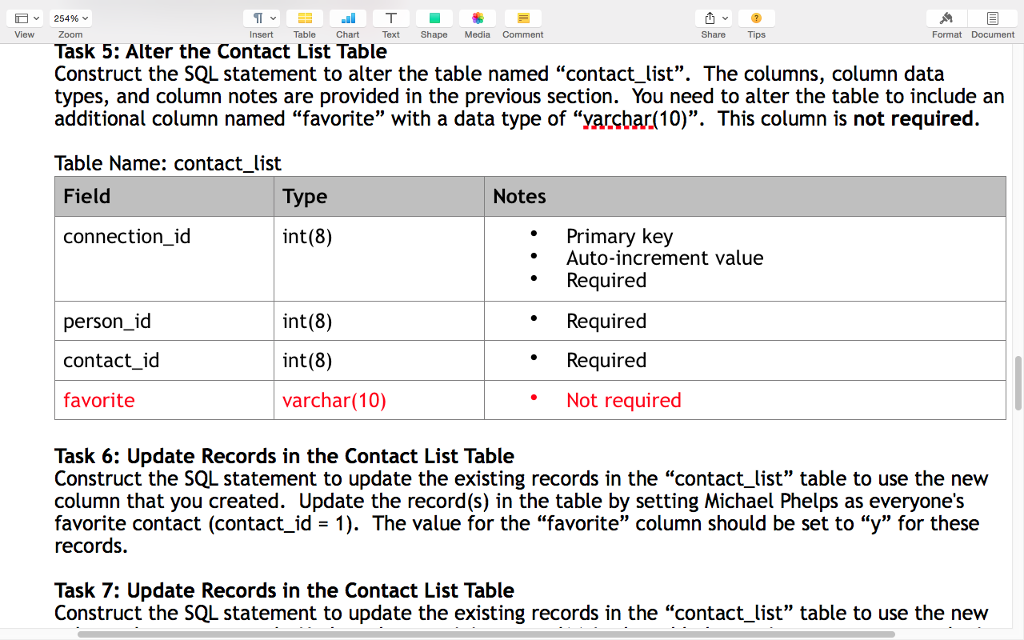
Task 6: Update Records in the Contact List Table
Construct the SQL statement to update the existing records in the contact_list table to use the new column that you created. Update the record(s) in the table by setting Michael Phelps as everyone's favorite contact (contact_id = 1). The value for the favorite column should be set to y for these records.
Task 7: Update Records in the Contact List Table
Construct the SQL statement to update the existing records in the contact_list table to use the new column that you created. Update the remaining record(s) in the table by setting every contact who is NOT Michael Phelps (contact_id 1) to not be a favorite. The value for the favorite column should be set to n for these records.
Task 8: Insert Records to Contact List Table
Construct the SQL statement to insert at least 3 new records in the contact_list table. Make sure that you use the new column that you created in the previous step. Note: You are required to add at least 3 new records with yourself as a new contact in the contact_list table. Make sure that you provide a value (y or n) for the new favorite column.
Task 9: Create the Image Table
Construct the SQL statement to create a table named image. The columns, column data types, and column notes are provided here. Create the image table according to these specifications.
Table Name: image
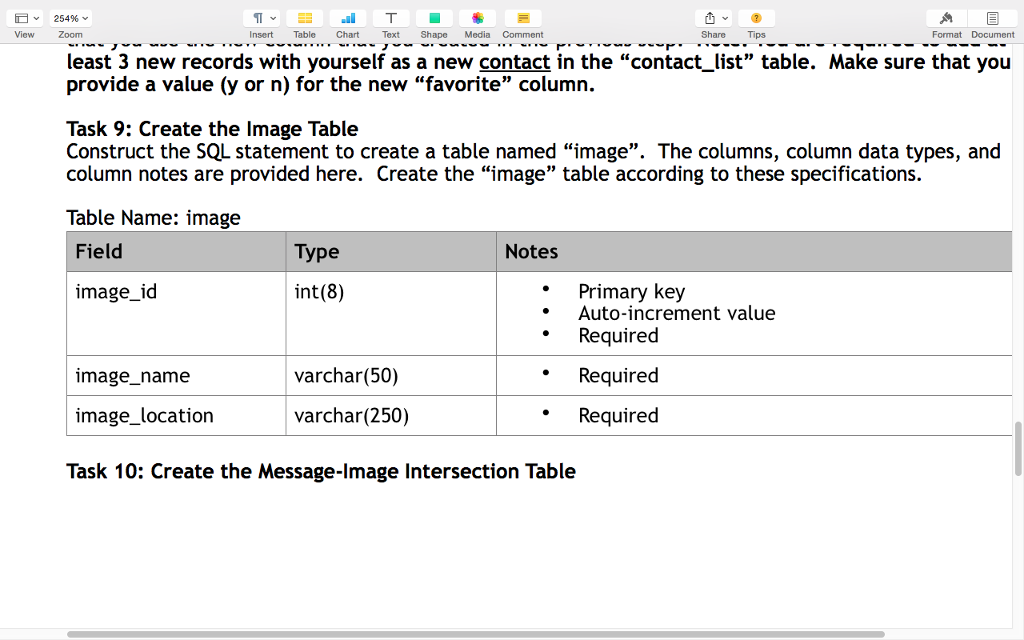
Task 10: Create the Message-Image Intersection Table
Construct the SQL statement to create an intersection table named message_image. The columns, column data types, and column notes are provided here. Create the message_image table according to these specifications.
Table Name: message_image
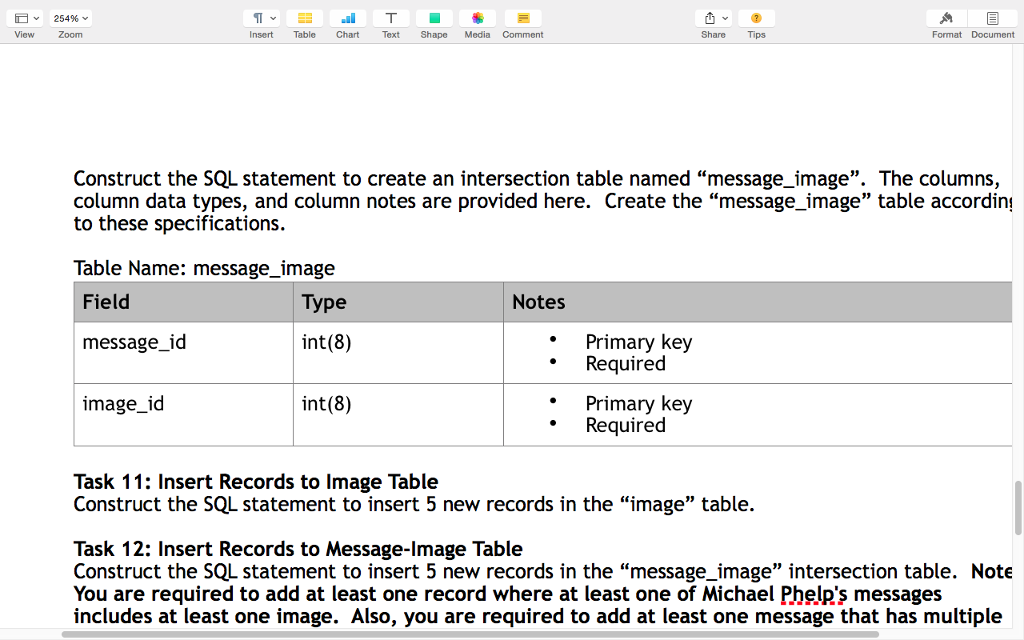
Task 11: Insert Records to Image Table
Construct the SQL statement to insert 5 new records in the image table.
Task 12: Insert Records to Message-Image Table
Construct the SQL statement to insert 5 new records in the message_image intersection table. Note: You are required to add at least one record where at least one of Michael Phelp's messages includes at least one image. Also, you are required to add at least one message that has multiple images.
Task 13: Find All of the Messages that Michael Phelps Sent
Construct the SQL statement to find all of the messages that Michael Phelps sent. Note: You must use the WHERE clause to set the conditions for this query. Display the following columns:
- Sender's first name
- Sender's last name
- Receiver's first name
- Receiver's last name
- Message ID
- Message
- Message Timestamp
Task 14: Find the Number of Messages Sent for Every Person
Construct the SQL statement to find the number of messages sent for every person. Note: You must use the WHERE clause to set the conditions for this query. Display the following columns:
- Count of messages
- Person ID
- First Name
- Last Name
Task 15: Find All of the Messages that Have At Least One Image Attached Using INNER JOINs
Construct the SQL statement to find all of the messages that have at least one image attached using INNER JOINs. Note: For messages with multiple images, display only the first image for the message. Display the following columns:
- Message ID
- Message
- Message Timestamp
- First Image Name
- First Image Location
Thank you for the help with this!
View 25496 Insert Table Chart Text Shape Media Comment Database Schema connection id Primary key person id Primary key Auto-increment value Required Required varchar(25) int(8) Required Required Required varchar(25) Required Custom Column Your Choice varchar(10) Not required Primary key Primary key Auto-increment value Required Primary key mase name rchar 500 rchar 250 Share Field message varchar 2s50 A Format Document Note Primary key Auto-increment value Required Required Required Required Required View 25496 Insert Table Chart Text Shape Media Comment Database Schema connection id Primary key person id Primary key Auto-increment value Required Required varchar(25) int(8) Required Required Required varchar(25) Required Custom Column Your Choice varchar(10) Not required Primary key Primary key Auto-increment value Required Primary key mase name rchar 500 rchar 250 Share Field message varchar 2s50 A Format Document Note Primary key Auto-increment value Required Required Required Required Required
Step by Step Solution
There are 3 Steps involved in it

Get step-by-step solutions from verified subject matter experts
 Study Help