







Question: Amortization Schedule - 4 points - compute the payment in the yellow highlighted box and complete the amortization schedule. Amortization Schedule Amount of loan: 10,000
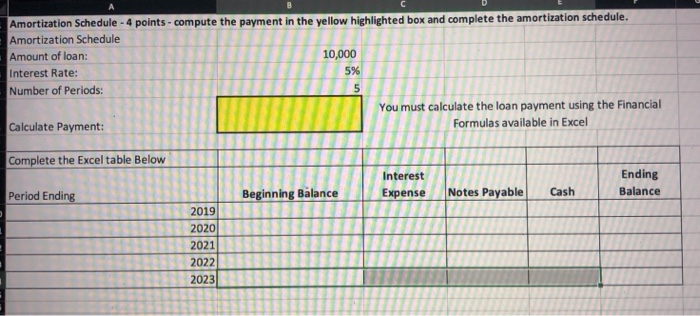
Amortization Schedule - 4 points - compute the payment in the yellow highlighted box and complete the amortization schedule. Amortization Schedule Amount of loan: 10,000 Interest Rate: 5% Number of Periods: You must calculate the loan payment using the Financial Calculate Payment: Formulas available in Excel Complete the Excel table Below Interest Expense Ending Balance Beginning Balance Period Ending Cash Notes Payable 2019 2020 2021 2022 2023
Step by Step Solution
There are 3 Steps involved in it
1 Expert Approved Answer
Step: 1 Unlock

Question Has Been Solved by an Expert!
Get step-by-step solutions from verified subject matter experts
Step: 2 Unlock
Step: 3 Unlock
 Study Help