







Question: An analytics manager, Mark, highlighted all empty cells using Excel's Conditional Formatting tool for the following dataset. What steps did he take? GH 1 Monthly
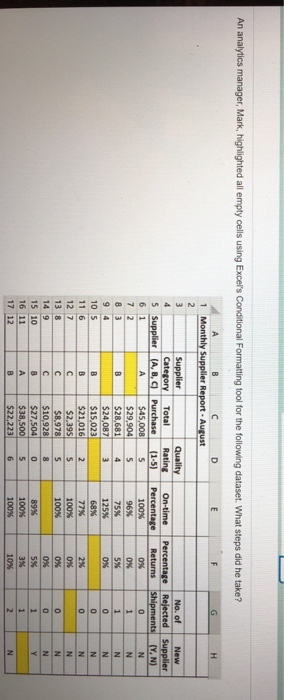
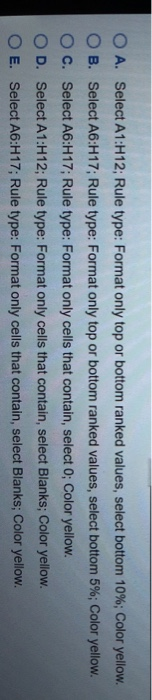
An analytics manager, Mark, highlighted all empty cells using Excel's Conditional Formatting tool for the following dataset. What steps did he take? GH 1 Monthly Supplier Report - August Supplier Category (A, B, C Quality Rating (1-5) No. of Rejected Shipments On-time Percentage 5 New Supplier (YN) Percentage Returns Supplier 100% ox 96% 75% 125% Ox 68N Total Purchase S45,008 $29,904 $28,681 $24,087 $15,023 $21,016 $2,395 $8,978 $10,928 $27,504 $38,500 $22,223 OBUNUN 100% 100% 89% 100% 100 O O A. Select A1:H12; Rule type: Format only top or bottom ranked values, select bottom 10%; Color yellow. B. Select A6:H17Rule type: Format only top or bottom ranked values, select bottom 5%; Color yellow. O c. Select A6:H17; Rule type: Format only cells that contain, select 0; Color yellow. D. Select A1:H12; Rule type: Format only cells that contain, select Blanks; Color yellow. O E. Select A6:H17; Rule type: Format only cells that contain, select Blanks; Color yellow O
Step by Step Solution
There are 3 Steps involved in it

Get step-by-step solutions from verified subject matter experts
 Study Help