Question: An Entity Relationship Diagram for the scenario. Please do not worry about squeezing information in each of the boxes. You only need name the entity.
- An Entity Relationship Diagram for the scenario. Please do not worry about squeezing information in each of the boxes. You only need name the entity. In a separate table below, you should provide the additional information.
- In a separate table, for each entity in the entity-relationship diagram, provide:
- a. The name of the entity
- b. The description of the entity
- c. The unique key or identifier for the entity
- d. The most important attributes that should be collected for this entity
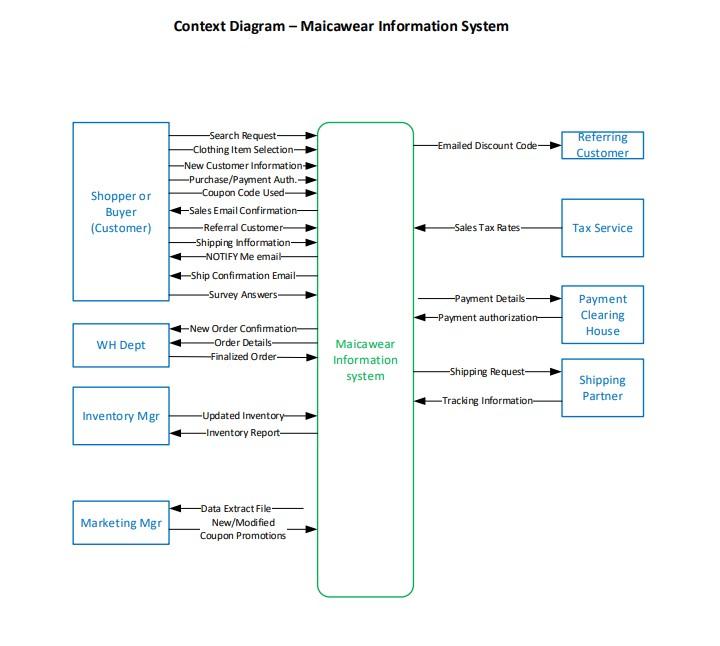 Use Cases: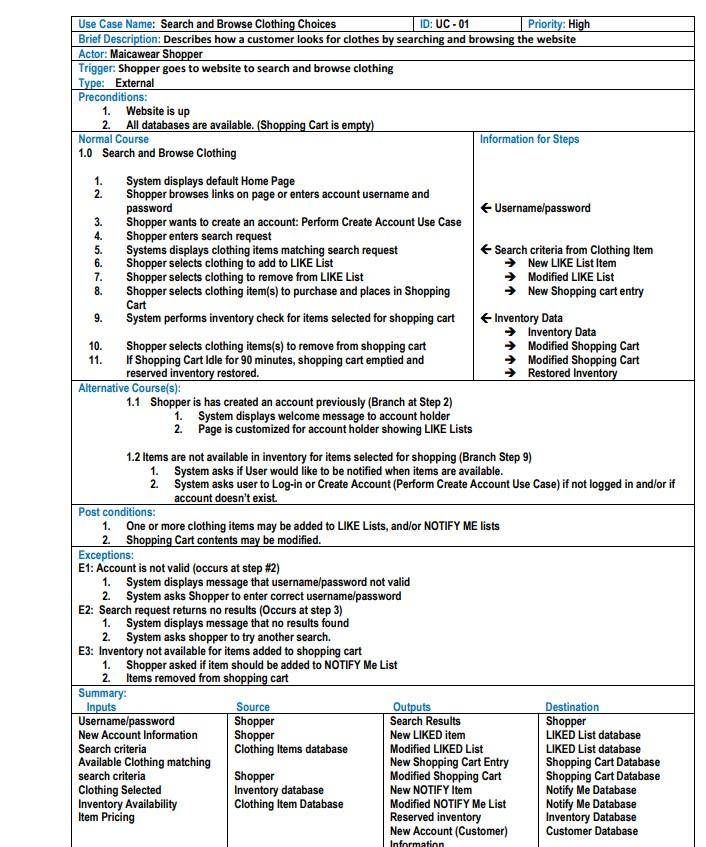
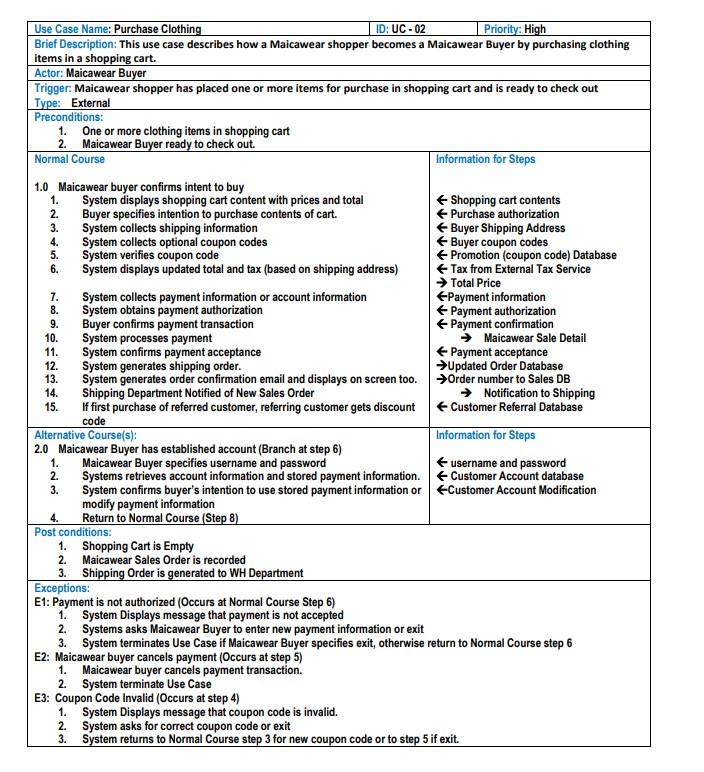
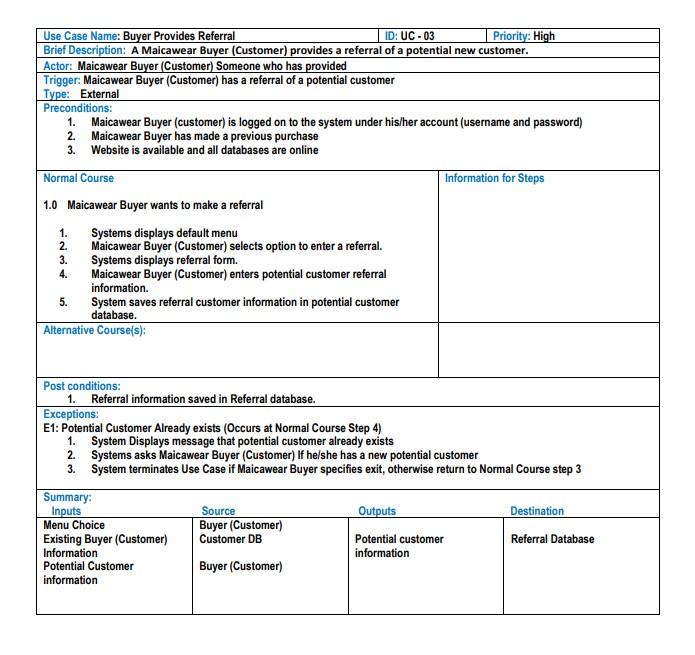
-
-
 Make it look something like this: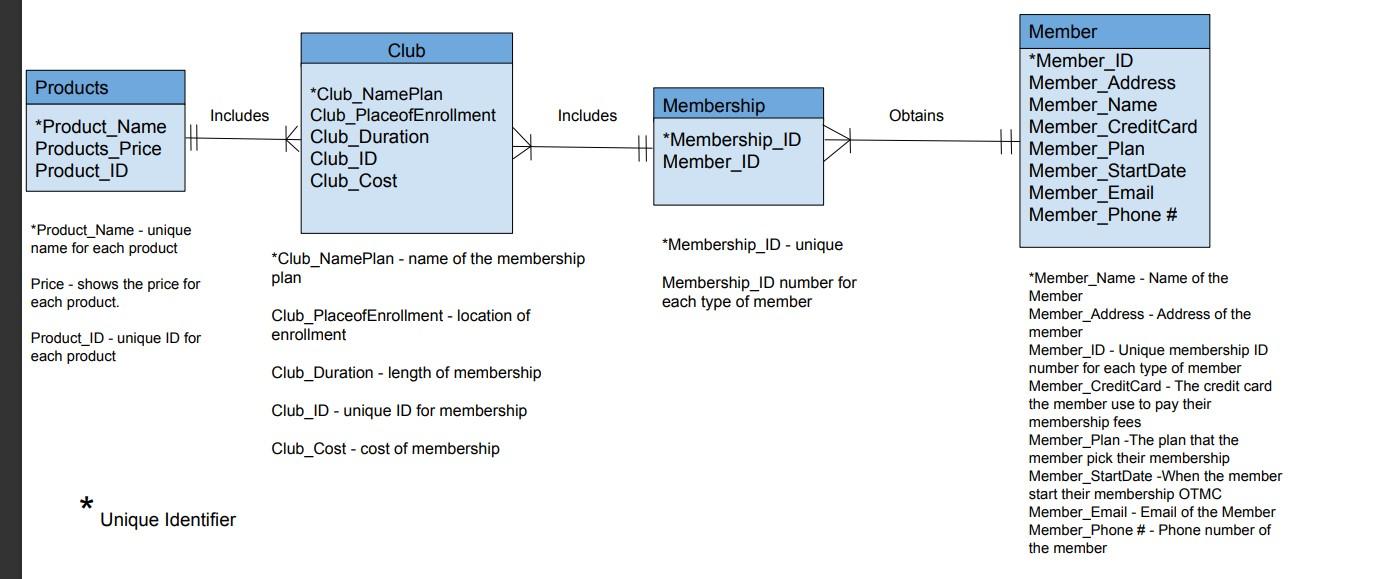
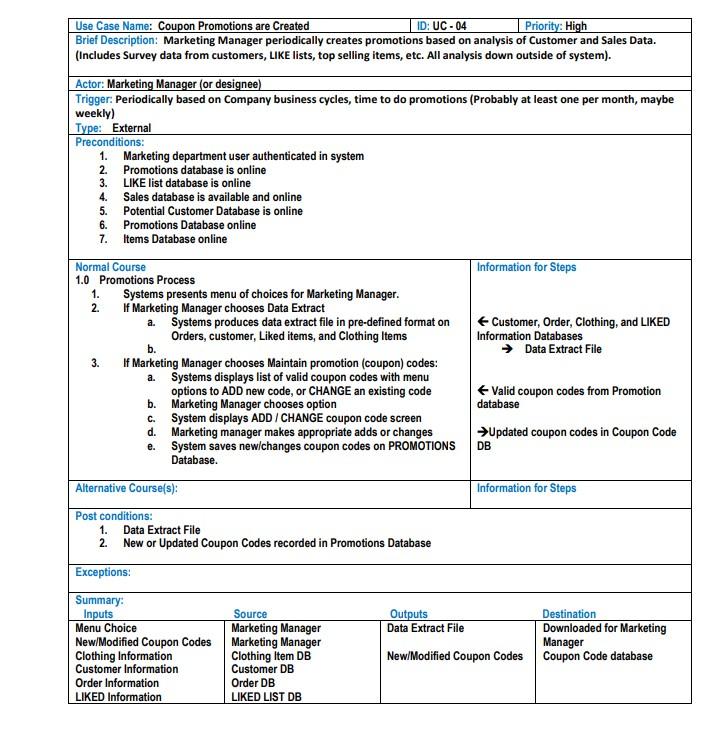
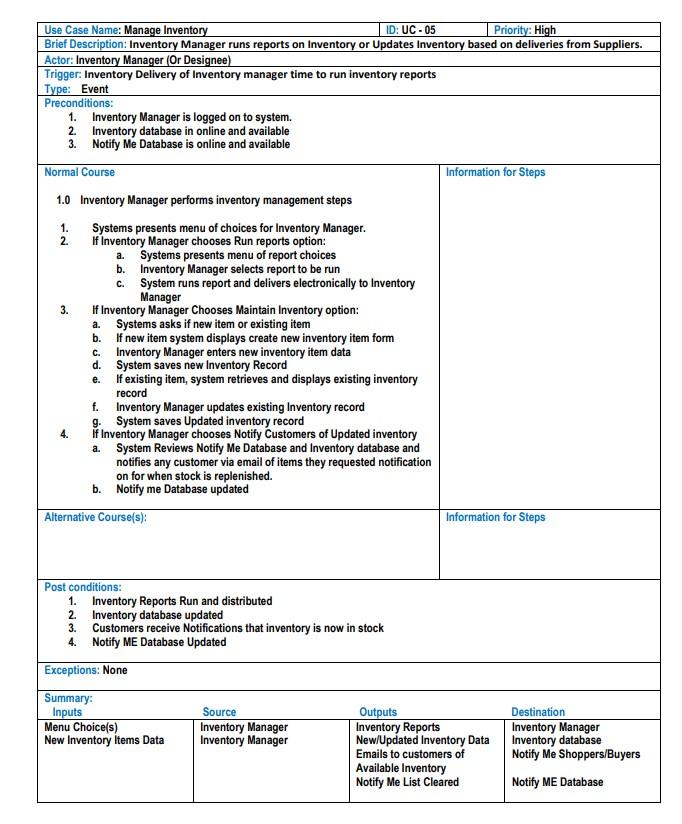
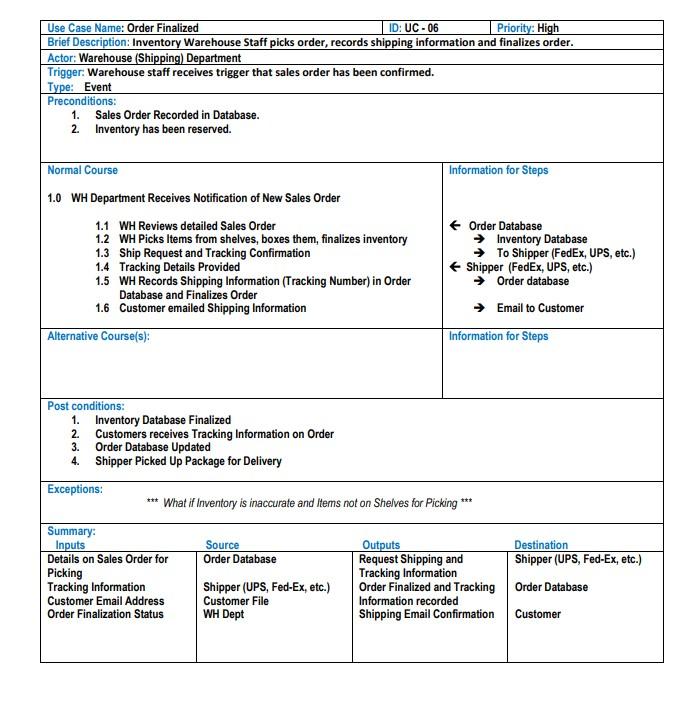
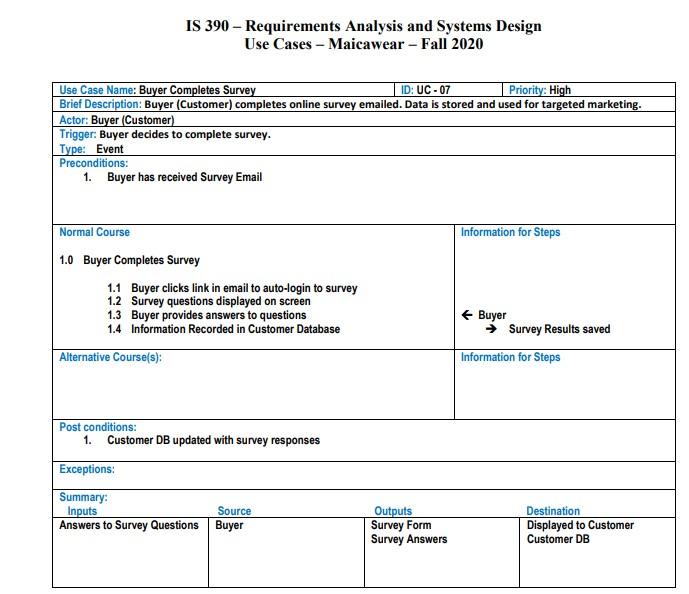
Context Diagram - Maicawear Information System -Emailed Discount Code Referring Customer Shopper or Buyer (Customer) -Search Request- -Clothing Item Selection -New Customer Information Purchase/Payment Auth. -Coupon Code Used +Sales Email Confirmation- -Referral Customer - Shipping Information -NOTIFY Me email- +-Ship Confirmation Email- Survey Answers -Sales Tax Rates Tax Service -Payment Details -Payment authorization Payment Clearing House WH Dept -New Order Confirmation- -Order Details -Finalized Order Maicawear Information system Shipping Request- Shipping Partner Tracking Information Inventory Mgr Updated Inventory Inventory Report- Marketing Mgr Data Extract File New/Modified Coupon Promotions 3. 4. 5. 6. 7. 8. 9. Use Case Name: Search and Browse Clothing Choices ID: UC -01 Priority: High Brief Description: Describes how a customer looks for clothes by searching and browsing the website Actor: Maicawear Shopper Trigger: Shopper goes to website to search and browse clothing Type: External Preconditions: 1. Website is up 2. All databases are available. (Shopping Cart is empty) Normal Course Information for Steps 1.0 Search and Browse Clothing 1. System displays default Home Page 2. Shopper browses links on page or enters account username and password Username/password Shopper wants to create an account: Perform Create Account Use Case Shopper enters search request Systems displays clothing items matching search request Search criteria from Clothing Item Shopper selects clothing to add to LIKE List New LIKE List Item Shopper selects clothing to remove from LIKE List Modified LIKE List Shopper selects clothing item(s) to purchase and places in Shopping New Shopping cart entry Cart 9. System performs inventory check for items selected for shopping cart Inventory Data Inventory Data 10. Shopper selects clothing items(s) to remove from shopping cart Modified Shopping Cart 11. If Shopping Cart Idle for 90 minutes, shopping cart emptied and Modified Shopping Cart reserved inventory restored. Restored Inventory Alternative Course(s): 1.1 Shopper is has created an account previously (Branch at Step 2) 1. System displays welcome message to account holder 2. Page is customized for account holder showing LIKE Lists 1.2 Items are not available in inventory for items selected for shopping (Branch Step 9) 1. System asks if User would like to be notified when items are available. 2 System asks user to Log-in or Create Account (Perform Create Account Use Case) if not logged in and/or if account doesn't exist. Post conditions: 1. One or more clothing items may be added to LIKE Lists, and/or NOTIFY ME lists 2. Shopping Cart contents may be modified. Exceptions: E1: Account is not valid (occurs at step #2) 1. System displays message that username/password not valid 2. System asks Shopper to enter correct username/password E2: Search request returns no results (Occurs at step 3) 1. System displays message that no results found 2. System asks shopper to try another search. E3: Inventory not available for items added to shopping cart 1. Shopper asked if item should be added to NOTIFY Me List 2. Items removed from shopping cart Summary: Inputs Source Outputs Destination Username/password Shopper Search Results Shopper New Account Information Shopper New LIKED item LIKED List database Search criteria Clothing Items database Modified LIKED List LIKED List database Available Clothing matching New Shopping Cart Entry Shopping Cart Database search criteria Shopper Modified Shopping Cart Shopping Cart Database Clothing Selected Inventory database New NOTIFY Item Notify Me Database Inventory Availability Clothing Item Database Modified NOTIFY Me List Notify Me Database Item Pricing Reserved inventory Inventory Database New Account (Customer) Customer Database Information 1. 5. 6. Use Case Name: Purchase Clothing ID: UC-02 Priority: High Brief Description: This use case describes how a Maicawear shopper becomes a Maicawear Buyer by purchasing clothing items in a shopping cart. Actor: Maicawear Buyer Trigger. Maicawear shopper has placed one or more items for purchase in shopping cart and is ready to check out Type: External Preconditions: One or more clothing items in shopping cart 2 Maicawear Buyer ready to check out. Normal Course Information for Steps 1.0 Maicawear buyer confirms intent to buy 1. System displays shopping cart content with prices and total Shopping cart contents 2. Buyer specifies intention to purchase contents of cart. Purchase authorization 3. System collects shipping information Buyer Shipping Address 4. System collects optional coupon codes Buyer coupon codes System verifies coupon code Promotion (coupon code) Database System displays updated total and tax (based on shipping address) Tax from External Tax Service Total Price System collects payment information or account information Payment information 8. System obtains payment authorization Payment authorization Buyer confirms payment transaction Payment confirmation 10. System processes payment Maicawear Sale Detail 11. System confirms payment acceptance Payment acceptance 12. System generates shipping order. Updated Order Database . System generates order confirmation email and displays on screen too. Order number to Sales DB 14. Shipping Department Notified of New Sales Order Notification to Shipping . If first purchase of referred customer, referring customer gets discount Customer Referral Database code Alternative Course(s): Information for Steps 2.0 Maicawear Buyer has established account (Branch at step 6) Maicawear Buyer specifies username and password username and password 2. Systems retrieves account information and stored payment information. Customer Account database System confirms buyer's intention to use stored payment information or Customer Account Modification modify payment information Return to Normal Course (Step 8) Post conditions: 1. Shopping Cart is Empty 2. Maicawear Sales Order is recorded 3. Shipping Order is generated to WH Department Exceptions: E1: Payment is not authorized (Occurs at Normal Course Step 6) 1. System Displays message that payment is not accepted 2. Systems asks Maicawear Buyer to enter new payment information or exit System terminates Use Case if Maicawear Buyer specifies exit, otherwise return Normal Course step 6 E2: Maicawear buyer cancels payment (Occurs at step 5) 1. Maicawear buyer cancels payment transaction. System terminate Use Case E3: Coupon Code Invalid (Occurs at step 4) 1. System Displays message that coupon code is invalid. 2. System asks for correct coupon code or exit System returns to Normal Course step 3 for new coupon code or to step 5 if exit. 1. 3. 4. 3. 2. 3. Use Case Name: Buyer Provides Referral ID: UC -03 Priority: High Brief Description: A Maicawear Buyer (Customer) provides a referral of a potential new customer. Actor: Maicawear Buyer (Customer) Someone who has provided Trigger. Maicawear Buyer (Customer) has a referral of a potential customer Type: External Preconditions: 1. Maicawear Buyer (customer) is logged on to the system under his/her account (username and password) Maicawear Buyer has made a previous purchase 3. Website is available and all databases are online 2. Normal Course Information for Steps WN - 1.0 Maicawear Buyer wants to make a referral 1. Systems displays default menu . Maicawear Buyer (Customer) selects option to enter a referral. Systems displays referral form. 4. Maicawear Buyer (Customer) enters potential customer referral information. 5. System saves referral customer information in potential customer database. Alternative Course(s): Post conditions: 1. Referral information saved in Referral database. Exceptions: E1: Potential Customer Already exists (Occurs at Normal Course Step 4) 1. System Displays message that potential customer already exists 2. Systems asks Maicawear Buyer (Customer) If he/she has a new potential customer 3. System terminates Use Case if Maicawear Buyer specifies exit, otherwise return to Normal Course step 3 Outputs Destination Summary: Inputs Menu Choice Existing Buyer (Customer) Information Potential Customer information Source Buyer (Customer) Customer DB Buyer (Customer) Referral Database Potential customer information NON Use Case Name: Coupon Promotions are created ID: UC - 04 Priority: High Brief Description: Marketing Manager periodically creates promotions based on analysis of Customer and Sales Data. (Includes Survey data from customers, LIKE lists, top selling items, etc. All analysis down outside of system). Actor: Marketing Manager (or designee) Trigger. Periodically based on Company business cycles, time to do promotions (Probably at least one per month, maybe weekly) Type: External Preconditions: 1. Marketing department user authenticated in system 2. Promotions database is online 3. LIKE list database is online 4. Sales database is available and online Potential Customer Database is online 6. Promotions Database online 7. Items Database online Normal Course Information for Steps 1.0 Promotions Process 1. Systems presents menu of choices for Marketing Manager. If Marketing Manager chooses Data Extract a. Systems produces data extract file in pre-defined format on Customer, Order, Clothing, and LIKED Orders, customer, Liked items, and Clothing Items Information Databases b. Data Extract File 3. If Marketing Manager chooses Maintain promotion (coupon) codes: a Systems displays list of valid coupon codes with menu options to ADD new code, or CHANGE an existing code Valid coupon codes from Promotion b. Marketing Manager chooses option database c. System displays ADD / CHANGE coupon code screen d. Marketing manager makes appropriate adds or changes Updated coupon codes in Coupon Code System saves new changes coupon codes on PROMOTIONS DB Database. 2. e. Alternative Course(s): Information for Steps Post conditions: 1. Data Extract File 2. New or Updated Coupon Codes recorded in Promotions Database Exceptions: Summary: Inputs Source Outputs Menu Choice Marketing Manager Data Extract File New/Modified Coupon Codes Marketing Manager Clothing Information Clothing Item DB New/Modified Coupon Codes Customer Information Customer DB Order Information Order DB LIKED Information LIKED LIST DB Destination Downloaded for Marketing Manager Coupon Code database Use Case Name: Manage Inventory ID: UC-05 Priority: High Brief Description: Inventory Manager runs reports on Inventory or Updates Inventory based on deliveries from Suppliers. Actor: Inventory Manager (Or Designee) Trigger: Inventory Delivery of Inventory manager time to run inventory reports Type: Event Preconditions: 1. Inventory Manager is logged on to system. 2. Inventory database in online and available 3. Notify Me Database is online and available Normal Course Information for Steps 1.0 Inventory Manager performs inventory management steps 1. Systems presents menu of choices for Inventory Manager. 2. if Inventory Manager chooses Run reports option: a Systems presents menu of report choices b. Inventory Manager selects report to be run c. System runs report and delivers electronically to Inventory Manager 3. If Inventory Manager Chooses Maintain Inventory option: a Systems asks if new item or existing item b. If new item system displays create new inventory item form c. Inventory Manager enters new inventory item data d. System saves new Inventory Record If existing item, system retrieves and displays existing inventory record f. Inventory Manager updates existing Inventory record g. System saves Updated inventory record 4. if Inventory Manager chooses Notify Customers of Updated inventory System Reviews Notify Me Database and Inventory database and notifies any customer via email of items they requested notification on for when stock is replenished. b. Notify me Database updated Alternative Course(s): Information for Steps 3 e. a. Post conditions: 1. Inventory Reports Run and distributed 2. Inventory database updated 3. Customers receive Notifications that inventory is now in stock 4. Notify ME Database Updated Exceptions: None Summary: Inputs Menu Choice(s) New Inventory Items Data Source Inventory Manager Inventory Manager Outputs Inventory Reports New/Updated Inventory Data Emails to customers of Available Inventory Notify Me List Cleared Destination Inventory Manager Inventory database Notify Me Shoppers/Buyers Notify ME Database Use Case Name: Order Finalized ID: UC -06 Priority: High Brief Description: Inventory Warehouse Staff picks order, records shipping information and finalizes order. Actor: Warehouse (Shipping) Department Trigger: Warehouse staff receives trigger that sales order has been confirmed. Type: Event Preconditions: 1. Sales Order Recorded in Database. 2 Inventory has been reserved. Information for Steps Normal Course 1.0 WH Department Receives Notification of New Sales Order 1.1 WH Reviews detailed Sales Order 1.2 WH Picks Items from shelves, boxes them, finalizes inventory 1.3 Ship Request and Tracking Confirmation 1.4 Tracking Details Provided 1.5 WH Records Shipping Information (Tracking Number) in Order Database and Finalizes Order 1.6 Customer emailed Shipping Information Order Database Inventory Database To Shipper (FedEx, UPS, etc.) Shipper (FedEx, UPS, etc.) Order database Email to Customer Alternative Course(s): Information for Steps *** Post conditions: 1. Inventory Database Finalized 2. Customers receives Tracking Information on Order 3. Order Database Updated 4. Shipper Picked Up Package for Delivery Exceptions: *** What if Inventory is inaccurate and Items not on Shelves for Picking Summary: Inputs Source Outputs Details on Sales Order for Order Database Request Shipping and Picking Tracking Information Tracking Information Shipper (UPS, Fed-Ex, etc.) Order Finalized and Tracking Customer Email Address Customer File Information recorded Order Finalization Status WH Dept Shipping Email Confirmation Destination Shipper (UPS, Fed-Ex, etc.) Order Database Customer IS 390 - Requirements Analysis and Systems Design Use Cases - Maicawear - Fall 2020 Use Case Name: Buyer Completes Survey ID: UC-07 Priority: High Brief Description: Buyer (Customer) completes online survey emailed. Data is stored and used for targeted marketing. Actor: Buyer (Customer) Trigger: Buyer decides to complete survey. Type: Event Preconditions: 1. Buyer has received Survey Email Normal Course Information for Steps 1.0 Buyer Completes Survey 1.1 Buyer clicks link in email to auto-login to survey 1.2 Survey questions displayed on screen 1.3 Buyer provides answers to questions 1.4 Information Recorded in Customer Database Buyer Survey Results saved Information for Steps Alternative Course(s): Post conditions: 1. Customer DB updated with survey responses Exceptions: Summary: Inputs Source Answers to Survey Questions Buyer Outputs Survey Form Survey Answers Destination Displayed to Customer Customer DB Club Products Membership Includes Includes Obtains *Product_Name Products_Price Product_ID *Club NamePlan Club_PlaceofEnrollment Club_Duration Club_ID Club_Cost Member *Member_ID Member_Address Member_Name Member_Credit Card Member Plan Member_StartDate Member_Email Member_Phone # + *Membership_ID Member_ID *Product_Name - unique name for each product *Membership_ID - unique *Club_NamePlan- name of the membership plan Price - shows the price for each product. Membership ID number for each type of member Club PlaceofEnrollment - location of enrollment Product_ID - unique ID for each product Club_Duration - length of membership Club_ID - unique ID for membership *Member_Name - Name of the Member Member_Address - Address of the member Member_ID - Unique membership ID number for each type of member Member_Credit Card - The credit card the member use to pay their membership fees Member_Plan - The plan that the member pick their membership Member_StartDate - When the member start their membership OTMC Member_Email - Email of the Member Member_Phone # - Phone number of the member Club_Cost - cost of membership * Unique Identifier Context Diagram - Maicawear Information System -Emailed Discount Code Referring Customer Shopper or Buyer (Customer) -Search Request- -Clothing Item Selection -New Customer Information Purchase/Payment Auth. -Coupon Code Used +Sales Email Confirmation- -Referral Customer - Shipping Information -NOTIFY Me email- +-Ship Confirmation Email- Survey Answers -Sales Tax Rates Tax Service -Payment Details -Payment authorization Payment Clearing House WH Dept -New Order Confirmation- -Order Details -Finalized Order Maicawear Information system Shipping Request- Shipping Partner Tracking Information Inventory Mgr Updated Inventory Inventory Report- Marketing Mgr Data Extract File New/Modified Coupon Promotions 3. 4. 5. 6. 7. 8. 9. Use Case Name: Search and Browse Clothing Choices ID: UC -01 Priority: High Brief Description: Describes how a customer looks for clothes by searching and browsing the website Actor: Maicawear Shopper Trigger: Shopper goes to website to search and browse clothing Type: External Preconditions: 1. Website is up 2. All databases are available. (Shopping Cart is empty) Normal Course Information for Steps 1.0 Search and Browse Clothing 1. System displays default Home Page 2. Shopper browses links on page or enters account username and password Username/password Shopper wants to create an account: Perform Create Account Use Case Shopper enters search request Systems displays clothing items matching search request Search criteria from Clothing Item Shopper selects clothing to add to LIKE List New LIKE List Item Shopper selects clothing to remove from LIKE List Modified LIKE List Shopper selects clothing item(s) to purchase and places in Shopping New Shopping cart entry Cart 9. System performs inventory check for items selected for shopping cart Inventory Data Inventory Data 10. Shopper selects clothing items(s) to remove from shopping cart Modified Shopping Cart 11. If Shopping Cart Idle for 90 minutes, shopping cart emptied and Modified Shopping Cart reserved inventory restored. Restored Inventory Alternative Course(s): 1.1 Shopper is has created an account previously (Branch at Step 2) 1. System displays welcome message to account holder 2. Page is customized for account holder showing LIKE Lists 1.2 Items are not available in inventory for items selected for shopping (Branch Step 9) 1. System asks if User would like to be notified when items are available. 2 System asks user to Log-in or Create Account (Perform Create Account Use Case) if not logged in and/or if account doesn't exist. Post conditions: 1. One or more clothing items may be added to LIKE Lists, and/or NOTIFY ME lists 2. Shopping Cart contents may be modified. Exceptions: E1: Account is not valid (occurs at step #2) 1. System displays message that username/password not valid 2. System asks Shopper to enter correct username/password E2: Search request returns no results (Occurs at step 3) 1. System displays message that no results found 2. System asks shopper to try another search. E3: Inventory not available for items added to shopping cart 1. Shopper asked if item should be added to NOTIFY Me List 2. Items removed from shopping cart Summary: Inputs Source Outputs Destination Username/password Shopper Search Results Shopper New Account Information Shopper New LIKED item LIKED List database Search criteria Clothing Items database Modified LIKED List LIKED List database Available Clothing matching New Shopping Cart Entry Shopping Cart Database search criteria Shopper Modified Shopping Cart Shopping Cart Database Clothing Selected Inventory database New NOTIFY Item Notify Me Database Inventory Availability Clothing Item Database Modified NOTIFY Me List Notify Me Database Item Pricing Reserved inventory Inventory Database New Account (Customer) Customer Database Information 1. 5. 6. Use Case Name: Purchase Clothing ID: UC-02 Priority: High Brief Description: This use case describes how a Maicawear shopper becomes a Maicawear Buyer by purchasing clothing items in a shopping cart. Actor: Maicawear Buyer Trigger. Maicawear shopper has placed one or more items for purchase in shopping cart and is ready to check out Type: External Preconditions: One or more clothing items in shopping cart 2 Maicawear Buyer ready to check out. Normal Course Information for Steps 1.0 Maicawear buyer confirms intent to buy 1. System displays shopping cart content with prices and total Shopping cart contents 2. Buyer specifies intention to purchase contents of cart. Purchase authorization 3. System collects shipping information Buyer Shipping Address 4. System collects optional coupon codes Buyer coupon codes System verifies coupon code Promotion (coupon code) Database System displays updated total and tax (based on shipping address) Tax from External Tax Service Total Price System collects payment information or account information Payment information 8. System obtains payment authorization Payment authorization Buyer confirms payment transaction Payment confirmation 10. System processes payment Maicawear Sale Detail 11. System confirms payment acceptance Payment acceptance 12. System generates shipping order. Updated Order Database . System generates order confirmation email and displays on screen too. Order number to Sales DB 14. Shipping Department Notified of New Sales Order Notification to Shipping . If first purchase of referred customer, referring customer gets discount Customer Referral Database code Alternative Course(s): Information for Steps 2.0 Maicawear Buyer has established account (Branch at step 6) Maicawear Buyer specifies username and password username and password 2. Systems retrieves account information and stored payment information. Customer Account database System confirms buyer's intention to use stored payment information or Customer Account Modification modify payment information Return to Normal Course (Step 8) Post conditions: 1. Shopping Cart is Empty 2. Maicawear Sales Order is recorded 3. Shipping Order is generated to WH Department Exceptions: E1: Payment is not authorized (Occurs at Normal Course Step 6) 1. System Displays message that payment is not accepted 2. Systems asks Maicawear Buyer to enter new payment information or exit System terminates Use Case if Maicawear Buyer specifies exit, otherwise return Normal Course step 6 E2: Maicawear buyer cancels payment (Occurs at step 5) 1. Maicawear buyer cancels payment transaction. System terminate Use Case E3: Coupon Code Invalid (Occurs at step 4) 1. System Displays message that coupon code is invalid. 2. System asks for correct coupon code or exit System returns to Normal Course step 3 for new coupon code or to step 5 if exit. 1. 3. 4. 3. 2. 3. Use Case Name: Buyer Provides Referral ID: UC -03 Priority: High Brief Description: A Maicawear Buyer (Customer) provides a referral of a potential new customer. Actor: Maicawear Buyer (Customer) Someone who has provided Trigger. Maicawear Buyer (Customer) has a referral of a potential customer Type: External Preconditions: 1. Maicawear Buyer (customer) is logged on to the system under his/her account (username and password) Maicawear Buyer has made a previous purchase 3. Website is available and all databases are online 2. Normal Course Information for Steps WN - 1.0 Maicawear Buyer wants to make a referral 1. Systems displays default menu . Maicawear Buyer (Customer) selects option to enter a referral. Systems displays referral form. 4. Maicawear Buyer (Customer) enters potential customer referral information. 5. System saves referral customer information in potential customer database. Alternative Course(s): Post conditions: 1. Referral information saved in Referral database. Exceptions: E1: Potential Customer Already exists (Occurs at Normal Course Step 4) 1. System Displays message that potential customer already exists 2. Systems asks Maicawear Buyer (Customer) If he/she has a new potential customer 3. System terminates Use Case if Maicawear Buyer specifies exit, otherwise return to Normal Course step 3 Outputs Destination Summary: Inputs Menu Choice Existing Buyer (Customer) Information Potential Customer information Source Buyer (Customer) Customer DB Buyer (Customer) Referral Database Potential customer information NON Use Case Name: Coupon Promotions are created ID: UC - 04 Priority: High Brief Description: Marketing Manager periodically creates promotions based on analysis of Customer and Sales Data. (Includes Survey data from customers, LIKE lists, top selling items, etc. All analysis down outside of system). Actor: Marketing Manager (or designee) Trigger. Periodically based on Company business cycles, time to do promotions (Probably at least one per month, maybe weekly) Type: External Preconditions: 1. Marketing department user authenticated in system 2. Promotions database is online 3. LIKE list database is online 4. Sales database is available and online Potential Customer Database is online 6. Promotions Database online 7. Items Database online Normal Course Information for Steps 1.0 Promotions Process 1. Systems presents menu of choices for Marketing Manager. If Marketing Manager chooses Data Extract a. Systems produces data extract file in pre-defined format on Customer, Order, Clothing, and LIKED Orders, customer, Liked items, and Clothing Items Information Databases b. Data Extract File 3. If Marketing Manager chooses Maintain promotion (coupon) codes: a Systems displays list of valid coupon codes with menu options to ADD new code, or CHANGE an existing code Valid coupon codes from Promotion b. Marketing Manager chooses option database c. System displays ADD / CHANGE coupon code screen d. Marketing manager makes appropriate adds or changes Updated coupon codes in Coupon Code System saves new changes coupon codes on PROMOTIONS DB Database. 2. e. Alternative Course(s): Information for Steps Post conditions: 1. Data Extract File 2. New or Updated Coupon Codes recorded in Promotions Database Exceptions: Summary: Inputs Source Outputs Menu Choice Marketing Manager Data Extract File New/Modified Coupon Codes Marketing Manager Clothing Information Clothing Item DB New/Modified Coupon Codes Customer Information Customer DB Order Information Order DB LIKED Information LIKED LIST DB Destination Downloaded for Marketing Manager Coupon Code database Use Case Name: Manage Inventory ID: UC-05 Priority: High Brief Description: Inventory Manager runs reports on Inventory or Updates Inventory based on deliveries from Suppliers. Actor: Inventory Manager (Or Designee) Trigger: Inventory Delivery of Inventory manager time to run inventory reports Type: Event Preconditions: 1. Inventory Manager is logged on to system. 2. Inventory database in online and available 3. Notify Me Database is online and available Normal Course Information for Steps 1.0 Inventory Manager performs inventory management steps 1. Systems presents menu of choices for Inventory Manager. 2. if Inventory Manager chooses Run reports option: a Systems presents menu of report choices b. Inventory Manager selects report to be run c. System runs report and delivers electronically to Inventory Manager 3. If Inventory Manager Chooses Maintain Inventory option: a Systems asks if new item or existing item b. If new item system displays create new inventory item form c. Inventory Manager enters new inventory item data d. System saves new Inventory Record If existing item, system retrieves and displays existing inventory record f. Inventory Manager updates existing Inventory record g. System saves Updated inventory record 4. if Inventory Manager chooses Notify Customers of Updated inventory System Reviews Notify Me Database and Inventory database and notifies any customer via email of items they requested notification on for when stock is replenished. b. Notify me Database updated Alternative Course(s): Information for Steps 3 e. a. Post conditions: 1. Inventory Reports Run and distributed 2. Inventory database updated 3. Customers receive Notifications that inventory is now in stock 4. Notify ME Database Updated Exceptions: None Summary: Inputs Menu Choice(s) New Inventory Items Data Source Inventory Manager Inventory Manager Outputs Inventory Reports New/Updated Inventory Data Emails to customers of Available Inventory Notify Me List Cleared Destination Inventory Manager Inventory database Notify Me Shoppers/Buyers Notify ME Database Use Case Name: Order Finalized ID: UC -06 Priority: High Brief Description: Inventory Warehouse Staff picks order, records shipping information and finalizes order. Actor: Warehouse (Shipping) Department Trigger: Warehouse staff receives trigger that sales order has been confirmed. Type: Event Preconditions: 1. Sales Order Recorded in Database. 2 Inventory has been reserved. Information for Steps Normal Course 1.0 WH Department Receives Notification of New Sales Order 1.1 WH Reviews detailed Sales Order 1.2 WH Picks Items from shelves, boxes them, finalizes inventory 1.3 Ship Request and Tracking Confirmation 1.4 Tracking Details Provided 1.5 WH Records Shipping Information (Tracking Number) in Order Database and Finalizes Order 1.6 Customer emailed Shipping Information Order Database Inventory Database To Shipper (FedEx, UPS, etc.) Shipper (FedEx, UPS, etc.) Order database Email to Customer Alternative Course(s): Information for Steps *** Post conditions: 1. Inventory Database Finalized 2. Customers receives Tracking Information on Order 3. Order Database Updated 4. Shipper Picked Up Package for Delivery Exceptions: *** What if Inventory is inaccurate and Items not on Shelves for Picking Summary: Inputs Source Outputs Details on Sales Order for Order Database Request Shipping and Picking Tracking Information Tracking Information Shipper (UPS, Fed-Ex, etc.) Order Finalized and Tracking Customer Email Address Customer File Information recorded Order Finalization Status WH Dept Shipping Email Confirmation Destination Shipper (UPS, Fed-Ex, etc.) Order Database Customer IS 390 - Requirements Analysis and Systems Design Use Cases - Maicawear - Fall 2020 Use Case Name: Buyer Completes Survey ID: UC-07 Priority: High Brief Description: Buyer (Customer) completes online survey emailed. Data is stored and used for targeted marketing. Actor: Buyer (Customer) Trigger: Buyer decides to complete survey. Type: Event Preconditions: 1. Buyer has received Survey Email Normal Course Information for Steps 1.0 Buyer Completes Survey 1.1 Buyer clicks link in email to auto-login to survey 1.2 Survey questions displayed on screen 1.3 Buyer provides answers to questions 1.4 Information Recorded in Customer Database Buyer Survey Results saved Information for Steps Alternative Course(s): Post conditions: 1. Customer DB updated with survey responses Exceptions: Summary: Inputs Source Answers to Survey Questions Buyer Outputs Survey Form Survey Answers Destination Displayed to Customer Customer DB Club Products Membership Includes Includes Obtains *Product_Name Products_Price Product_ID *Club NamePlan Club_PlaceofEnrollment Club_Duration Club_ID Club_Cost Member *Member_ID Member_Address Member_Name Member_Credit Card Member Plan Member_StartDate Member_Email Member_Phone # + *Membership_ID Member_ID *Product_Name - unique name for each product *Membership_ID - unique *Club_NamePlan- name of the membership plan Price - shows the price for each product. Membership ID number for each type of member Club PlaceofEnrollment - location of enrollment Product_ID - unique ID for each product Club_Duration - length of membership Club_ID - unique ID for membership *Member_Name - Name of the Member Member_Address - Address of the member Member_ID - Unique membership ID number for each type of member Member_Credit Card - The credit card the member use to pay their membership fees Member_Plan - The plan that the member pick their membership Member_StartDate - When the member start their membership OTMC Member_Email - Email of the Member Member_Phone # - Phone number of the member Club_Cost - cost of membership * Unique Identifier









 Study Help