







Question: An IF function in Excel has three arguments. You can see the description of these arguments in the picture below. Answer the following questions about
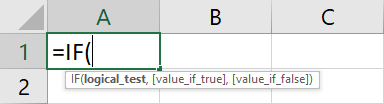
An IF function in Excel has three arguments. You can see the description of these arguments in the picture below.
Answer the following questions about the arguments in the IF function.
Whatever is entered for logical_test should result in TRUE or FALSE if copied into another cell ( =logical_test ). Answer : True or False
Whatever is entered for value_if_true should always be the result you want to see the way the spreadsheet is setup right now. Answer: True or False
The value_if_false should be TRUE or FALSE. Answer: True or False
The reason that value_if_true and value_if_false are in brackets (sometimes called square brackets) is that they are optional. The IF function will work if they are omitted, but perhaps not in the way you expect it to. Answer: True or False
If logical_test is true, then the result shown in the cell is the same as if whatever is entered for value_if_false ( =value_if_false ) were typed into the cell. Answer:True or False
Step by Step Solution
There are 3 Steps involved in it

Get step-by-step solutions from verified subject matter experts
 Study Help