







Question: An intern was tasked with creating a program which would password protect user data files with an 8 character password. This was done by writing

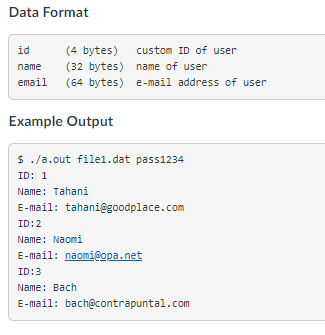
An intern was tasked with creating a program which would password protect user data files with an 8 character password. This was done by writing the first 4 bytes of the password at the beginning of the file and the second 4 bytes at the end (after the user data is written). The data is written in between these bytes as binary data given the data format specified below. Write a program which accepts two command line arguments: a filename and a password. Check that the password matches the one given in the file. If it does, print the contents of the file as shown in the example run. If the password does not match, print the message "ACCESS DENIED ". Data Format id (4 bytes) custom ID of user name (32 bytes) name of user email (64 bytes) e-mail address of user Example Output $ ./a.out file1.dat pass1234 ID: 1 Name: Tahani E-mail: tahani@goodplace.com ID:2 Name: Naomi E-mail: naomi@opa.net ID:3 Name: Bach E-mail: bach@contrapuntal.com An intern was tasked with creating a program which would password protect user data files with an 8 character password. This was done by writing the first 4 bytes of the password at the beginning of the file and the second 4 bytes at the end (after the user data is written). The data is written in between these bytes as binary data given the data format specified below. Write a program which accepts two command line arguments: a filename and a password. Check that the password matches the one given in the file. If it does, print the contents of the file as shown in the example run. If the password does not match, print the message "ACCESS DENIED ". Data Format id (4 bytes) custom ID of user name (32 bytes) name of user email (64 bytes) e-mail address of user Example Output $ ./a.out file1.dat pass1234 ID: 1 Name: Tahani E-mail: tahani@goodplace.com ID:2 Name: Naomi E-mail: naomi@opa.net ID:3 Name: Bach E-mail: bach@contrapuntal.com
Step by Step Solution
There are 3 Steps involved in it

Get step-by-step solutions from verified subject matter experts
 Study Help