







Question: Analysis Phase for Project #3.doc NOTE: Execute Project#3 Test Case #6 (see project #3) requirements for the six test cases Numbers below to be input
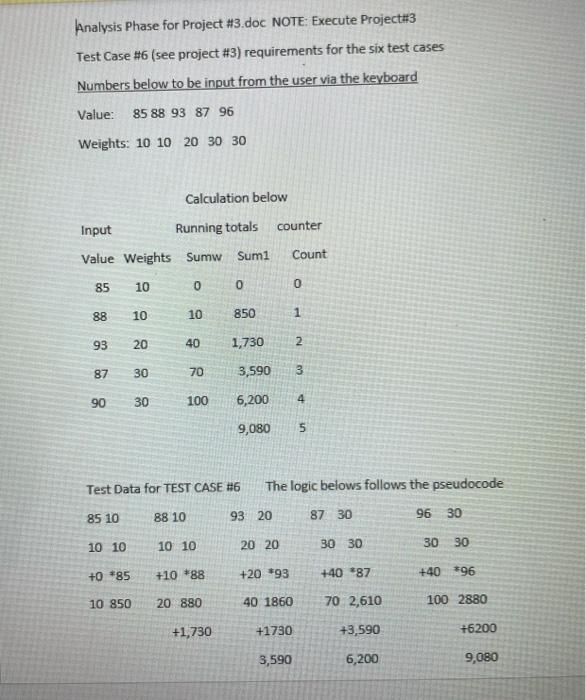
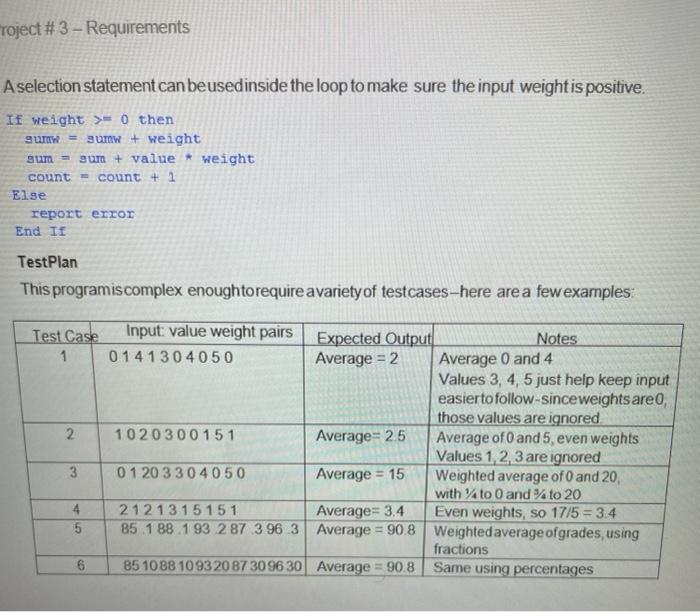
Analysis Phase for Project #3.doc NOTE: Execute Project#3 Test Case #6 (see project #3) requirements for the six test cases Numbers below to be input from the user via the keyboard Value: 85 88 93 87 96 Weights: 10 10 20 30 30 Calculation below counter Input Running totals Value Weights Sumw Sum1 Count 85 10 0 O 0 88 10 10 850 1 93 20 40 1,730 2 87 30 70 3,590 3 90 30 100 6,200 4 9,080 5 Test Data for TEST CASE #6 The logic belows follows the pseudocode 85 10 88 10 93 20 87 30 96 30 10 10 10 10 20 20 30 30 30 30 +0*85 +10 *88 +20 493 +40 87 +40*96 10 850 20 880 40 1860 70 2,610 100 2880 +1,730 +1730 +3,590 +6200 3,590 6,200 9,080 Toject # 3 - Requirements A selection statement can beusedinside the loop to make sure the input weight is positive. If weight >=0 then um = sum + weight sum = sum + value * weight count = count + 1 Else report error End II TestPlan This programiscomplex enoughtorequire avariety of testcases-here are a few examples: Test Case 1 2 Input: value weight pairs Expected Output Notes 01 41304050 Average = 2 Average 0 and 4 Values 3, 4, 5 just help keep input easier to follow-since weights are, those values are ignored 1020300151 Average=25 Average of 0 and 5, even weights Values 1, 2, 3 are ignored 01 20 330 4050 Average = 15 Weighted average of 0 and 20, with Ato 0 and % to 20 212 1 315 15 1 Average= 3.4 Even weights, so 17/5 = 3.4 85 1 88 1 93 2 87 396 3 Average = 90.8 Weighted average of grades, using fractions 85 1088 1093 20 8730 96 30 Average = 90.8 Same using percentages 3 4 5 6
Step by Step Solution
There are 3 Steps involved in it

Get step-by-step solutions from verified subject matter experts
 Study Help