







Question: ANALYZE DATA WITH PIVOTTABLES GETTING STARTED - Open the file IL _ EX 1 9 _ 8 a _ FirstLastName _ 1 . xlsx ,
ANALYZE DATA WITH PIVOTTABLES
GETTING STARTED
Open the file ILEXaFirstLastNamexlsx available for download from the SAM website.
Save the file as ILEXaFirstLastNamexlsx by changing the to a
If you do not see the xIsx file extension in the Save As dialog box, do not type it The program will add the file extension for you automatically.
With the file ILEXaFirstLastNamexIsx still open, ensure that your first and last name is displayed in cell B of the Documentation sheet.
If cell B does not display your name, delete the file and download a new copy from the SAM website.
PROJECT STEPS
Sandra Russo is an account manager at M&K Merchants Bank, where she consults with businesses of all sizes to help them be successful and profitable. Sandra is using an Excel workbook to analyze the financial performance of Home Chef, the market leader in producing midrange kitchen utensils. She asks for your help in creating PivotTables and PivotCharts to provide an overview of Home Chef's customers, regional sales, pricing, and product line.
Go to the Orders worksheet, which contains a table of data named Orders.
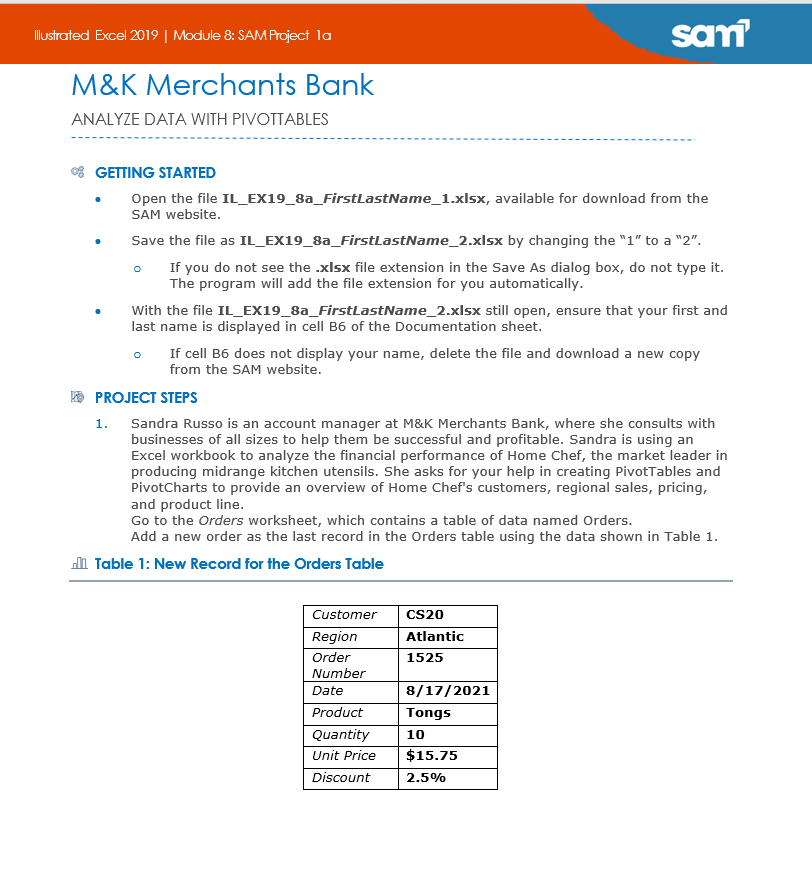
Add a new order as the last record in the Orders table using the data shown in Table
Table : New Record for the Orders Table
Step by Step Solution
There are 3 Steps involved in it
1 Expert Approved Answer
Step: 1 Unlock

Question Has Been Solved by an Expert!
Get step-by-step solutions from verified subject matter experts
Step: 2 Unlock
Step: 3 Unlock
 Study Help