



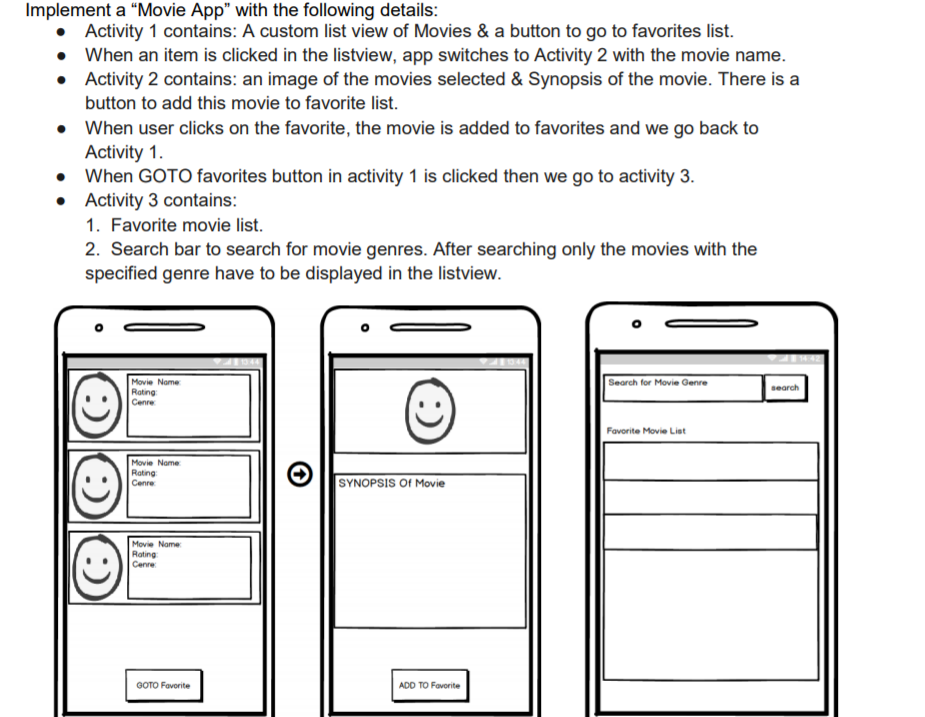
Question: android studio Implement a Movie App with the following details Activity 1 contains: A custom list view of Movies & a button to go to
 android studio
Implement a "Movie App" with the following details Activity 1 contains: A custom list view of Movies & a button to go to favorites list. When an item is clicked in the listview, app switches to Activity 2 with the movie name Activity 2 contains: an image of the movies selected & Synopsis of the movie. There is a button to add this movie to favorite list. When user clicks on the favorite, the movie is added to favorites and we go back to Activity 1. When GOTO favorites button in activity 1 is clicked then we go to activity 3 Activity 3 contains 1. Favorite movie list. 2. Search bar to search for movie genres. After searching only the movies with the specified genre have to be displayed in the listview . . . Movie Nome Search for Movie Genre search Roting Cenre Favorite Movie List Movie Name Roting Cenre SYNOPSIS Of Movie Rating Cenre GOTO Favorite ADD TO Fovorite Implement a "Movie App" with the following details Activity 1 contains: A custom list view of Movies & a button to go to favorites list. When an item is clicked in the listview, app switches to Activity 2 with the movie name Activity 2 contains: an image of the movies selected & Synopsis of the movie. There is a button to add this movie to favorite list. When user clicks on the favorite, the movie is added to favorites and we go back to Activity 1. When GOTO favorites button in activity 1 is clicked then we go to activity 3 Activity 3 contains 1. Favorite movie list. 2. Search bar to search for movie genres. After searching only the movies with the specified genre have to be displayed in the listview . . . Movie Nome Search for Movie Genre search Roting Cenre Favorite Movie List Movie Name Roting Cenre SYNOPSIS Of Movie Rating Cenre GOTO Favorite ADD TO Fovorite
Step by Step Solution
There are 3 Steps involved in it

Get step-by-step solutions from verified subject matter experts