







Question: Android Studio Section II - Short Answer Marks: 3 Complete the java code to create a ListView of programming names (JAVA, ANDROID, C#, PYTHON, JAVASCRIPT,
Android Studio
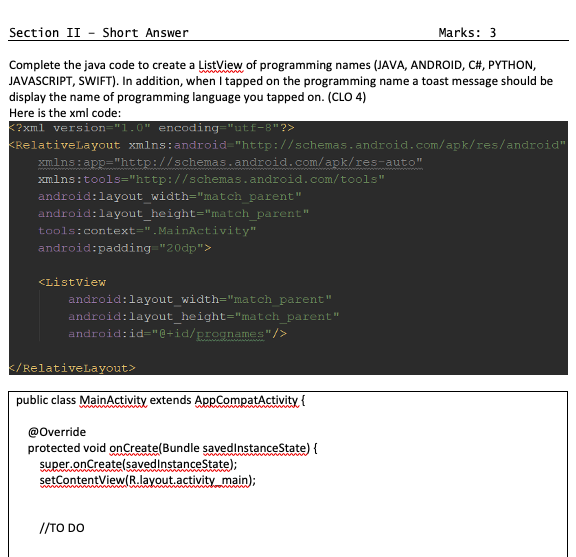
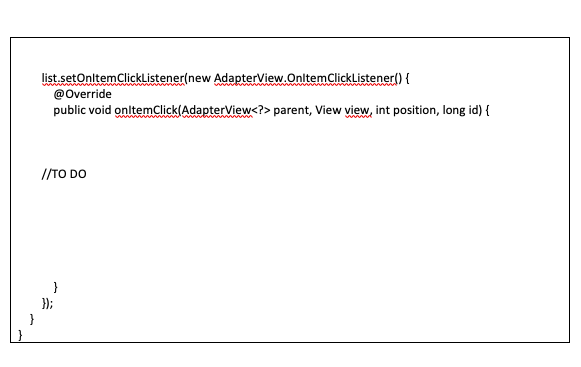
Section II - Short Answer Marks: 3 Complete the java code to create a ListView of programming names (JAVA, ANDROID, C#, PYTHON, JAVASCRIPT, SWIFT). In addition, when I tapped on the programming name a toast message should be display the name of programming language you tapped on. (CLO 4) Here is the xml code: KRelativeLayout xmlns:android="http://schemas.android.com/apk/res/android" xmlns:app="http://schemas.android.com/apk/res-auto" xmlns:tools="http://schemas.android.com/tools" android:layout_width="match_parent" android:layout_height="match_parent" tools:context=".MainActivity" android:padding"20dp">
Step by Step Solution
There are 3 Steps involved in it

Get step-by-step solutions from verified subject matter experts
 Study Help