







Question: R11.7: The control panel in Section 11.4 uses a grid layout manager. Explain a drawback of the grid that is apparent in Figure 12. What
R11.7: The control panel in Section 11.4 uses a grid layout manager. Explain a drawback of the grid that is apparent in Figure 12. What could you do to overcome this drawback?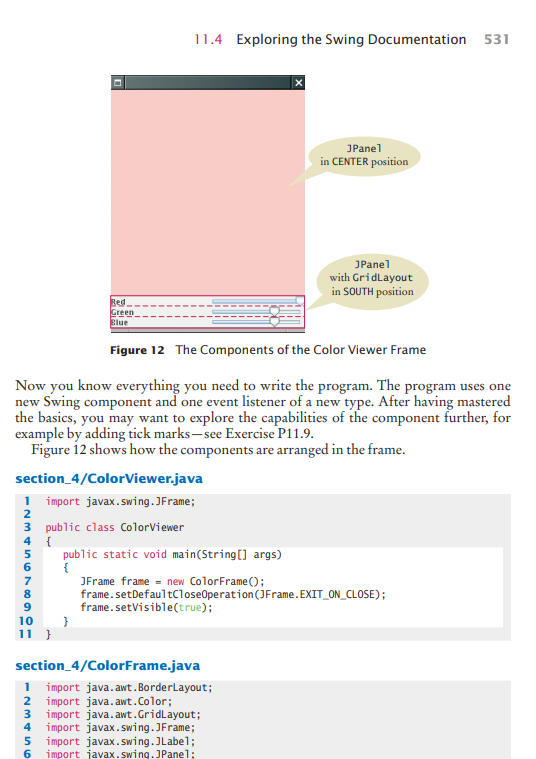
11.4 Exploring the Swing Documentation 531 JPanel in CENTER position JPanel with GridLayout in SOUTH position Green Blue Figure 12 The Components of the Color Viewer Frame Now you know everything you need to write the program. The program uses one new Swing component and one event listener of a new type. After having mastered the basics, you may want to explore the capabilities of the component further, for example by adding tick marks-see Exercise P11.9. Figure 12 shows how the components are arranged in the frame. section_4/ColorViewer.java 1 import javax.swing.JFrame; 2 3 public class ColorViewer 4 public static void main(String[] args) JFrame frame = new ColorFrame(); frame.setDefaultCloseOperation(JFrame.EXIT_ON_CLOSE); frame.setVisible(true); } 11} 5 6 7 8 9 10 section_4/ColorFrame.java 1 import java.awt.BorderLayout; 2 import java.awt.Color; 3 import java.awt.GridLayout; 4 import javax.swing.JFrame; 5 import javax.swing. JLabel; import javax.swing.JPanel; 6 11.4 Exploring the Swing Documentation 531 JPanel in CENTER position JPanel with GridLayout in SOUTH position Green Blue Figure 12 The Components of the Color Viewer Frame Now you know everything you need to write the program. The program uses one new Swing component and one event listener of a new type. After having mastered the basics, you may want to explore the capabilities of the component further, for example by adding tick marks-see Exercise P11.9. Figure 12 shows how the components are arranged in the frame. section_4/ColorViewer.java 1 import javax.swing.JFrame; 2 3 public class ColorViewer 4 public static void main(String[] args) JFrame frame = new ColorFrame(); frame.setDefaultCloseOperation(JFrame.EXIT_ON_CLOSE); frame.setVisible(true); } 11} 5 6 7 8 9 10 section_4/ColorFrame.java 1 import java.awt.BorderLayout; 2 import java.awt.Color; 3 import java.awt.GridLayout; 4 import javax.swing.JFrame; 5 import javax.swing. JLabel; import javax.swing.JPanel; 6
Step by Step Solution
There are 3 Steps involved in it

Get step-by-step solutions from verified subject matter experts
 Study Help