







Question: Anime Eyes The goal of this Python programming assignment is to write your own code inside a provided program framework, with some new graphical and
Anime Eyes
The goal of this Python programming assignment is to write your own code inside a provided program framework, with some new graphical and mathematical considerations. You must create a pair of staring Anime Eyes, which have an iris, a pupil, and a highlight. Your code must adapt to the width and height of the canvas, so that the eyes perfectly fit the screen and do not overlap any edges, for any arbitrary canvas size.This is shown as follows:
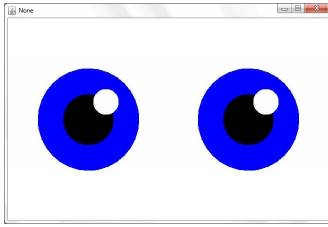 In the JES environment, type in the following program code exactly as you see it here and on the next page, including the comments, and save the program as Lab2.py in your Python folder. Alternatively, you may be able to download the framework code from the class site. Where you see my name in the comment code, replace it with your own name. As always, be very careful about indentation and capitalization. The blank space in each function is where you will be writing your own code. - Lab #2 Anime Eyes #-------------------------------------------------------------- # This function paints a filled circle of radius R # and color NewColor on the Canvas, using as # the coordinates of the center of the circle. # Xc, Yc, and R may all be floats. #-------------------------------------------------------------- def addCircleFilled (Canvas,Xc,Yc,R,NewColor=black): return #-------------------------------------------------------------- # This function paints ONE anime eyeball on the Canvas, # centered at . The color of the iris is NewColor, the # pupil is black, and the highlight is white. The sizes and # positions of the iris, pupil, and highlight are derived # from center point and the radius of the iris R. #-------------------------------------------------------------- def Eyeball (Canvas,Xc,Yc,R,NewColor): return #-------------------------------------------------------------- # This function paints two anime eyeballs on the canvas # by CALLING Eyeball TWICE (once for each eye). # It first must determine the correct radius and center # positions for each eye before calling Eyeball at all. #-------------------------------------------------------------- def Stare (Canvas,NewColor): repaint(Canvas) return #-------------------------------------------------------------- # This function establishes the size of the canvas and the # color of the anime eyes. You MAY NOT change ANY code in # the Run function except for the color in the call to Stare! #-------------------------------------------------------------- def Run(): W = requestIntegerInRange("Enter Width", 100, 1000) H = requestIntegerInRange("Enter Height", 100, 1000) Canvas = makeEmptyPicture(W,H) show(Canvas) Stare(Canvas,blue) return
In JES cl R ick the Load Program button. At the >>> prompt, type Run() with the parentheses and press . The program should run as it is shown here, but should not do anything except put a blank canvas on screen with dimensions selected by the user. Fix any syntax errors or other mistakes. We will not change Run, but we will fill in code for the other three functions. Once the program is complete, you are allowed to change the color of the eyeballs (the blue) to a color of interest to you. addCircleFilled In the blank space in the addCircleFilled function, write new code to paint a filled circle with the center of the circle at location with radius R and color NewColor. You must use the JES function addOvalFilled, which has the following formal parameters: addOvalFilled(picture, startX, startY, width, height, color) In this JES function, startX and startY are the coordinates of the upper-left corner of an oval (not a circle), and width and height describe the size of the ovals bounding box. We want to use those parameters to create a circle, as shown below:
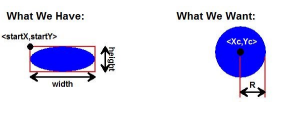
You have to figure out how to convert the Xc, Yc, and R of our new addCircleFilled function into the startX, startY, width, and height that can be used to call the addOvalFilled function of JES. (Weve done this in class.) Remember that addOvalFilled requires integer parameters; but many of the values calculated in this program are passed to addCircleFilled as floating-point numbers and must be rounded and converted to integers before they can be used in the call to addOvalFilled. You are allowed to type in and use the INT function described in the Companion book. Eyeball Next, in the blank space in the Eyeball function, write new code to paint a single anime eyeball on the canvas, given the center of the circle is at location , with iris radius R and iris color NewColor (all of this information is passed in through the parameter list). In Eyeball, you will need to call the addCircleFilled function three times, once for the iris, once for the pupil, and once for the highlight. The hard part is figuring out the centers and radii of the three circles. The radius of the iris (the colored area) comes directly from parameter R. The radius of the pupil (the black center of the eye) is half the radius of the iris, and has the same center coordinates as the iris. The radius of the highlight (the white spot) is one-quarter that of the iris. Its center is located relative to the center of the eyeball at a distance offset to the right (in the +X direction) and upwards (in the Y direction) by an amount calculated as follows: Offset = R 2 This will put the center of the highlight directly on the boundary between the pupil and the iris, at 45 upwards and to the right of the center of the pupil. Stare Next, in the blank space in the Stare function, write new code to call Eyeball twice, once for the left eye and once for the right eye, with the correct radius and coordinates for each eye computed from the size of the Canvas. If the width and height of the Canvas are extracted into variables W and H as follows: W = getWidth(Canvas) H = getHeight(Canvas) then all the other measurements needed to find the position of the eyeballs are computed as follows:
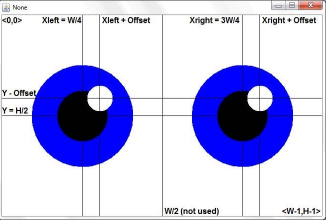
What remains for Stare to compute is the eyeball radius. The radius R is computed from the minimum (using Pythons min(,) function) of Xleft and Y, times , minus 5 pixels. This may seem overly complicated, but doing it this way guarantees that the eyes will always fit onto the screen.
None None
Step by Step Solution
There are 3 Steps involved in it

Get step-by-step solutions from verified subject matter experts
 Study Help