







Question: #-------------------------------------------------------------- # This function paints a filled circle of radius R # and color NewColor on the Canvas, using as # the coordinates of the
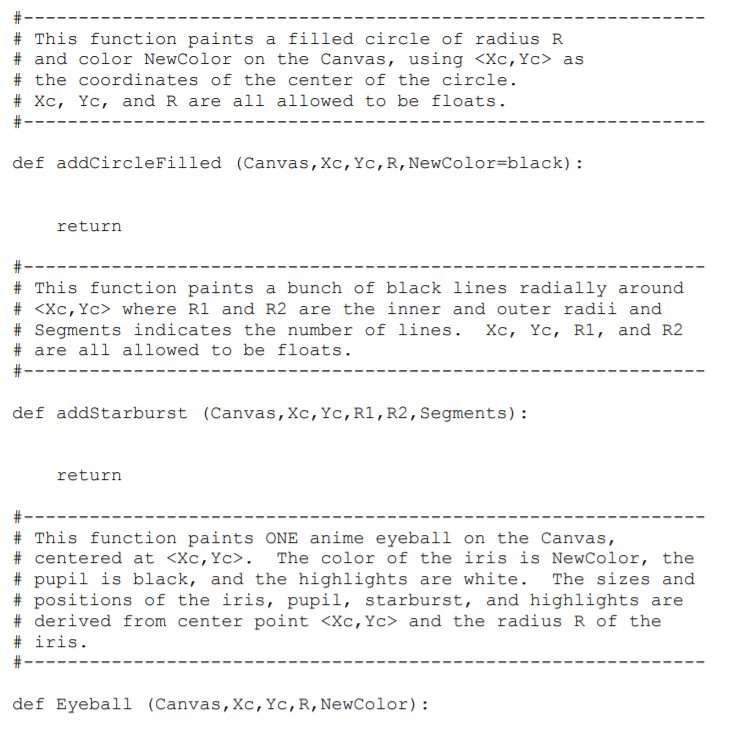
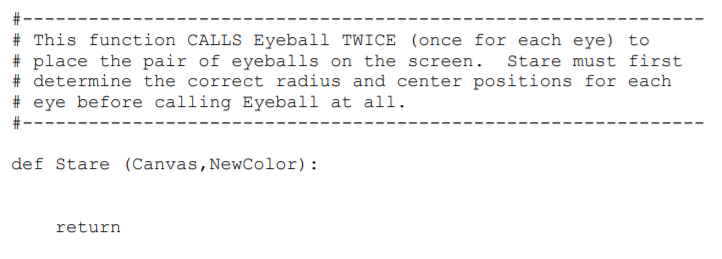
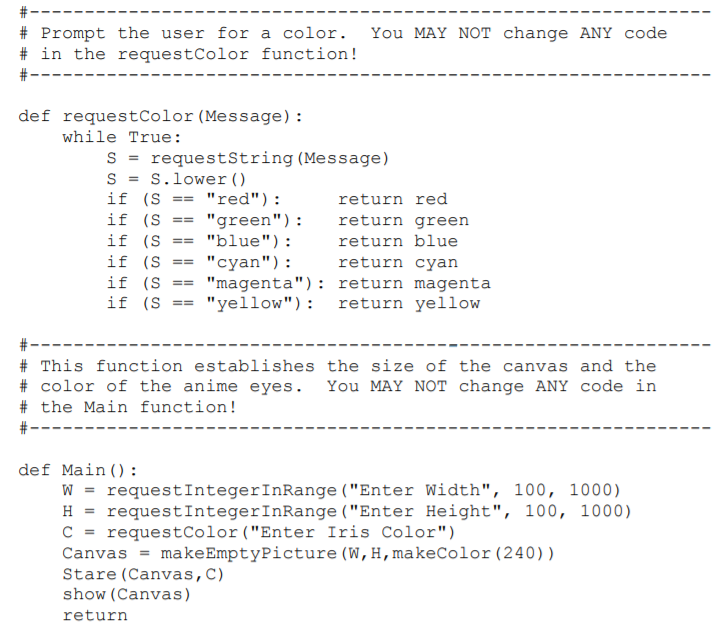
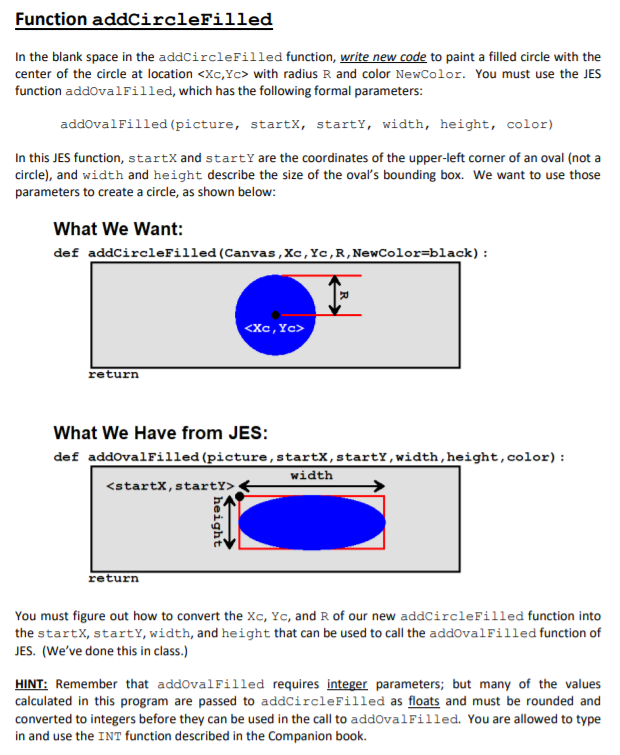
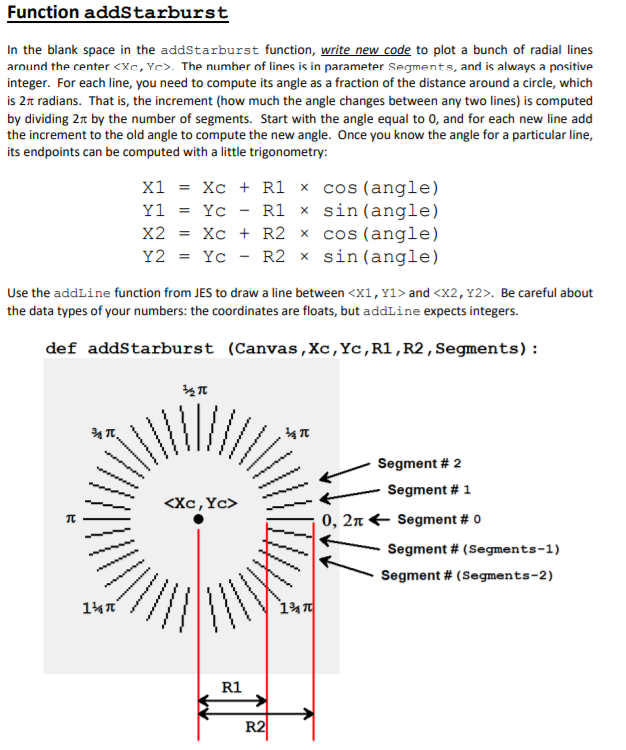
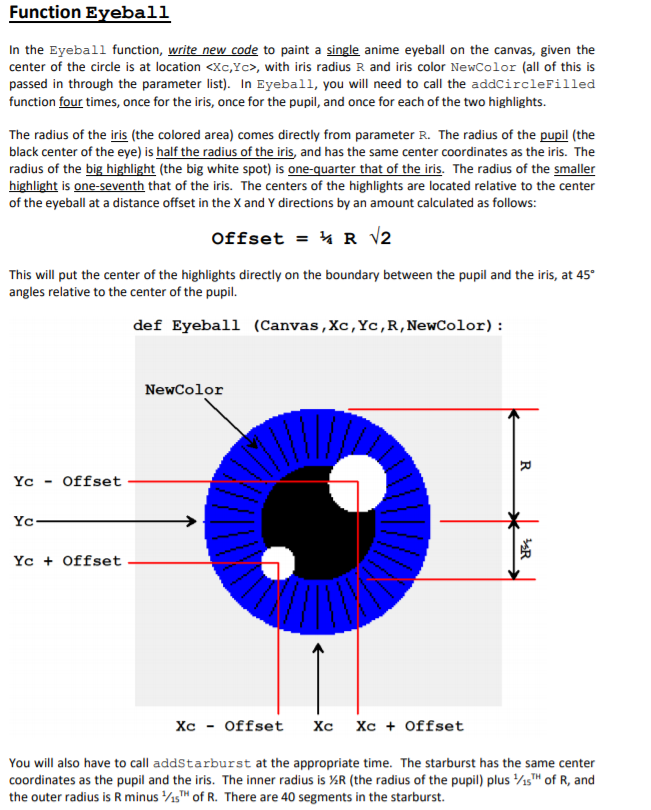
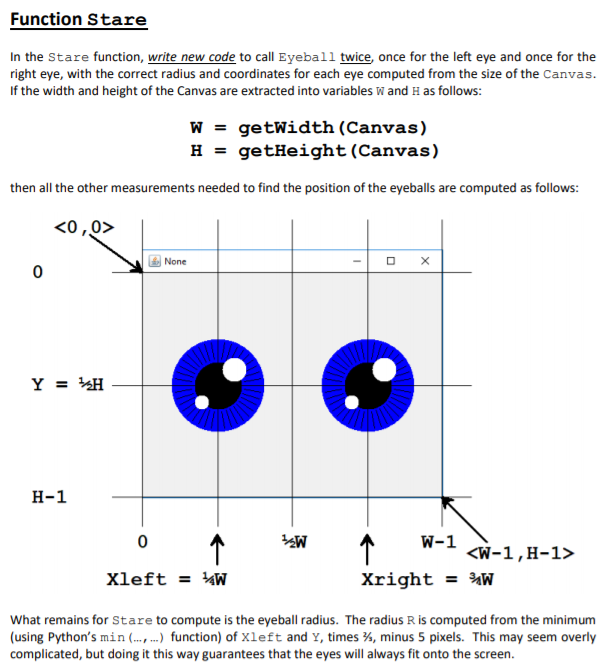
#-------------------------------------------------------------- # This function paints a filled circle of radius R # and color NewColor on the Canvas, usingas # the coordinates of the center of the circle. # Xc, Yc, and R are all allowed to be floats. #-------------------------------------------------------------- def addCircleFilled (Canvas,Xc,Yc,R,NewColor=black): return #-------------------------------------------------------------- # This function paints a bunch of black lines radially around # where R1 and R2 are the inner and outer radii and # Segments indicates the number of lines. Xc, Yc, R1, and R2 # are all allowed to be floats. #-------------------------------------------------------------- def addStarburst (Canvas,Xc,Yc,R1,R2,Segments): return #-------------------------------------------------------------- # This function paints ONE anime eyeball on the Canvas, # centered at . The color of the iris is NewColor, the # pupil is black, and the highlights are white. The sizes and # positions of the iris, pupil, starburst, and highlights are # derived from center point and the radius R of the # iris. #-------------------------------------------------------------- def Eyeball (Canvas,Xc,Yc,R,NewColor): return #-------------------------------------------------------------- # This function CALLS Eyeball TWICE (once for each eye) to # place the pair of eyeballs on the screen. Stare must first # determine the correct radius and center positions for each # eye before calling Eyeball at all. #-------------------------------------------------------------- def Stare (Canvas,NewColor): return #-------------------------------------------------------------- # Prompt the user for a color. You MAY NOT change ANY code # in the requestColor function! #-------------------------------------------------------------- def requestColor(Message): while True: S = requestString(Message) S = S.lower() if (S == "red"): return red if (S == "green"): return green if (S == "blue"): return blue if (S == "cyan"): return cyan if (S == "magenta"): return magenta if (S == "yellow"): return yellow #-------------------------------------------------------------- # This function establishes the size of the canvas and the # color of the anime eyes. You MAY NOT change ANY code in # the Main function! #-------------------------------------------------------------- def Main(): W = requestIntegerInRange("Enter Width", 100, 1000) H = requestIntegerInRange("Enter Height", 100, 1000) C = requestColor("Enter Iris Color") Canvas = makeEmptyPicture(W,H,makeColor(240)) Stare(Canvas,C) show(Canvas) return
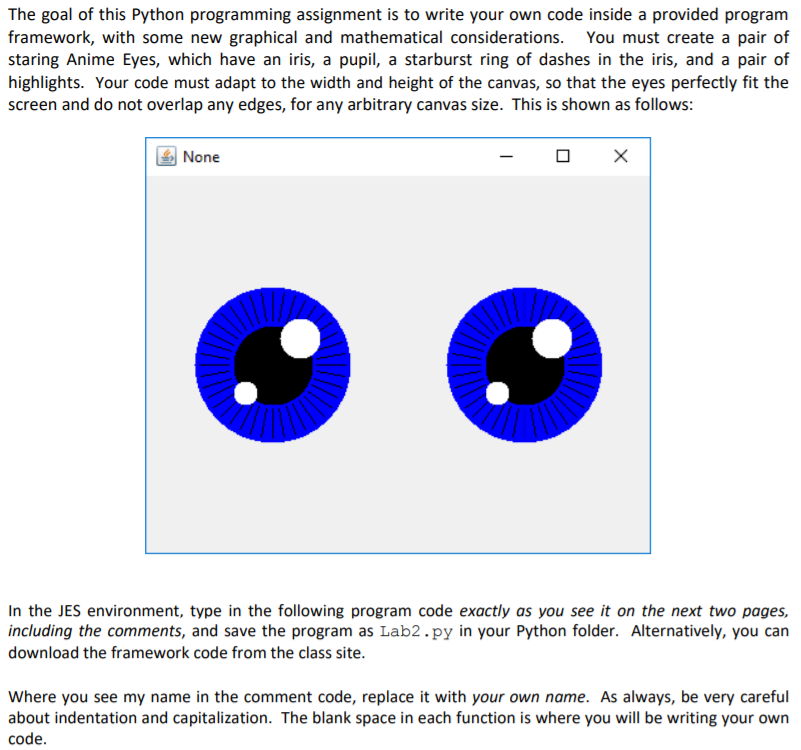
The goal of this Python programming assignment is to write your own code inside a provided program framework, with some new graphical and mathematical considerations. You must create a pair of staring Anime Eyes, which have an iris, a pupil, a starburst ring of dashes in the iris, and a pair of highlights. Your code must adapt to the width and height of the canvas, so that the eyes perfectly fit the screen and do not overlap any edges, for any arbitrary canvas size. This is shown as follows: None In the JES environment, type in the following program code exactly as you see it on the next two pages, including the comments, and save the program as Lab2.py in your Python folder. Alternatively, you can download the framework code from the class site. Where you see my name in the comment code, replace it with your own name. As always, be very careful about indentation and capitalization. The blank space in each function is where you will be writing your own code The goal of this Python programming assignment is to write your own code inside a provided program framework, with some new graphical and mathematical considerations. You must create a pair of staring Anime Eyes, which have an iris, a pupil, a starburst ring of dashes in the iris, and a pair of highlights. Your code must adapt to the width and height of the canvas, so that the eyes perfectly fit the screen and do not overlap any edges, for any arbitrary canvas size. This is shown as follows: None In the JES environment, type in the following program code exactly as you see it on the next two pages, including the comments, and save the program as Lab2.py in your Python folder. Alternatively, you can download the framework code from the class site. Where you see my name in the comment code, replace it with your own name. As always, be very careful about indentation and capitalization. The blank space in each function is where you will be writing your own code
Step by Step Solution
There are 3 Steps involved in it

Get step-by-step solutions from verified subject matter experts
 Study Help