







Question: ANSWER IN C LANGUAGE DUE BEFORE 10TH MARCH 2021 #include #include #define IMAGE_SIZE 10 // this function prints the array void printImgArray(int array[IMAGE_SIZE][IMAGE_SIZE]) { printf(------
ANSWER IN C LANGUAGE DUE BEFORE 10TH MARCH 2021
#include
#include
#define IMAGE_SIZE 10
// this function prints the array
void printImgArray(int array[IMAGE_SIZE][IMAGE_SIZE])
{
printf("------ Image Contents ------- ");
for (int i=0; i { for (int j=0; j printf("%02d, ",array[i][j]); printf(" "); } printf("----------------------------- "); } /** * This function counts the number of distinct * number (i.e. the number of cells) **/ int cellCount(int image[IMAGE_SIZE][IMAGE_SIZE]){ // This first function gets a 10x10 two- dimensional array and return the number of distinct cells. This array represents each unique cell with a unique number. Please see the right picture below in which you can see there are 7 distinct cells, each represented with a unique number. If the right picture below is sent to this function, it should return 7, as there are 7 distinct groups of data // Also may change the return value. return 0; } /** * This function colors each cell with a unique color * (i.e. unique number) **/ void color(int image[IMAGE_SIZE][IMAGE_SIZE]){ // The second function labels each cell with a unique number. For example, if the given image (i.e., two-dimensional array) is something like the left picture below, one sample solution can be something like the right picture. It is not important how you choose the numbers for the cell, as long as it is not zero or a negative number. Also, the numbers do not need to be in a consecutive order. For example, one might label the cells in the example below with arbitrary numbers of 20, 3, 4, 8, 18, 7, 1. }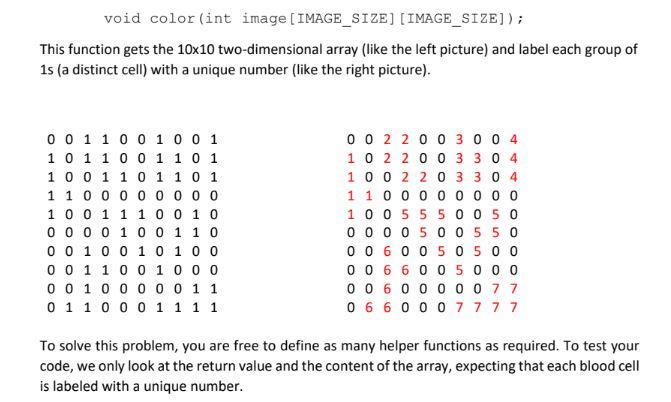
Step by Step Solution
There are 3 Steps involved in it

Get step-by-step solutions from verified subject matter experts
 Study Help