







Question: Answer quickly. Cs2010 Lab 13 his lab assignment gives you practice working with arrays including searching and sorting an array project name and Create a
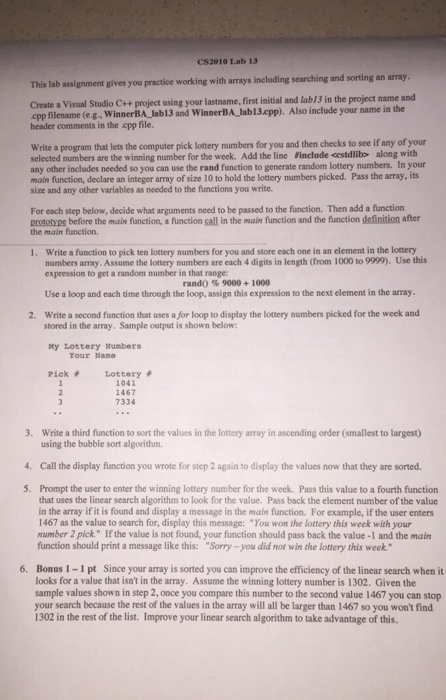
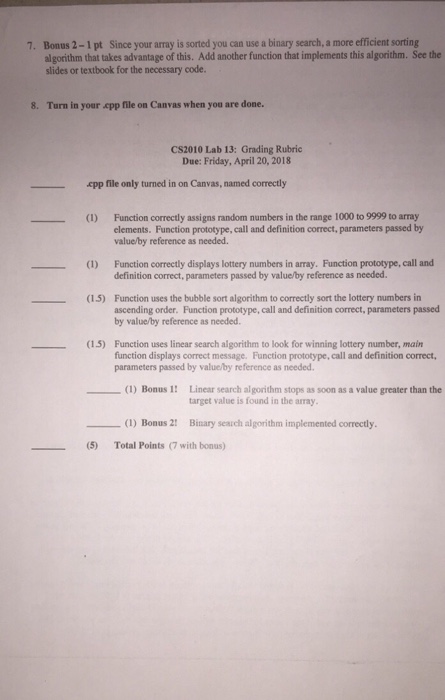
Cs2010 Lab 13 his lab assignment gives you practice working with arrays including searching and sorting an array project name and Create a Visual Studio C++ project using cpp filename (e.g. WinnerBA Jab13 and WinnerBA lab13.cpp). Also include your name in the header comments in the cpp file. Write a program that lets the computer pick lottery numbers for you and then checks to see if any of your selected numbers are the winning number for the week. Add the line Finclude estdlibs along with any other includes needed so you can use the rand function to generate random lottery numbers. In your main function, declare an integer array of size 10 to hold the lottery numbers picked. Pass the array, its size and any other variables as needed to the functions you write For each step below, decide what arguments need to be passed to the function. Then add a function the main function. 1. Write a function to pick ten lottery numbers for you and store each one in an element in the lottery prototyns before the main function, a function sall in the main function and the function definition ater numbers array. Assume the lottery numbers are each 4 digits in length (from 1000 to 9999). Use this expression to get a random number in that range Use a loop and each time through the loop, assign this expression to the next element in the array Write a second function that uses a for loop to display the lottery numbers picked for the week and rand() % 9000 + 1000 2. stored in the array. Sample output is shown below My Lottery Numbers Pick # Lottery # Your Namne 1041 1467 7334 3. Write a third function to sort the values in the lottery array in ascending order (smallest to largest) using the bubble sort algorithm. 4 Call the display function you wrote for step 2 again to display the values now that they are sorted. 5. Prompt the user to enter the winning lottery number for the week. Pass this value to a fourth function that uses the linear search algorithm to look for the value. Pass back the element number of the value in the array if it is found and display a message in the main function. For example, if the user enters 1467 as the value to search for, display this message: "You won the lottery this week with your mumber 2 pick." If the value is not found, your function should pass back the value -1 and the main function should print a message like this: "Sorry-you did not win the lottery this week. Since your array is sorted you can improve the efficiency of the linear search when it Bonus 1-1 pt looks for a value that isn't in the array. Assume the winning lottery number is 1302. Given the sample values shown in step 2, once you compare this number to the second value 1467 you can stop your search because the rest of the values in the array will all be larger than 1467 so you won't find 1302 in the rest of the list. Improve your linear search algorithm to take advantage of this. 6
Step by Step Solution
There are 3 Steps involved in it

Get step-by-step solutions from verified subject matter experts
 Study Help