







Question: answer the following QUESTION 4 On the following code The DO Until will be end only when? Do Until Offset(rowCount, 0).Value =. MUCase(.Offset(rowCount, O).Value) -
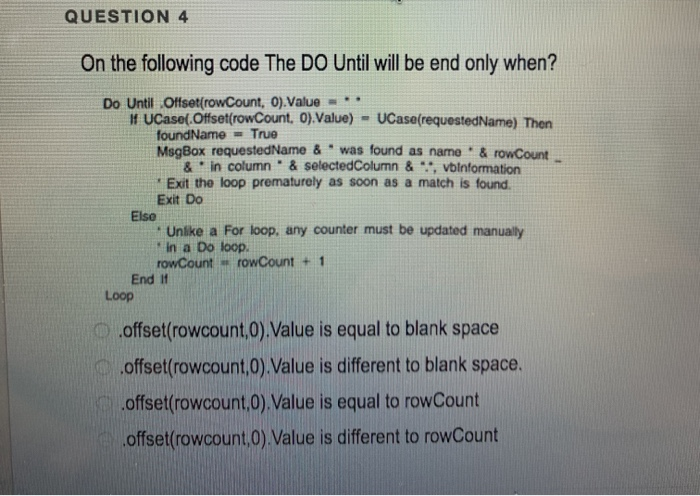
QUESTION 4 On the following code The DO Until will be end only when? Do Until Offset(rowCount, 0).Value =. MUCase(.Offset(rowCount, O).Value) - UCase(requestedName) Then foundName = True MsgBox requestedName & was found as name & rowCount & in column" & selectedColumn &", vbinformation * Exit the loop prematurely as soon as a match is found. Exit Do Else Unlike a For loop, any counter must be updated manually In a Do loop. rowCount -rowCount + End If Loop offset(rowcount,0).Value is equal to blank space .offset(rowcount,0).Value is different to blank space. offset(rowcount,0).Value is equal to rowCount offset(rowcount,0).Value is different to rowCount
Step by Step Solution
There are 3 Steps involved in it

Get step-by-step solutions from verified subject matter experts
 Study Help