







Question: Answer the questions below using xxd (or other hex viewer only), dd, file and stat commands. For each question, include a screenshot as appropriate. You
Answer the questions below using xxd (or other hex viewer only), dd, file and stat commands. For each question, include a screenshot as appropriate. You are not to use automated tools for this assignment. Well do that later.
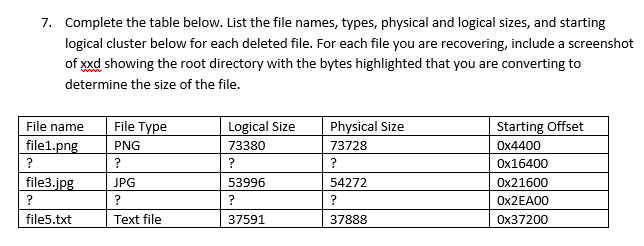
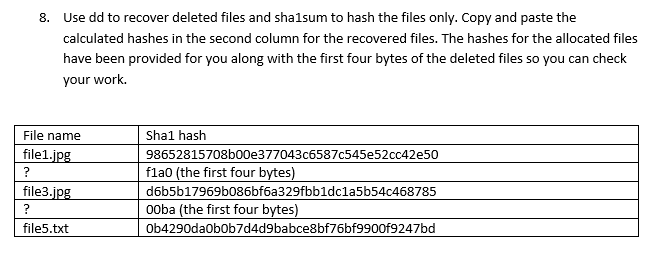
7. Complete the table below. List the file names, types, physical and logical sizes, and starting logical cluster below for each deleted file. For each file you are recovering, include a screenshot of xxd showing the root directory with the bytes highlighted that you are converting to determine the size of the file. Logical Size 73380 ? Physical Size 73728 ? File name file1.png ? file3.jpg ? file5.txt File Type PNG ? JPG ? Text file Starting Offset Ox4400 Ox16400 Ox21600 Ox2EADO Ox37200 53996 ? 54272 ? 37888 37591 8. Use dd to recover deleted files and shalsum to hash the files only. Copy and paste the calculated hashes in the second column for the recovered files. The hashes for the allocated files have been provided for you along with the first four bytes of the deleted files so you can check your work. File name file1.jpg ? file3.jpg ? file5.txt Shal hash 98652815708b00e377043c6587c545e52cc42e50 flao (the first four bytes) d6b5b17969b086bf6a329fbb1dc1a5b54c468785 ooba (the first four bytes) Ob4290da0b0b7d4d9babce8bf76bf9900f9247bd 7. Complete the table below. List the file names, types, physical and logical sizes, and starting logical cluster below for each deleted file. For each file you are recovering, include a screenshot of xxd showing the root directory with the bytes highlighted that you are converting to determine the size of the file. Logical Size 73380 ? Physical Size 73728 ? File name file1.png ? file3.jpg ? file5.txt File Type PNG ? JPG ? Text file Starting Offset Ox4400 Ox16400 Ox21600 Ox2EADO Ox37200 53996 ? 54272 ? 37888 37591 8. Use dd to recover deleted files and shalsum to hash the files only. Copy and paste the calculated hashes in the second column for the recovered files. The hashes for the allocated files have been provided for you along with the first four bytes of the deleted files so you can check your work. File name file1.jpg ? file3.jpg ? file5.txt Shal hash 98652815708b00e377043c6587c545e52cc42e50 flao (the first four bytes) d6b5b17969b086bf6a329fbb1dc1a5b54c468785 ooba (the first four bytes) Ob4290da0b0b7d4d9babce8bf76bf9900f9247bd
Step by Step Solution
There are 3 Steps involved in it

Get step-by-step solutions from verified subject matter experts
 Study Help