







Question: answer this by SQL Language, and show the screen shot for the work and run on your computer. Thank you. To test whether a table
answer this by SQL Language, and show the screen shot for the work and run on your computer. Thank you.
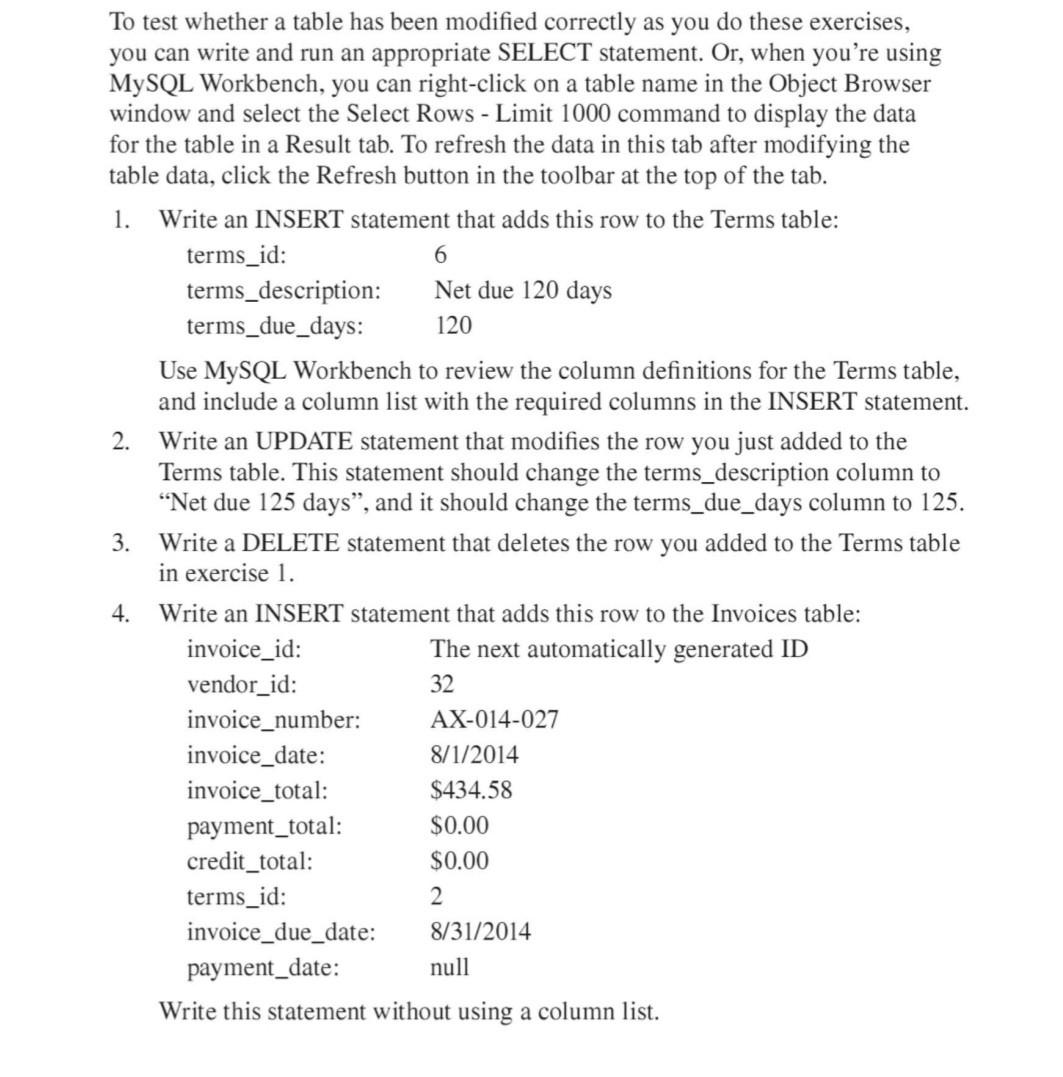
To test whether a table has been modified correctly as you do these exercises, you can write and run an appropriate SELECT statement. Or, when you're using MySQL Workbench, you can right-click on a table name in the Object Browser window and select the Select Rows - Limit 1000 command to display the data for the table in a Result tab. To refresh the data in this tab after modifying the table data, click the Refresh button in the toolbar at the top of the tab. 1. Write an INSERT statement that adds this row to the Terms table: \( \begin{array}{ll}\text { terms_id: } & 6 \\ \text { terms_description: } & \text { Net due } 120 \text { days } \\ \text { terms_due_days: } & 120\end{array} \) Use MySQL Workbench to review the column definitions for the Terms table, and include a column list with the required columns in the INSERT statement. 2. Write an UPDATE statement that modifies the row you just added to the Terms table. This statement should change the terms_description column to "Net due 125 days", and it should change the terms_due_days column to 125 . 3. Write a DELETE statement that deletes the row you added to the Terms table in exercise 1. 4. Write an INSERT statement that adds this row to the Invoices table: cally generated ID Write this statement without using a column list
Step by Step Solution
There are 3 Steps involved in it

Get step-by-step solutions from verified subject matter experts
 Study Help