







Question: ANSWER WITH MATLAB CODE ONLY PLEASE DO NOT COPY AND PASTE AN ANSWER FROM A PREVIOUS VERSION OF THIS QUESTION, IT IS NOT CORRECT AND
ANSWER WITH MATLAB CODE ONLY
PLEASE DO NOT COPY AND PASTE AN ANSWER FROM A PREVIOUS VERSION OF THIS QUESTION, IT IS NOT CORRECT AND DOES NOT PRODUCE A PLOT OF THE MODEL.
Loops. In the Lotka Volterra predator-prey model, the changes in the predator population y and the prey population x are described by the following equations:
xt=xt+1xt=axtbxtyt
yt=yt+1yt=cxtytdyt
Write a function simulatepredatorprey(x,y, a,b,c,d, T) that takes in the initial population sizes of x and y and simulates the model with the input parameters, for T discrete time steps (in years), updating the population sizes after each time step. For each time step, calculate the number of predator & prey from the population sizes of the previous year using the difference equations above. Your function should return the history of the population sizes as a 2-row matrix (first row containing the history of x and second row containing the history of y), starting with the initial population sizes in the first column, and with each additional column containing the population sizes of x and y at that time step. Your function should also plot the population the predator and the prey over time. Predator and prey plots should use different line and marker styles. The axes should be labeled and the figure should contain a legend. Assume the time steps are given in years and the population sizes are given in thousands.
THE CORRECT ANSWER WILL RETURN THE FOLLOWING OUTPUTS EXACTLY AS WELL AS A LABELED PLOT:
>> disp(simulatepredatorprey(10,20, 0.1, 0.01, 0.01, 0.2, 1)) 10 9 20 18 >> disp(simulatepredatorprey(10,20, 0.1, 0.01, 0.01, 0.2, 5)) 10.0000 9.0000 8.2800 7.7815 7.4592 7.2791 20.0000 18.0000 16.0200 14.1425 12.4145 10.8576
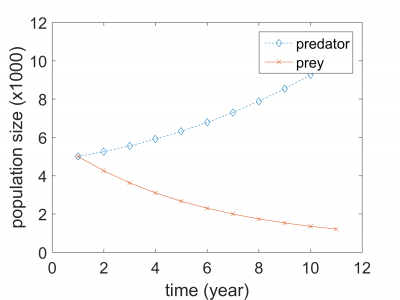
12 8 10 predator prey 7 0 2 46 810 12 time (year) 12 8 10 predator prey 7 0 2 46 810 12 time (year)
Step by Step Solution
There are 3 Steps involved in it

Get step-by-step solutions from verified subject matter experts
 Study Help