







Question: Any help would be appreciated, thanks! For your final project, you will build a Medical Record System. This design will cover the key OOP concepts
Any help would be appreciated, thanks!
For your final project, you will build a Medical Record System. This design will cover the key OOP concepts of: UML diagrams, classes, objects, attributes, methods, encapsulation, messages, inheritance, polymorphism, exceptions and association relationships. In terms of Java, you will use sequencing, decision making, looping, arrays and method construction.
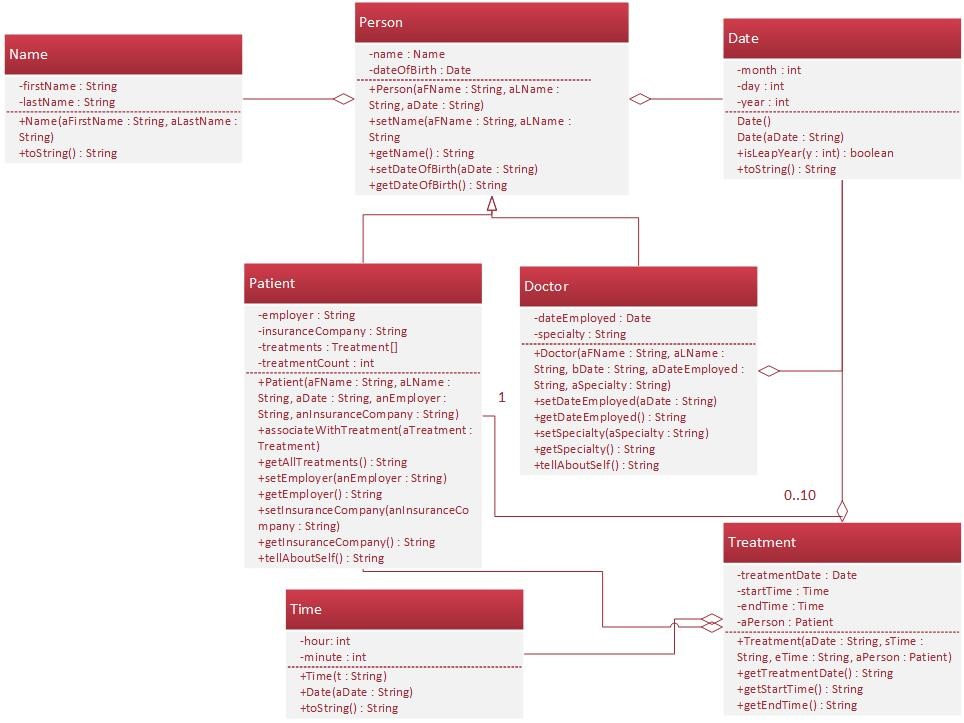
The UML Class diagram is included with the documentation. Here is a rundown of the classes necessary for the project.
Domain Classes
Person Class
The Person class is the primary Domain class for the project. It stores the basic data for a person within the system. It utilized two (2) other classes as attributes Name and Date. It has the appropriate setters, getters and only one constructor.
Patient Class
The Patient class inherits from the Person class as a specific type of person. It contains the unique data for patients who receive treatment. This is the most complicated of the classes; especially, since it uses an array of class Treatment. Each Patient, in this system, can have from 0 to 10 treatments. When creating the Treatment attribute array, you need to declare it to hold 10 elements. It has the appropriate setters, getters and one constructor. The tellAboutSelf method is used to output the attribute data in a formatted string for display.
tellAboutSelf Output Format:

Doctor Class
The Doctor class inherits from the Person class as a specific type of person. It has the appropriate setters, getters and one constructor. The tellAboutSelf method is used to output the attribute data in a formatted string for display.
tellAboutSelf Output Format:

Treatment Class
The Treatment class is for storing data about Patients medical treatments. Treatments are associated with a Patient using the Treatment array in the Patient class. Each Patient can have up to 10 treatments. Treatment uses the Date, Time and Patient classes.
Utility Classes
Name Class
The Name class is used to store the first and last name data for any type of Person. Both the first and last names must be provided. If one is null, neither should be set. The toString method is provided to return the full name in the format lastName, firstname.
Time Class
The Time class is used to store clock time of hours and minutes. Seconds are not necessary. The time is stored in International or military style. The hours attribute should store values from 0 to 24. No other value should be stored. If an invalid number is sent to Time, a zero should be stored. This is true of hours and minutes. Time is input in the format 00:00 as a string. No other format is to be accepted by the class.
The minute attribute should only store values from 0 to 60. Invalid values should result in 0 being stored. The toString method is the interface for this class and should return the time in the following format hour:minute (00:00). Single digits should be displayed with a leading zero (0) or as 01:00.
Date Class
The Date class is the most complicated of the utility classes. Its purpose is to store a valid date and when invalid, throw an exception. The attribute of month, day and year are integer values and should always be valid.
Date input the date input to the constructor should be in a string formatted as mm/dd/yyyy. Any input not conforming to that format should throw an exception and store zeros (0) for all the attributes.
Month attribute the month attribute should store the values 1 to 12. Any invalid month value should throw an exception.
Day attribute the day attribute should store the appropriate value based on the month and leap year vs non-leap year for February. An invalid day for a month should throw an exception. For example, a day value of 31 is acceptable for January, but not for April. For February, 29 is acceptable if the year is a leap year, but not if not a leap year. Therefore, the class needs a method (isLeapYear) for determining whether the year input is a leap year or not. The method returns the Boolean TRUE if it is a leap year and FALSE if not.
Here is the algorithm for determining if a year is a leap year:
If the year is evenly divisible by 4, go to step 2.
If the year is evenly divisible by 100, go to step 3.
If the year is evenly divisible by 400, go to step 4.
The year is a leap year (it has 366 days, February 29.)
The year is not a leap year (it has 365 days, February 28.)
Year attribute the year value is used to determine the leap year and should store values in the range of 1000 to 9999. Invalid year values should throw an exception.
Date Exceptions The date class should throw an exception for the following reasons.
Time string not in the form of mm/dd/yyyy.
Februarys day value is invalid.
Month value is invalid.
Day value for appropriate month is invalid.
Year value is invalid.
All methods that use the Date class should be designed to throw exceptions.
The user interface for this class is the toString method. It should be designed to return the date in the following string format mm/dd/yyyy with leading zeros (0) for single digit values as in 01/02/2016.
Evaluation Program
Your project will be tested using the Demoperson.java file. You may use it to test your designs, but do not modify the file except for testing dates, times, etc.
DemoPerson.Java:
public class DemoPerson { public static void main(String[] args) { try { //create doctors Doctor person1 = new Doctor("Peter", "Washington", "01/03/2000", "02/28/2001", "Internal Medicine"); Doctor person2 = new Doctor("Mary", "Adams", "04/05/1987", "04/06/1998", "General Surgery"); //create patients Patient person3 = new Patient("Paul", "Jefferson", "02/28/2016", "Ebay", "Insurance of Omaha"); Patient person4 = new Patient("Mama", "Casselliot", "02/02/2016", "PayPal", "Travelers Insurance"); //create treatments new Treatment("08/04/2015", "01:00", "01:20", person3); new Treatment("08/05/2015", "02:00", "02:20", person3); new Treatment("08/06/2015", "03:00", "03:20", person4); new Treatment("08/07/2015", "04:00", "04:20", person3); new Treatment("09/08/2015", "10:00", "10:20", person4);
//output people System.out.println( person1.tellAboutSelf() + " " + person2.tellAboutSelf() + " " + person3.tellAboutSelf() + " " + person4.tellAboutSelf() + " ");
//output treatments System.out.println( person3.getAllTreatments() + " " + person4.getAllTreatments() + " "); } catch (Exception e) { System.out.println("Error: Exception Thrown " + e.getMessage()); } }//end of main }//end of class
class/method layout:
Sample run of program:
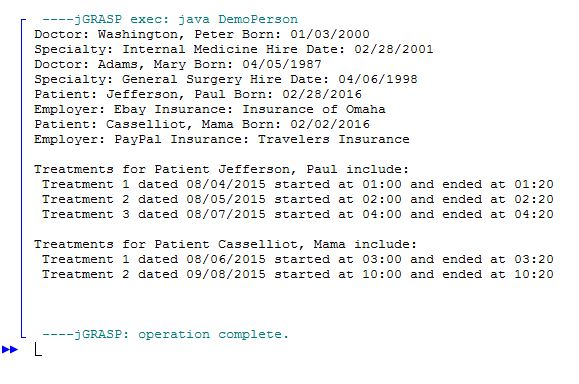
Patient: Jefferson, Paul Born: 02/28/2016 Employer Ebay Insurance Insurance of Omaha Patient: Jefferson, Paul Born: 02/28/2016 Employer Ebay Insurance Insurance of Omaha
Step by Step Solution
There are 3 Steps involved in it

Get step-by-step solutions from verified subject matter experts
 Study Help