



Question: Anyone can help me with this C++ lab5! 3:38 .11 Lab 5- Reading and Writing Files Objectives . Read and write to and from data
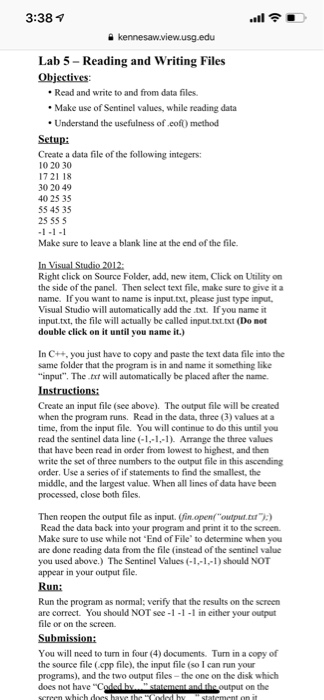
3:38 .11 Lab 5- Reading and Writing Files Objectives . Read and write to and from data files. Make use of Sentinel values, while reading data Understand the usefulness of eof) method Setup: Create a data file of the following integers: 10 20 30 1721 18 30 20 49 40 25 35 55 45 35 25 55 5 Make sure to leave a blank line at the end of the file. Right click on Source Folder, add, new item, Click on Utility on the side of the panel. Then select text file, make sure to give it a name. If you want to name is input.txt, please just type imput Visual Studio will automatically add thetxt. If you name it input.txt, the file will actually be called input.txt.txt (Do not double click on it until you name it.) In C++, you just have to copy and paste the text data file into the sarm e folder that the program is in and name it something like input". The txt will automatically be placed after the name Create an input file (see above). The output file will be created when the program runs. Read in the data, three (3) values at a time, from the input file. You will continue to do this until you read the sentinel data line (1,-1,). Arrange the three values that have been read in order from lowest to highest, and then write the set of three numbers to the output file in this ascending order. Use a series of if statements to find the smallest, the middle, and the largest value. When all lines of data have been processed, close both files. Then reopen the output file as input. (fin openf "output.axu Read the data back into your program Make sure to use while not "End of File to determine when you are done reading data from the file (instead of the sentinel value you used above.) The Sentinel Values (-1,-1,-1) should NOT appear in your output file. Run: print it to the screen. Run the program as normal: verify that the results on the screen are correct. You should NOT see-1-1-1 in either your output file or on the screen. You will need to turn in four (4) documents. Turn in a copy of the source file (epp file), the input file (so I can run your programs), and the two output files-the one on the disk which does not have "C on the 3:38 .11 Lab 5- Reading and Writing Files Objectives . Read and write to and from data files. Make use of Sentinel values, while reading data Understand the usefulness of eof) method Setup: Create a data file of the following integers: 10 20 30 1721 18 30 20 49 40 25 35 55 45 35 25 55 5 Make sure to leave a blank line at the end of the file. Right click on Source Folder, add, new item, Click on Utility on the side of the panel. Then select text file, make sure to give it a name. If you want to name is input.txt, please just type imput Visual Studio will automatically add thetxt. If you name it input.txt, the file will actually be called input.txt.txt (Do not double click on it until you name it.) In C++, you just have to copy and paste the text data file into the sarm e folder that the program is in and name it something like input". The txt will automatically be placed after the name Create an input file (see above). The output file will be created when the program runs. Read in the data, three (3) values at a time, from the input file. You will continue to do this until you read the sentinel data line (1,-1,). Arrange the three values that have been read in order from lowest to highest, and then write the set of three numbers to the output file in this ascending order. Use a series of if statements to find the smallest, the middle, and the largest value. When all lines of data have been processed, close both files. Then reopen the output file as input. (fin openf "output.axu Read the data back into your program Make sure to use while not "End of File to determine when you are done reading data from the file (instead of the sentinel value you used above.) The Sentinel Values (-1,-1,-1) should NOT appear in your output file. Run: print it to the screen. Run the program as normal: verify that the results on the screen are correct. You should NOT see-1-1-1 in either your output file or on the screen. You will need to turn in four (4) documents. Turn in a copy of the source file (epp file), the input file (so I can run your programs), and the two output files-the one on the disk which does not have "C on the
Step by Step Solution
There are 3 Steps involved in it
To tackle this C lab follow these steps Step 1 Set up the Input File Create a Text File Name it inpu... View full answer

Get step-by-step solutions from verified subject matter experts