







Question: Apex Oracle SQL Queries -- CREATING EACH TABLE IN THE ACADEMIC DATABASE CREATE TABLE ACADEMIC_SESSION ( SESSION_ID NUMBER NOT NULL , SESSION_NAME VARCHAR2(50) ) ;
Apex Oracle SQL Queries
-- CREATING EACH TABLE IN THE ACADEMIC DATABASE CREATE TABLE ACADEMIC_SESSION ( SESSION_ID NUMBER NOT NULL , SESSION_NAME VARCHAR2(50) ) ;
CREATE TABLE COURSE ( COURSE_ID NUMBER NOT NULL , COURSE_NAME VARCHAR2 (50) , SESSION_ID NUMBER , DEPARTMENT_ID NUMBER ) ;
CREATE TABLE DEPARTMENT ( DEPARTMENT_ID NUMBER NOT NULL , DEPARTMENT_NAME VARCHAR2(50) , HOD VARCHAR2(50) ) ;
CREATE TABLE EXAM_DETAIL ( EXAM_ID NUMBER NOT NULL , EXAM_TYPE VARCHAR2(50) NOT NULL , START_DATE DATE , NAME VARCHAR2(50) ) ;
CREATE TABLE EXAM_RESULT ( STUDENT_ID NUMBER NOT NULL, EXAM_ID NUMBER NOT NULL, COURSE_ID NUMBER NOT NULL, GRADE NUMBER ) ;
CREATE TABLE EXAM_TYPE ( EXAM_TYPE VARCHAR2(50) NOT NULL , EXAM_NAME VARCHAR2(50) , EXAM_DESC VARCHAR2(50) ) ;
CREATE TABLE FACULTY_COURSE ( FACULTY_ID NUMBER NOT NULL, COURSE_ID NUMBER NOT NULL ) ;
CREATE TABLE FACULTY ( FACULTY_ID NUMBER NOT NULL , FACULTY_NAME VARCHAR2(50) , FIRST_NAME VARCHAR2(50), LAST_NAME VARCHAR2(50) ) ;
CREATE TABLE FACULTY_LOGIN ( FACULTY_ID NUMBER NOT NULL, LOGIN_DATE DATE NOT NULL, LOGIN_TIME DATE NOT NULL, DETAILS VARCHAR2(50) ) ;
CREATE TABLE PARENT_INFORMATION ( PARENT_ID NUMBER NOT NULL , FATHER_NAME VARCHAR2(50) , MOTHER_NAME VARCHAR2(50) ) ;
CREATE TABLE STUDENT_ATTENDANCE ( STUDENT_ID NUMBER NOT NULL, NO_OF_WORKING_DAYS NUMBER , NO_OF_DAYS_OFF NUMBER , ELIGIBILITY_FOR_EXAMS CHAR ) ;
CREATE TABLE STUDENT_COURSE ( STUDENT_ID NUMBER , COURSE_ID NUMBER ) ;
CREATE TABLE STUDENT ( STUDENT_ID NUMBER NOT NULL , FIRST_NAME VARCHAR2(50) , PARENT_ID NUMBER, STUDENT_REG_YEAR DATE ) ;
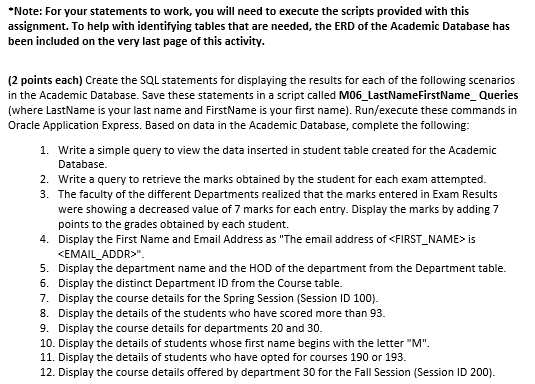
*Note: For your statements to work, you will need to execute the scripts provided with this assignment. To help with identifying tables that are needed, the ERD of the Academic Database has been included on the very last page of this activity. (2 points each) Create the SQL statements for displaying the results for each of the following scenarios in the Academic Database. Save these statements in a script called M06_LastNameFirstName_Queries (where LastName is your last name and FirstName is your first name). Run/execute these commands in Oracle Application Express. Based on data in the Academic Database, complete the following: 1. Write a simple query to view the data inserted in student table created for the Academic Database. 2. Write a query to retrieve the marks obtained by the student for each exam attempted. 3. The faculty of the different Departments realized that the marks entered in Exam Results were showing a decreased value of 7 marks for each entry. Display the marks by adding 7 points to the grades obtained by each student. 4. Display the First Name and Email Address as "The email address of
Step by Step Solution
There are 3 Steps involved in it

Get step-by-step solutions from verified subject matter experts
 Study Help