







Question: app.java (initial application) MainFrame.java (external JFrame) ControlPanel , a Java class for the panel that will contain two other panels, using a layout. TopPanel ,
- app.java (initial application)
- MainFrame.java (external JFrame)
- ControlPanel, a Java class for the panel that will contain two other panels, using a layout.
- TopPanel, a Java class for the Panel that will display the groups name and group's average GPA
- CenterPanel, a Java class for the Panel that will display names and semester GPAs of the 4 students in a group.
- group.java and student.java (a working version from previous labs, might need updates, see important #2 below).
Students should apply consistent indenting in all submissions. This can be done via the NetBeans Source menu.
Contents
You can start with this NetBeans project.
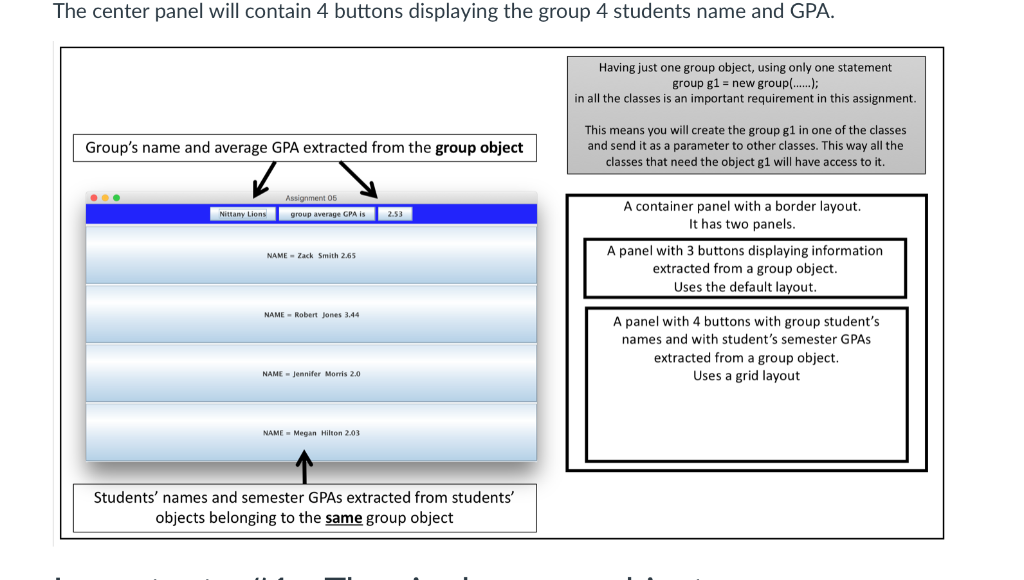
You will create 3 panels and one group object. One panel contains two other panels.
On a top panel you will display the group's name and average GPA.
The center panel will contain 4 buttons displaying the group 4 students name and GPA.
Important - #1 - The single group object
You will create only one group object g1 in this assignment.
There will be only one statement group g1 = new group(...); in the whole application.
Since two panels need to be used, g1 will need to be created somewhere and then pass the object g1 as a parameter to other classes.
Important - #2 - GPA Calculation
Your previous group/student solution might be working this way; otherwise, you will need to updated it.
Because GPA is calculated randomly in student, depending how you calculate it there is a chance that the average group GPA will not match with the displayed sum of each student's GPA.
In order to fix this, you need to:
- in group:
- semesterGPA is calculated using the GPA attribute in student, not the semesterGPA() method in student
- in student:
- it needs GPA as an attribute
- the attribute GPA is calculated in the constructor, when the student is created, calling the semesterGPA() random method
- the semesterGPA() method, whenever it is called, updates the value of the attribute GPA
The center panel will contain 4 buttons displaying the group 4 students name and GPA Having just one group object, using only one statement group gl- new group!( in all the classes is an important requirement in this assignment This means you will create the group g1 in one of the classes and send it as a parameter to other classes. This way all the classes that need the object g1 will have access to it. Group's name and average GPA extracted from the group object Assignment 05 A container panel with a border layout. It has two panels ttany Lions group average CPA is A panel with 3 buttons displaying information extracted from a group object. Uses the default layout NAME Zack Smith 2.65 NAME Robert jones 3.44 A panel with 4 buttons with group student's names and with student's semester GPAs extracted from a group object. Uses a grid layout NAME Jennifer Morris 2.0 NAME Megan Hilton 2.03 Students' names and semester GPAs extracted from students' objects belonging to the same group object Having just one group object, using only one statement group g1-new group(....); in all the classes is an important requirement in this assignment. This means you will create the group g1 in one of the classes and send it as a parameter to other classes. This way all the classes that need the object g1 will have access to it. Group's name and average GPA extracted from the group object Assignment 05 A container panel with a border layout. It has two panels. A panel with 3 buttons displaying information extracted from a group object. Uses the default layout. Nittany Lions group average GPA is 2.53 NAME Zack Smith 2.65 NAME Robert Jones 3.44 A panel with 4 buttons with group student's names and with student's semester GPAs extracted from a group object. Uses a grid layout NAME Jennifer Morris 2.0 NAME Megan Hilton 2.03 Students' names and semester GPAs extracted from students objects belonging to the same group object
Step by Step Solution
There are 3 Steps involved in it

Get step-by-step solutions from verified subject matter experts
 Study Help