







Question: Deliverables app.java (initial application) MyJFrame.java (external JFrame) A Java class for the control panel, that will contain the 2 new panels, using a layout. A
Deliverables
app.java (initial application)
MyJFrame.java (external JFrame)
A Java class for the control panel, that will contain the 2 new panels, using a layout.
A Java class for the Panel that will display the students name
A Java class for the Panel that will display "whats up 20 times, using a layout.
student.java (a working version from previous labs, no changes needed). All the student's information should be extracted from the student object.
Contents
The objective is to organize the graphical components on the screen.
You might use this NetBeans project to start your lab.
You will need 2 panels inside myJPanel.
Creating and adding panels is very similar to creating and adding other graphical components such as buttons.
It should look like this: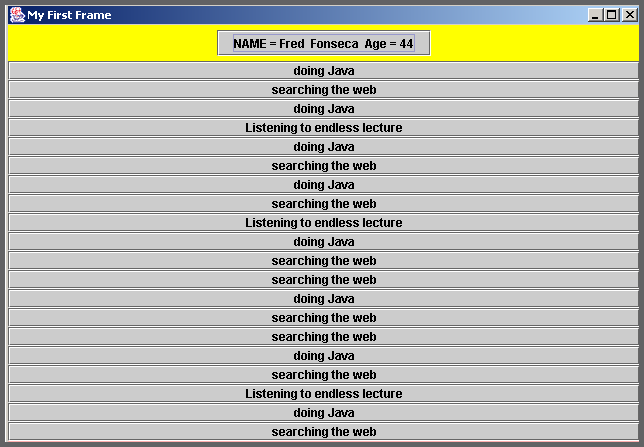
---------------------------------------------------------------------------------------------------------------------------------------------------------------------
I already have the layout completed, now just need to figure out how to display the student name and "whats up", Not sure whether to use a for statement or to make individual buttons. Right now I am throwing errors when run it. The following is my code:
APP.JAVA
public class app {
public static void main(String args[]) { myJFrame mjf = new myJFrame(); student st1 = new student("Hal", "Smith", 30); } }
-------------------------------------------------------------------------------
myJFrame.JAVA
import java.awt.*; import javax.swing.*;
public class myJFrame extends JFrame {
public myJFrame() { super("My First Frame"); ControlJPanel mjp = new ControlJPanel(); getContentPane().add(mjp, "Center"); setDefaultCloseOperation(EXIT_ON_CLOSE); setSize(1000, 700); setVisible(true); } }
----------------------------------------------------------------------------------------
ControlJPanel.JAVA
import java.awt.*; import javax.swing.*;
public class ControlJPanel extends JPanel {
public ControlJPanel() { super(); BorderLayout border = new BorderLayout(); setLayout(border); setBackground(Color.gray); CenterPanel bot = new CenterPanel(); TopPanel top = new TopPanel(); add(top, "North"); add(bot, "Center"); } }
---------------------------------------------------------------------------------------------
CenterPanel.JAVA
import java.awt.*; import javax.swing.*;
public class CenterPanel extends JPanel {
JButton jb2; student st1; public CenterPanel() { super(); GridLayout grid = new GridLayout(20, 1); setLayout(grid); setBackground(Color.pink); JButton jb1 = new JButton(st1.whatsUp()); add(jb1); } }
------------------------------------------------------------------------------------------
TopPanel.JAVA
import java.awt.*; import javax.swing.*;
public class TopPanel extends JPanel { student st1; public TopPanel() { super(); setBackground(Color.DARK_GRAY); JButton jb1 = new JButton("Name: " + st1.getName()); add(jb1, "North"); } }
-----------------------------------------------------------------------------
Student.JAVA
import java.util.Random;
class student
{
//class variables
String firstName;
String lastName;
int age;
//constructor method
student(String informedFirstName, String informedLastName, int informedAge)
{
firstName = informedFirstName;
lastName = informedLastName;
age = informedAge;
}
//a method that returns the student's complete name
String getName()
{
return firstName +" " + lastName;
}
int getAge()
{
return age;
}
//Method that creates an array and returns student tasks randomly
String whatsUp()
{
String tasks[] = {"Working on a crazy java lab", "COFFEE!!!!", "Cramming for an exam", "Contemplating life"};
Random r = new Random();
int rand = r.nextInt(4);
return tasks[rand];
}
}
My First Frame NAME = Fred Fonseca Age=44 doing Java searching the web doing Java Listening to endless lecture doing Java searching the web doing Java searching the weh Listening to endless lecture doing Java searching the web searching the web doing Java searching the web searching the web doing Java searching the web Listening to endless lecture doing Java searching the web
Step by Step Solution
There are 3 Steps involved in it

Get step-by-step solutions from verified subject matter experts
 Study Help