







Question: ArtSow.java File...... // ArtShow.java - This program determines if an art show attendee gets a 5% discount // for preregistering. // Input: Interactive. // Output:
ArtSow.java File......
// ArtShow.java - This program determines if an art show attendee gets a 5% discount // for preregistering. // Input: Interactive. // Output: A statement telling the user if they get a discount or no discount.
import javax.swing.*;
public class ArtShow { public static void main(String args[]) { String registerString; registerString = JOptionPane.showInputDialog("Did you preregister? Enter Y or N: "); // Test input here. If Y, call discount(), else call noDiscount(). System.exit(0);
} // End of main() method. // Write discount method here.
// Write noDiscount method here.
} // End of ArtShow class.
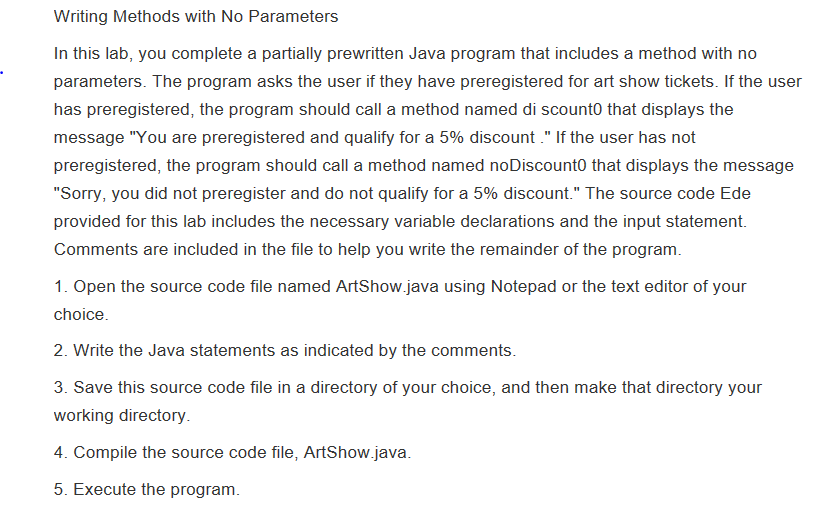
Writing Methods with No Parameters In this lab, you complete a partially prewritten Java program that includes a method with no parameters. The program asks the user if they have preregistered for art show tickets. If the user has preregistered, the program should call a method named di scounto that displays the message "You are preregistered and qualify for a 5% discount If the user has not preregistered, the program should call a method named noDiscounto that displays the message "Sorry, you did not preregister and do not qualify for a 5% discount." The source code Ede provided for this lab includes the necessary variable declarations and the input statement. Comments are included in the file to help you write the remainder of the program. 1. Open the source code file named ArtShow.java using Notepad or the text editor of your choice 2. Write the Java statements as indicated by the comments. 3. Save this source code file in a directory of your choice, and then make that directory your working directory 4. Compile the source code file, Artshow.java. 5. Execute the program
Step by Step Solution
There are 3 Steps involved in it

Get step-by-step solutions from verified subject matter experts
 Study Help