Question: As a first step, consider the glove image shown below Can you use a thresholding technique to obtain the second image? Basically, this is your
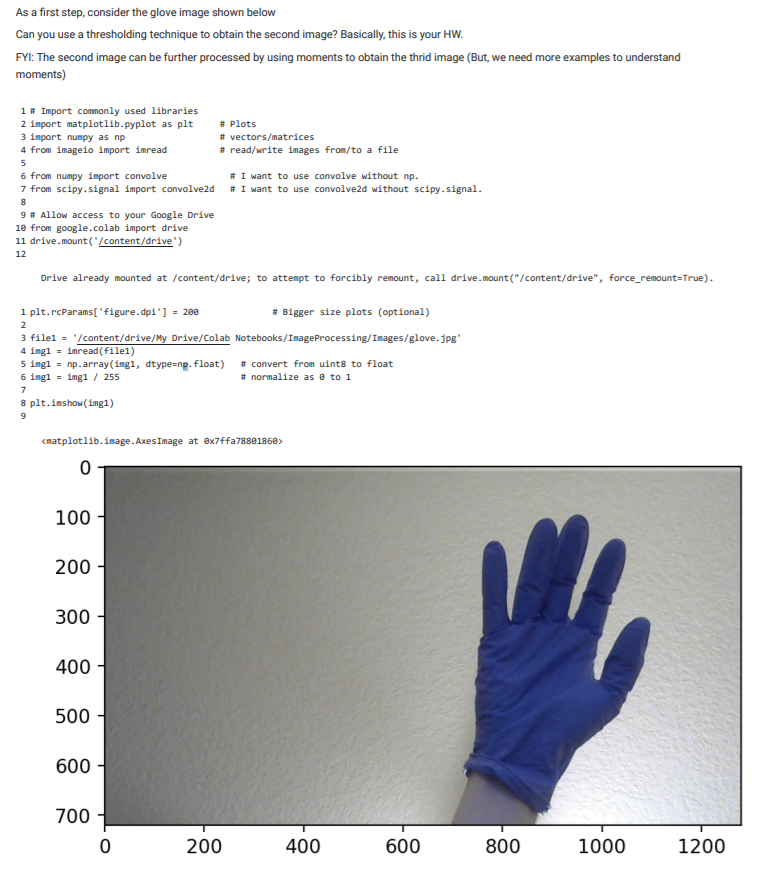
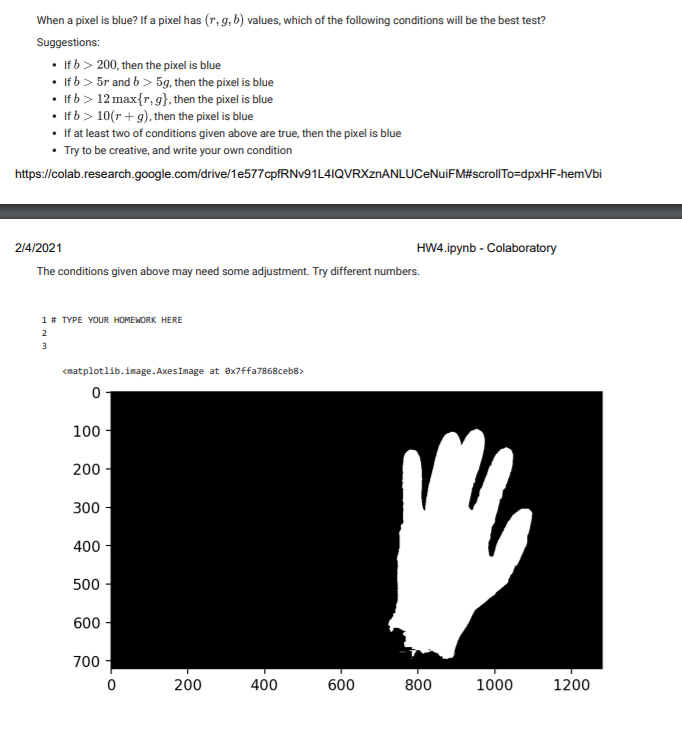
As a first step, consider the glove image shown below Can you use a thresholding technique to obtain the second image? Basically, this is your HW. FYI: The second image can be further processed by using moments to obtain the thrid image (But, we need more examples to understand moments) 1 # Import commonly used libraries 2 import matplotlib.pyplot as plt # Plots 3 import numpy as np # vectors/matrices 4 from imageio import imread #read/write inages from/to a file 5 6 from numpy import convolve # I want to use convolve without np. 7 from scipy.signal import convolved # I want to use convolved without scipy.signal. 8 9 # Allow access to your Google Drive 10 from google.colab import drive 11 drive.mount('/content/drive) 12 Drive already mounted at /content/drive; to attempt to forcibly remount, call drive.mount("/content/drive", force_remount=True). 2 1 plt.rcParams['figure.dpi'] = 200 # Bigger size plots (optional) 3 filei = '/content/drive/My Drive/Colab Notebooks/ImageProcessing/Images/glove.jpg' 4 imgi = imread(filel) 5 imgi = np.array(ingi, dtype=np.float) # convert from uint8 to float 6 ingl = img1 / 255 # normalize as a to 1 7 8 plt. inshow(img1) 9 0 100 200 300 400- 500 600 700 0 200 400 600 800 1000 1200 . When a pixel is blue? If a pixel has (1,9,b) values, which of the following conditions will be the best test? Suggestions: If b > 200, then the pixel is blue If b > 5r and b > 5g, then the pixel is blue If b > 12 max{r,g}, then the pixel is blue If b > 10(r+g), then the pixel is blue If at least two of conditions given above are true, then the pixel is blue . Try to be creative, and write your own condition https://colab.research.google.com/drive/1e577cpfRNV91L4IQVRXZNANLUCeNuiFM#scrollTo=dpxHF-hembi 2/4/2021 HW4.ipynb - Colaboratory The conditions given above may need some adjustment. Try different numbers. 1 # TYPE YOUR HOMEWORK HERE 2 3 0 100 200 300 400 500 600 700 0 200 400 600 800 1000 1200 As a first step, consider the glove image shown below Can you use a thresholding technique to obtain the second image? Basically, this is your HW. FYI: The second image can be further processed by using moments to obtain the thrid image (But, we need more examples to understand moments) 1 # Import commonly used libraries 2 import matplotlib.pyplot as plt # Plots 3 import numpy as np # vectors/matrices 4 from imageio import imread #read/write inages from/to a file 5 6 from numpy import convolve # I want to use convolve without np. 7 from scipy.signal import convolved # I want to use convolved without scipy.signal. 8 9 # Allow access to your Google Drive 10 from google.colab import drive 11 drive.mount('/content/drive) 12 Drive already mounted at /content/drive; to attempt to forcibly remount, call drive.mount("/content/drive", force_remount=True). 2 1 plt.rcParams['figure.dpi'] = 200 # Bigger size plots (optional) 3 filei = '/content/drive/My Drive/Colab Notebooks/ImageProcessing/Images/glove.jpg' 4 imgi = imread(filel) 5 imgi = np.array(ingi, dtype=np.float) # convert from uint8 to float 6 ingl = img1 / 255 # normalize as a to 1 7 8 plt. inshow(img1) 9 0 100 200 300 400- 500 600 700 0 200 400 600 800 1000 1200 . When a pixel is blue? If a pixel has (1,9,b) values, which of the following conditions will be the best test? Suggestions: If b > 200, then the pixel is blue If b > 5r and b > 5g, then the pixel is blue If b > 12 max{r,g}, then the pixel is blue If b > 10(r+g), then the pixel is blue If at least two of conditions given above are true, then the pixel is blue . Try to be creative, and write your own condition https://colab.research.google.com/drive/1e577cpfRNV91L4IQVRXZNANLUCeNuiFM#scrollTo=dpxHF-hembi 2/4/2021 HW4.ipynb - Colaboratory The conditions given above may need some adjustment. Try different numbers. 1 # TYPE YOUR HOMEWORK HERE 2 3 0 100 200 300 400 500 600 700 0 200 400 600 800 1000 1200









 Study Help