







Question: as fast as possible Calculator 1 X + - * 7 11 Programming Concepts II - In-class Quiz 1 12/5-24 The way a calculator works
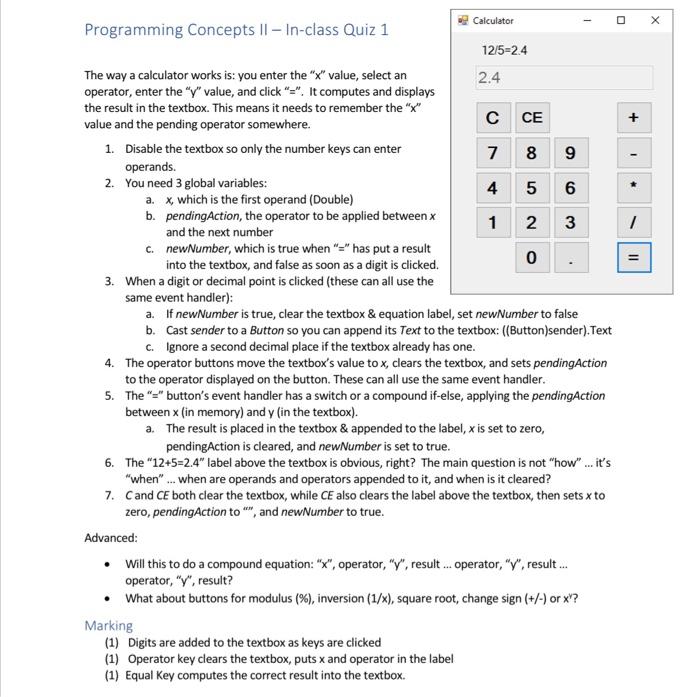
Calculator 1 X + - * 7 11 Programming Concepts II - In-class Quiz 1 12/5-24 The way a calculator works is: you enter the "x" value, select an 2.4 operator, enter the "y" value, and click "=". It computes and displays the result in the textbox. This means it needs to remember the "X" value and the pending operator somewhere. C CE 1. Disable the textbox so only the number keys can enter 7 8 9 operands. 2. You need 3 global variables: 4 5 6 a. x which is the first operand (Double) b. pendingAction, the operator to be applied between x 1 2 3 and the next number C. newNumber, which is true when "=" has put a result into the textbox, and false as soon as a digit is clicked. 0 3. When a digit or decimal point is clicked (these can all use the same event handler): a. If new Number is true, clear the textbox & equation label, set newNumber to false b. Cast sender to a Button so you can append its Text to the textbox: ((Button)sender). Text c.Ignore a second decimal place if the textbox already has one. 4. The operator buttons move the textbox's value to x, clears the textbox, and sets pendingAction to the operator displayed on the button. These can all use the same event handler. 5. The "=" button's event handler has a switch or a compound if-else, applying the pendingAction between x (in memory) and y (in the textbox). a. The result is placed in the textbox & appended to the label, x is set to zero, pendingAction is cleared, and newNumber is set to true. 6. The "12+5=2.4" label above the textbox is obvious, right? The main question is not "how" ... it's "when"... when are operands and operators appended to it, and when is it cleared? 7. Cand CE both clear the textbox, while CE also clears the label above the textbox, then sets x to zero, pendingAction to "", and newNumber to true. Advanced: Will this to do a compound equation: "X", operator, "Y", result ... operator, "Y", result... operator, "Y", result? What about buttons for modulus (%), inversion (1/x), square root, change sign (+/-) or x?? Marking (1) Digits are added to the textbox as keys are clicked (1) Operator key clears the textbox, puts x and operator in the label (1) Equal Key computes the correct result into the textbox
Step by Step Solution
There are 3 Steps involved in it

Get step-by-step solutions from verified subject matter experts
 Study Help