







Question: #ASAP# (USING R PROGRAMMING) Excel File Content: Student Number Grades Exum Scores Subjects Year Level PDM-2021-000852 1.75 78 CS11-Fprog 1 PDM-2021-001225 1.75 88 CS11-IntroCom 1
#ASAP# (USING R PROGRAMMING)
Excel File Content:
| Student Number | Grades | Exum Scores | Subjects | Year Level |
| PDM-2021-000852 | 1.75 | 78 | CS11-Fprog | 1 |
| PDM-2021-001225 | 1.75 | 88 | CS11-IntroCom | 1 |
| PDM-2020-001223 | 2.25 | 70 | CS21- DigD | 2 |
| PDM-2020-000851 | 2.25 | 84 | CS21-DS1 | 2 |
| PDM-2020-000848 | 1.5 | 80 | CS31-Algoc | 3 |
| PDM-2019-001224 | 2 | 78 | CS31-BA | 3 |
| PDM-2019-001042 | 1.75 | 78 | CS31-OS | 3 |
| PDM-2019-001224 | 2.5 | 74 | CS32-SE2 | 3 |
| PDM-2013-001046 | 2.25 | 82 | CS41-OJT | 4 |
| PDM-2013-000805 | 2 | 78 | CS41- Thesis 1 | 4 |
| PDM-2013-001233 | 2 | 74 | CS41- IAS | 4 |
| PDM-2021-000717 | 2.25 | 82 | CS11-Fprog | 1 |
| PDM-2021-000853 | 1.75 | 92 | CS11-IntroCom | 1 |
| PDM-2013-000803 | 1.75 | 45 | CS41-OJT | 4 |
| PDM-2013-001303 | 2 | 76 | CS41- Thesis 1 | 4 |
| PDM-2013-000802 | 2 | 78 | CS41- IAS | 4 |
| PDM-2020-001043 | 2 | 88 | CS21-DS1 | 2 |
| PDM-2021-000855 | 2 | 78 | CS11-Fprog | 1 |
| PDM-2021-001302 | 2.5 | 80 | CS11-IntroCom | 1 |
| PDM-2013-001047 | 1.75 | 86 | CS41-OJT | 4 |
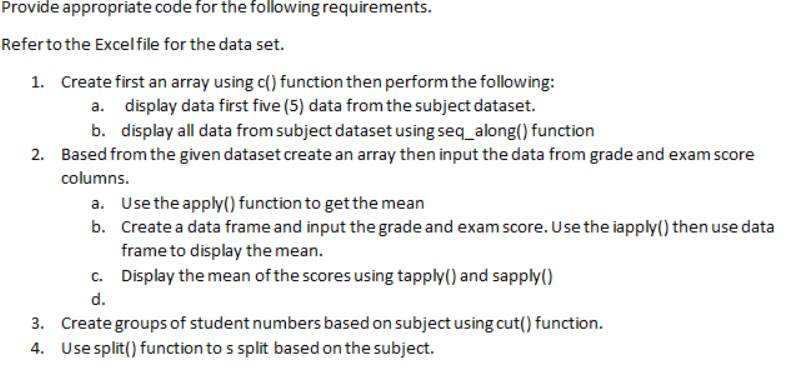
Provide appropriate code for the following requirements. Refer to the Excel file for the data set. 1. Create first an array using c() function then perform the following: a. display data first five (5) data from the subject dataset. b. display all data from subject dataset using seq_along() function 2. Based from the given dataset create an array then input the data from grade and exam score columns. a. Use the apply() function to get the mean b. Create a data frame and input the grade and exam score. Use the iapply() then use data frame to display the mean. C. Display the mean of the scores using tapply() and sapply() d. 3. Create groups of student numbers based on subject using cut() function. 4. Use split() function to s split based on the subject
Step by Step Solution
There are 3 Steps involved in it

Get step-by-step solutions from verified subject matter experts
 Study Help