







Question: Modifying your prac2.css style sheet, recreate this webpage. You may override previous styles or add new styles/classes as needed. Check out my borders We've
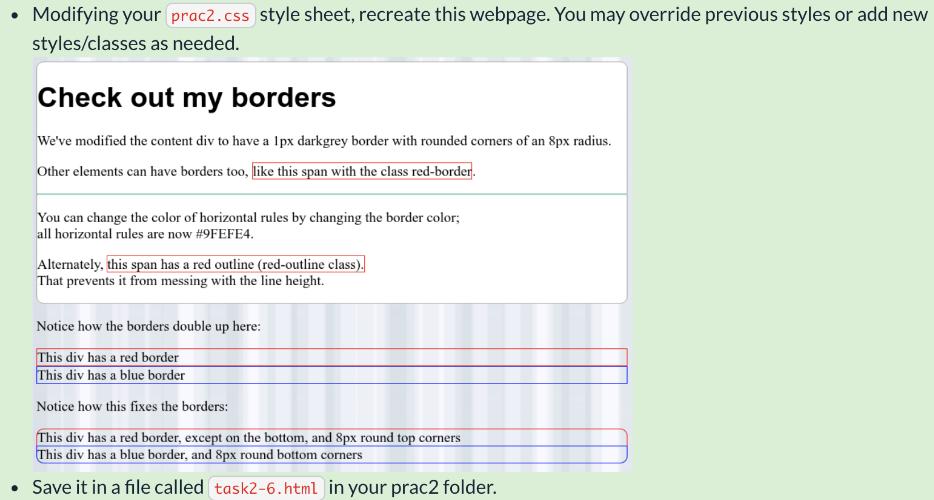
Modifying your prac2.css style sheet, recreate this webpage. You may override previous styles or add new styles/classes as needed. Check out my borders We've modified the content div to have a Ipx darkgrey border with rounded cormers of an 8px radius. Other elements can have borders too, like this span with the class red-border. You can change the color of horizontal rules by changing the border color; all horizontal rules are now #9FEFE4. Alternately, this span has a red outline (red-outline class). That prevents it from messing with the line height. Notice how the borders double up here: This div has a red border This div has a blue border Notice how this fixes the borders: This div has a red border, except on the bottom, and 8px round top corners This div has a blue border, and 8px round bottom corners Save it in a file called task2-6.html in your prac2 folder.
Step by Step Solution
3.37 Rating (153 Votes )
There are 3 Steps involved in it
Solution All of the steps mentioned in the question for making and designing an HTML webpage as shown in image in question are implemented in the atta... View full answer

Get step-by-step solutions from verified subject matter experts
 Study Help