







Question: You have the following tasks: Create a new folder for this Pacific Trails case study. Create an external style sheet named pacific.css that configures the
You have the following tasks:
-
Create a new folder for this Pacific Trails case study.
-
Create an external style sheet named pacific.css that configures the color and text for the Pacific Trails website.
-
Modify the Home page to utilize an external style sheet to configure colors and fonts. The new Home page and color swatches are shown in Figure 3.33.
Figure 3.33
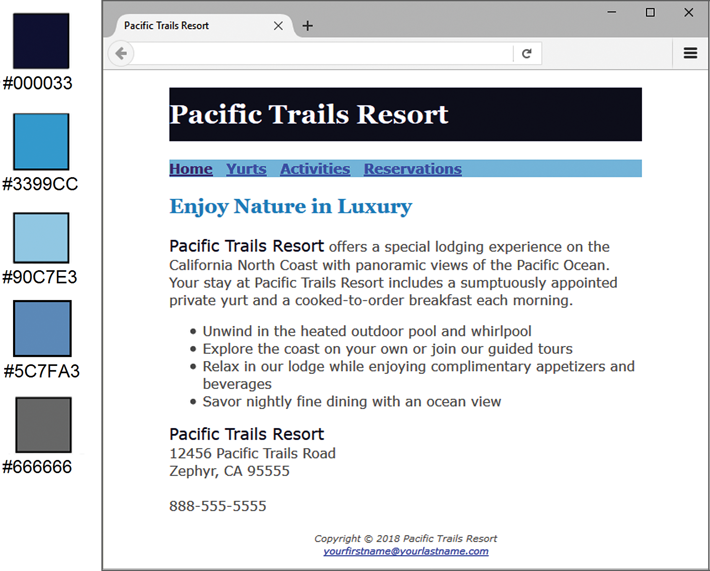
New Pacific Trails index.html
Figure 3.33 Full Alternative Text
-
Modify the Yurts page to be consistent with the new Home page.
-
Configure centered page layout.
Hands-On Practice Case Study
-
TASK 1: THE WEBSITE FOLDER.Create a folder on your hard drive or portable storage device called pacificcss. Copy all the files from your Chapter 2 pacific folder into the pacificcss folder.
-
TASK 2: THE EXTERNAL STYLE SHEET.You will use a text editor to create an external style sheet named pacific.css. Code the CSS to configure the following:
-
Global styles for the document (use the body element selector) with background color #FFFFFF, text color #666666, and Verdana, Arial, or any sans-serif font.
-
Styles for the header element selector that configure background color #000033, text color #FFFFFF, and Georgia or any serif font.
-
Styles for the h1 element selector that configure 200% line height.
-
Styles for the nav element selector that display text in bold and has a sky-blue background color (#90C7E3).
-
Styles for the h2 element selector that configure medium-blue text color (#3399CC) and Georgia or any serif font.
-
Styles for the dt element selector that configure dark-blue text color (#000033) and bold font.
-
Styles for a class named resort that configure dark-blue text color (#000033) and 1.2em font size.
-
Styles for the footer element selector with a small font size (.70em) and italic, centered text.
Save the file as pacific.css in the pacificcss folder. Check your syntax with the CSS validator (http://jigsaw.w3.org/css-validator). Correct and retest if necessary.
-
-
TASK 3: THE HOME PAGE.Launch a text editor, and open the index.html file. You will modify this file to apply styles from the pacific.css external style sheet as follows:
-
Add a element to associate the web page with the pacific.css external style sheet file.
-
Configure the navigation area. Remove the element from the navigation area, because the CSS will configure the bold font weight.
-
Find the company name (Pacific Trails Resort) in the first paragraph below the h2. Configure a span that contains this text. Assign the span element to the resort class.
-
Look for the company name (Pacific Trails Resort) directly above the street address. Configure a span that contains this text. Assign the span element to the resort class.
-
Configure the page footer area. Remove the and elementsthey are no longer needed since CSS is now used to configure the text.
Save the index.html file, and test in a browser. Your page should look similar to the one shown in Figure 3.33 except that your page content will be left-aligned instead of indented from the margins. Dont worryyoull configure your page layout in Task 5 of this case study.
-
-
TASK 4: THE YURTS PAGE.Launch a text editor, and open the yurts.html file. You will modify this file in a similar manner: Add the element, configure the navigation area, and configure the page footer area. Delete the strong tags contained within each dt element. Save and test your new yurts.html page. It should look similar to the one shown in Figure 3.34 except for the alignment.
Figure 3.34
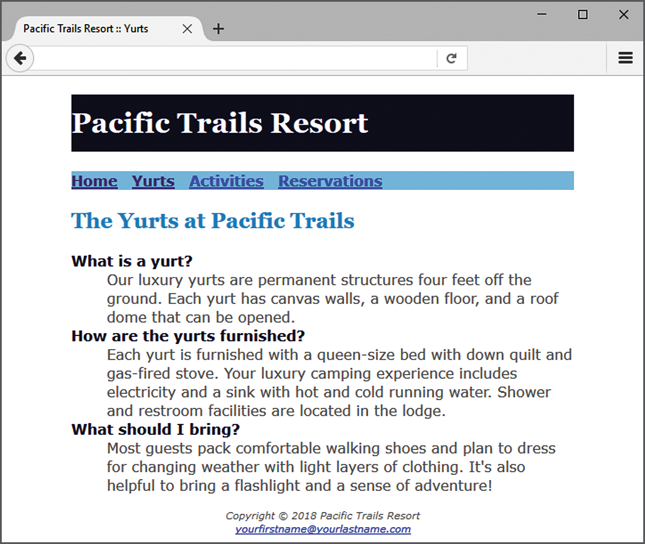
New yurts.html page
Figure 3.34 Full Alternative Text
-
TASK 5: CENTER PAGE LAYOUT WITH CSS.Modify pacific.css, index.html, and yurts.html to configure page content that is centered with 80% width. Refer to Hands-On Practice 3.9 if necessary.
-
Launch a text editor, and open the pacific.css file. Add a style rule for an id named wrapper with width set to 80%, margin-right set to auto, and margin-left set to auto.
-
Launch a text editor, and open the index.html file. Add the HTML code to configure a div element assigned to the id wrapper that wraps, or contains, the code within the body section. Save and test your index.html page in a browser and youll notice that the page content is now centered within the browser viewport as shown in Figure 3.33.
-
Launch a text editor and open the yurts.html file. Add the HTML code to configure a div element assigned to the id wrapper that wraps, or contains, the code within the body section. Save and test your yurts.html page in a browser and youll notice that the page content is now centered within the browser viewport as shown in Figure 3.34.
Experiment with modifying the pacific.css file. Change the page background color, the font family, and so on. Test your pages in a browser. Isnt it amazing how a change in a single file can affect multiple files when external style sheets are used?
-
- 0 x Pacific Trails Resort x + #000033 Pacific Trails Resort Home Yurts Activities Reservations #3399CC Enjoy Nature in Luxury #90C7E3 Pacific Trails Resort offers a special lodging experience on the California North Coast with panoramic views of the Pacific Ocean. Your stay at Pacific Trails Resort includes a sumptuously appointed private yurt and a cooked-to-order breakfast each morning. #5C7FA3 Unwind in the heated outdoor pool and whirlpool Explore the coast on your own or join our guided tours Relax in our lodge while enjoying complimentary appetizers and beverages Savor nightly fine dining with an ocean view Pacific Trails Resort 12456 Pacific Trails Road Zephyr, CA 95555 #666666 888-555-5555 Copyright 2018 Pacific Trails Resort yourfirstname@yourlastname.com - 0 X Pacific Trails Resort :: Yurts X + Pacific Trails Resort Home Yurts Activities Reservations The Yurts at Pacific Trails What is a yurt? Our luxury yurts are permanent structures four feet off the ground. Each yurt has canvas walls, a wooden floor, and a roof dome that can be opened. How are the yurts furnished? Each yurt is furnished with a queen-size bed with down quilt and gas-fired stove. Your luxury camping experience includes electricity and a sink with hot and cold running water. Shower and restroom facilities are located in the lodge. What should I bring? Most guests pack comfortable walking shoes and plan to dress for changing weather with light layers of clothing. It's also helpful to bring a flashlight and a sense of adventure! Copyright 2018 Pacific Trails Resort yourfirstname@yourlastname.com - 0 x Pacific Trails Resort x + #000033 Pacific Trails Resort Home Yurts Activities Reservations #3399CC Enjoy Nature in Luxury #90C7E3 Pacific Trails Resort offers a special lodging experience on the California North Coast with panoramic views of the Pacific Ocean. Your stay at Pacific Trails Resort includes a sumptuously appointed private yurt and a cooked-to-order breakfast each morning. #5C7FA3 Unwind in the heated outdoor pool and whirlpool Explore the coast on your own or join our guided tours Relax in our lodge while enjoying complimentary appetizers and beverages Savor nightly fine dining with an ocean view Pacific Trails Resort 12456 Pacific Trails Road Zephyr, CA 95555 #666666 888-555-5555 Copyright 2018 Pacific Trails Resort yourfirstname@yourlastname.com - 0 X Pacific Trails Resort :: Yurts X + Pacific Trails Resort Home Yurts Activities Reservations The Yurts at Pacific Trails What is a yurt? Our luxury yurts are permanent structures four feet off the ground. Each yurt has canvas walls, a wooden floor, and a roof dome that can be opened. How are the yurts furnished? Each yurt is furnished with a queen-size bed with down quilt and gas-fired stove. Your luxury camping experience includes electricity and a sink with hot and cold running water. Shower and restroom facilities are located in the lodge. What should I bring? Most guests pack comfortable walking shoes and plan to dress for changing weather with light layers of clothing. It's also helpful to bring a flashlight and a sense of adventure! Copyright 2018 Pacific Trails Resort yourfirstname@yourlastname.com
Step by Step Solution
There are 3 Steps involved in it

Get step-by-step solutions from verified subject matter experts
 Study Help