







Question: ASP SQL lockout user for a few minutes after 3 invalid login attempts Hi there, I am working with asp and sql for this assignment
ASP SQL lockout user for a few minutes after 3 invalid login attempts
Hi there, I am working with asp and sql for this assignment and I am making a login form. I got the login form to work with my database table but now I want to add a lockout after 3 login attempts, but I am unsure how to do that. Below is a picture of the login portion of my code. I have tried using an incrementing "if else" statement but that didn't appear to work. What would I need to do? Example code would be helpful.
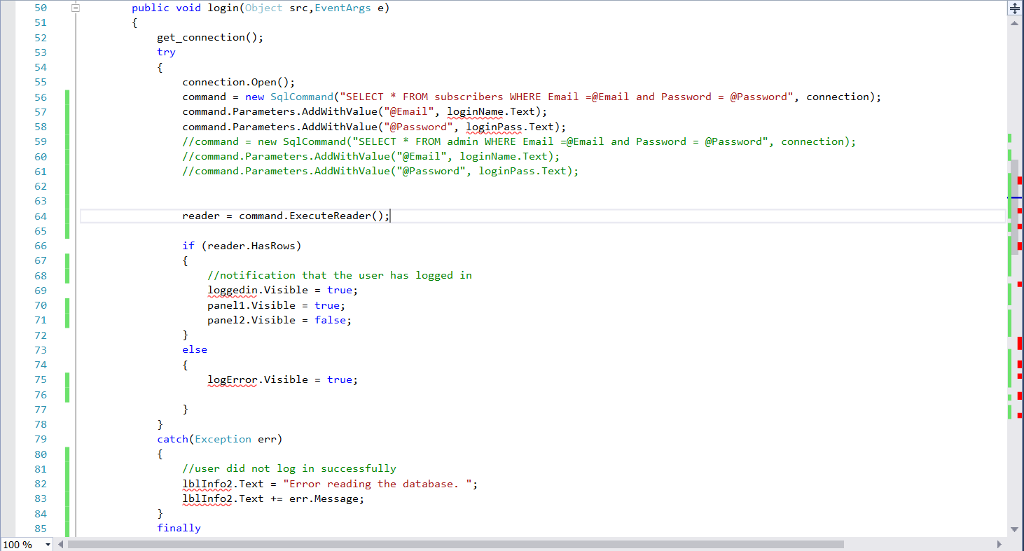
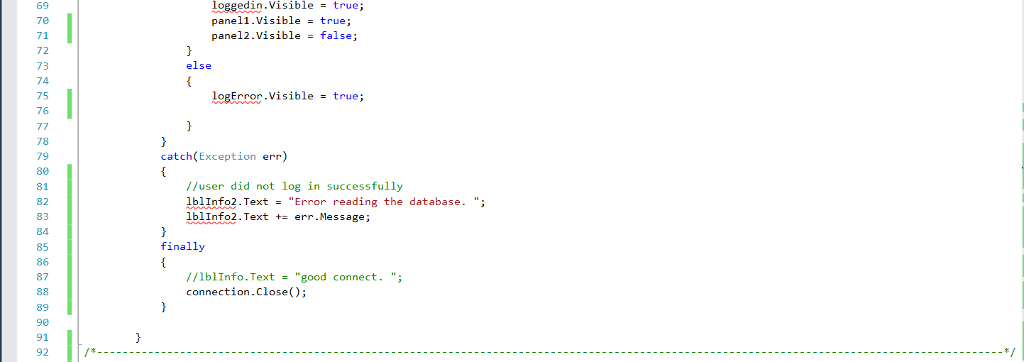
50 public void login(Object src, EventArgs e) 52 53 54 get_connection) try 56 57 58 59 60 61 62 63 64 65 connection.Open(); command = new SqlCommand("SELECT * FROM subscribers WHERE Email -eEmail and Password = password", connection); command.Parameters.AddWithValue"eEmail", loginName.Text); command. Parameters.AddwithValue( "Password", loginPass.Text); //command new SqlCommand ("SELECT FROM admin WHERE Email-Email and Password @Password", connection); //command. Parameters.AddwithValue"Email", loginName. Text) //command.Parameters.AddwithValue"Password", loginPass. Text); reader command. ExecuteReader(O: if (reader.HasRows) 67 68 69 70 71 /otification that the user has logged in loggedin.Visible - true; panel1.visible true pane12,Visible false; 73 74 else logError . Visible true; = 76 79 30 81 82 83 84 85 catch(Exception err) //user did not log in successfully lblInfo2.Text - "Error reading the database. "; lblinfo2 . Text += errMessage; finally 100%
Step by Step Solution
There are 3 Steps involved in it

Get step-by-step solutions from verified subject matter experts
 Study Help