







Question: Assign IP addresses based on Class A with sub-net mask of 255.255.255.0 Assign VLANs and IP Addresses ? 32: PC2 VLAN 502 e0/0: 142.102.66.20/24 31:
Assign IP addresses based on Class A with sub-net mask of 255.255.255.0
Assign VLANs and IP Addresses
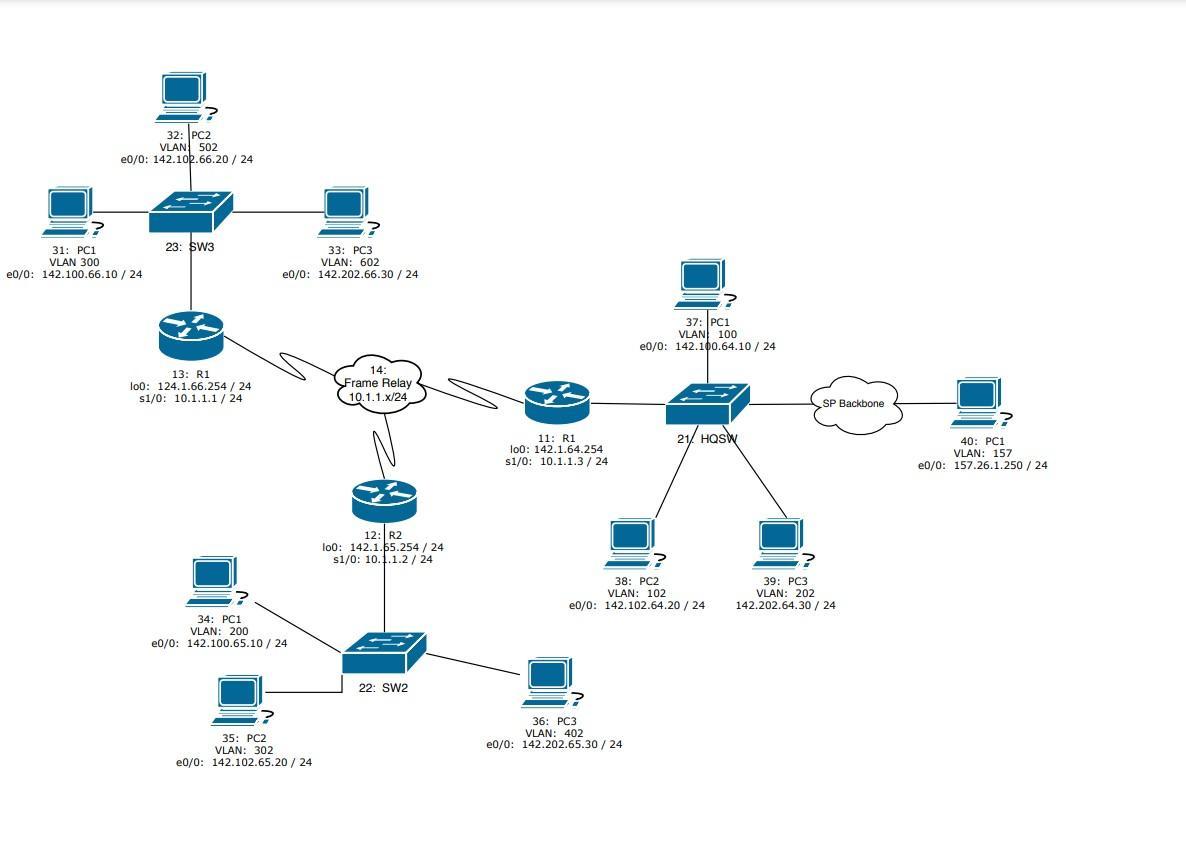
? 32: PC2 VLAN 502 e0/0: 142.102.66.20/24 31: PC1 VLAN 300 e0/0: 142.100.66.10 / 24 23: SW3 13: R1 100: 124.1.66.254 | 24 s1/0: 10.1.1.1/24 33: PC3 VLAN: 602 e0/0: 142.202.66.30 / 24 34: PC1 VLAN: 200 e0/0: 142.100.65.10 / 24 35: PC2 VLAN: 302 e0/0: 142.102.65.20 / 24 14: Frame Relay 10.1.1.x/24 12: R2 lo0: 142.1.55.254 / 24 s1/0: 10.1.1.2/24 22: SW2 11: R1 l00: 142.1.64.254 s1/0: 10.1.1.3/24 36: PC3 VLAN: 402 e0/0: 142.202.65.30 / 24 37: PC1 VLAN 100 e0/0: 142.100.64.10/24 ? ? 38: PC2 VLAN: 102 e0/0: 142.102.64.20 / 24 21/ HQSW SP Backbone 39: PC3 VLAN: 202 142.202.64.30 / 24 40: PC1 VLAN: 157 e0/0: 157.26.1.250/24
Step by Step Solution
3.53 Rating (156 Votes )
There are 3 Steps involved in it
To assign IP addresses based on Class A with a subnet mask of 2552552550 we first need to determine ... View full answer

Get step-by-step solutions from verified subject matter experts
 Study Help