







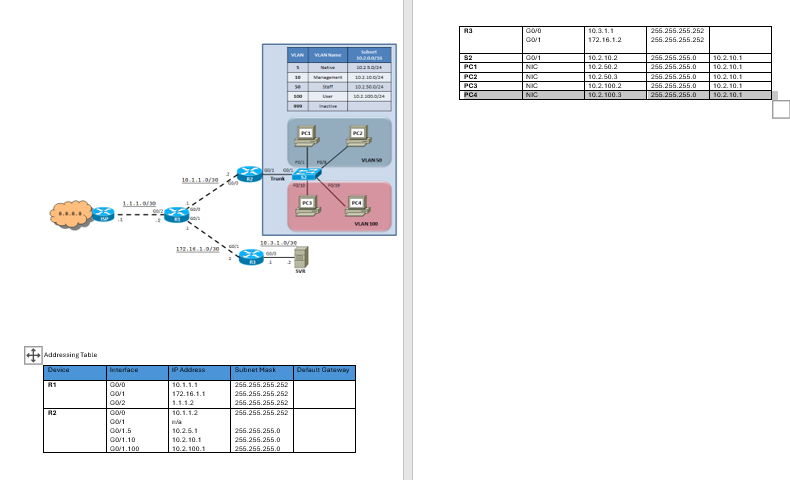
Question: can u provide command for the same please Addressing TableAddressing Table Device Interface IP Address Subnet Mask Default Gateway R 1 G 0 / 0
can u provide command for the same please
Addressing TableAddressing Table
Device Interface IP Address Subnet Mask Default Gateway
R G
G
G
R G
G
G
G
G
na
R G
G
S G
PC NIC
PC NIC
PC NIC
PC NIC
Review Logical Topology and table document
IMPORTANT: ISP router has been preconfigured you do not need to do any configurations
R R & R have been preconfigured with NAT and RIP which is a routable protocol
DO Not remove
Tasks mistake Marks
On S configure VLANs and the Management SVI.
Configure and name the VLANs as indicated in the topology diagram.
Assign the management IP address VLAN and configure its default gateway
On S configure interfaces.
Interfaces F through F should be access ports, assigned to VLAN
Interfaces F through F should be access ports, assigned to VLAN
Interfaces F F and G should be access ports, assigned to VLAN and disabled.
On S configure port security
Enable port security on F through F
Connect a maximum of MAC addresses.
Secure the ports so that the MAC address of a device is dynamically learned and added to the running configuration.
Set the port security violation to Restrict
On S configure trunking
Configure VLAN as the native VLAN for G
On S configure DHCP snooping
Enable DCHP snooping for Vlans
On S set the domain name and generate secure keys
Configure the domain name to netacad.pka
Secure keys needed to encrypt data, generate the RSA keys using
On S create an SSH user and reconfigure for the VTY lines for SSHonly access
Create an administrator user with cisco as the secret password
Configure VTY lines to check the local username database for login credentials and to only allow SSH for remote access
On R and S configure RouteronaStick InterVLAN routing
Configure R interVLAN routing for VLANs native and using Q links.
Configure S G to support interVLAN routing trunking using VLAN as the native VLAN.
On R enable DHCP services. marks NOTE: Do not use DHCP Relay agent, it is not necessary for this topology
Create two DHCP pools called STAFFPOOL and USERPOOL be exact for the names.
Assign network address, subnet mask, and default gateway for the Staff and User VLANs. refer to VLAN subnets IP addressing in the VLAN table on st page
Exclude the first addresses of each pool.
PC and PC should get a VLAN IP address IP configuration.
PC and PC should get a VLAN IP address IP configuration.
On R R R and SVR configure interfaces.
Interfaces must be configured accurately and active as identified in the logical topology.
Ping directly connected interfaces.
On R R R and S configure management features. no need to configure Line console
Assign class as the privileged EXEC encrypted password.
Create a banner warning that Unauthorized access is prohibited be exact for this text input.
Verify Connectivity
All PCs and SVR should be able to reach
Step by Step Solution
There are 3 Steps involved in it
1 Expert Approved Answer
Step: 1 Unlock

Question Has Been Solved by an Expert!
Get step-by-step solutions from verified subject matter experts
Step: 2 Unlock
Step: 3 Unlock
 Study Help