Question: Assignment 1: Calendar App Description Write a web application to display monthly calendar of any month using your own JavaScript class and CSS styles. You
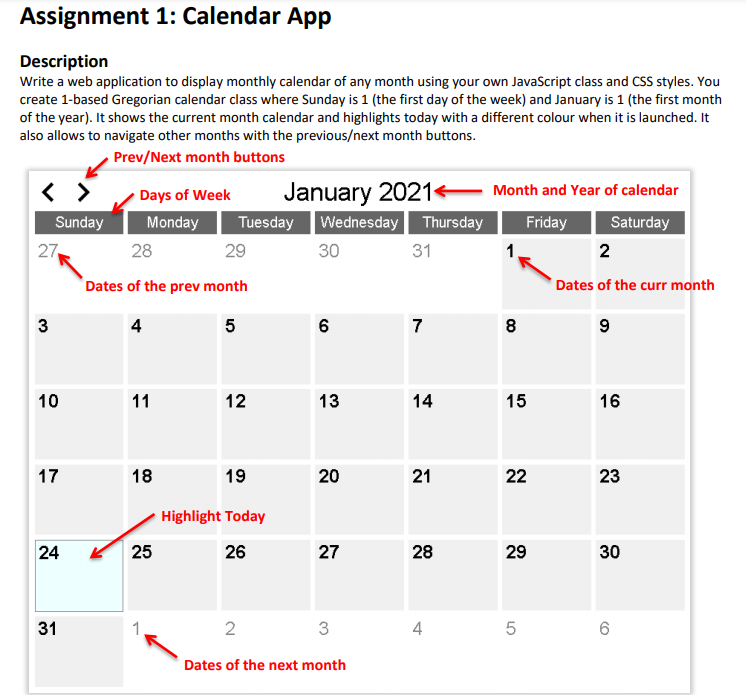
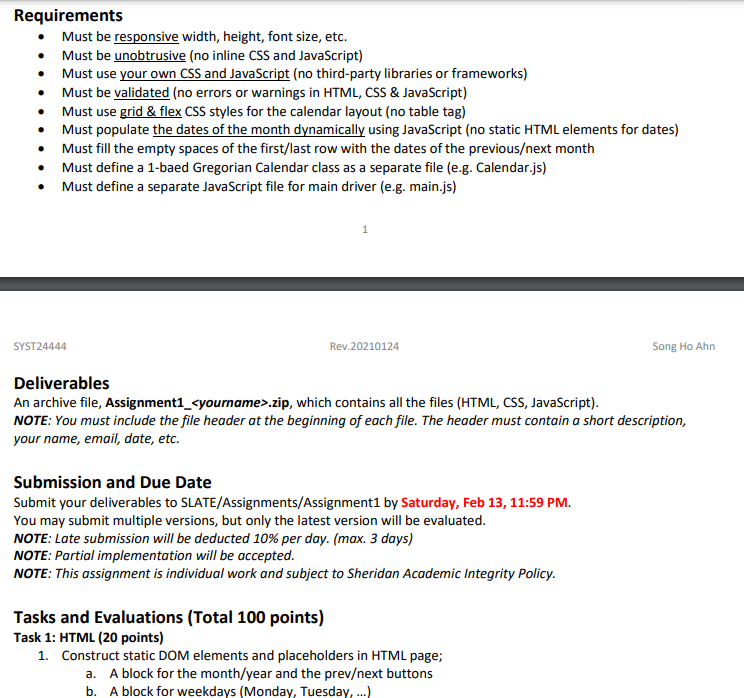
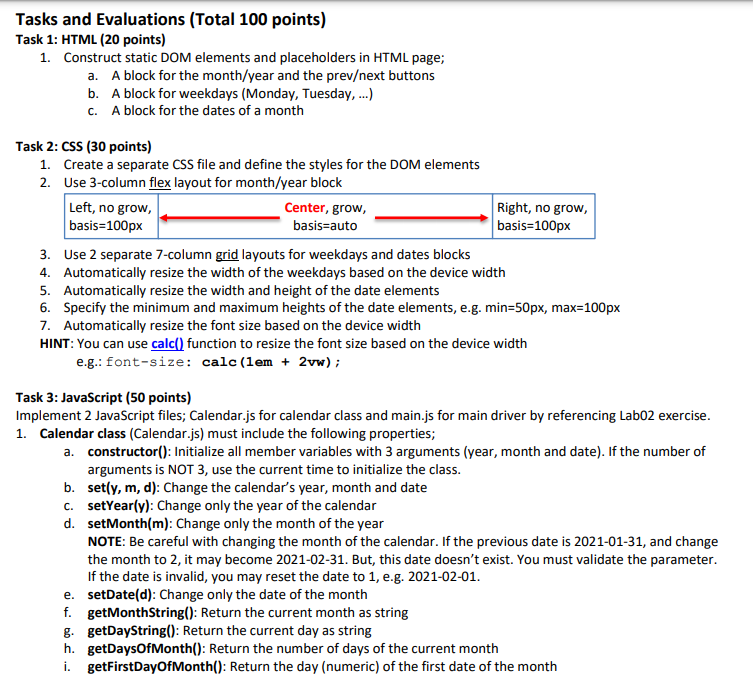
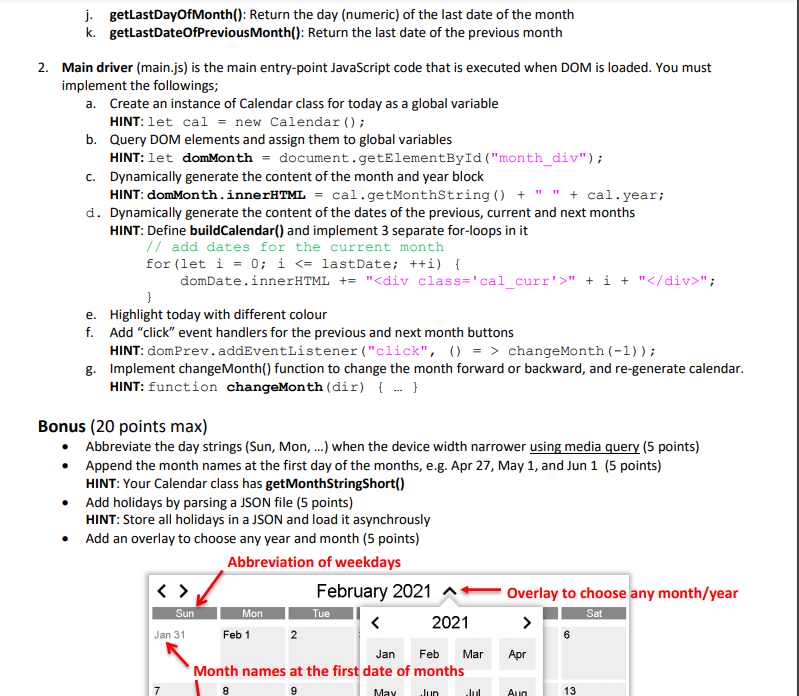
Assignment 1: Calendar App Description Write a web application to display monthly calendar of any month using your own JavaScript class and CSS styles. You create 1-based Gregorian calendar class where Sunday is 1 (the first day of the week) and January is 1 (the first month of the year). It shows the current month calendar and highlights today with a different colour when it is launched. It also allows to navigate other months with the previousext month buttons. Prev/Next month buttons Days of Week January 20214 Month and Year of calendar Sunday Monday Tuesday Wednesday Thursday Friday Saturday 27 29 30 31 1 2 Dates of the prev month Dates of the curr month 28 3 4 5 6 7 8 9 10 11 12 13 14 15 16 17 18 19 20 21 22 23 Highlight Today 24 25 26 27 28 29 30 31 2. 3 4 5 Dates of the next month Requirements Must be responsive width, height, font size, etc. Must be unobtrusive (no inline CSS and JavaScript) Must use your own CSS and JavaScript (no third-party libraries or frameworks) Must be validated (no errors or warnings in HTML, CSS & JavaScript) Must use grid & flex CSS styles for the calendar layout (no table tag) Must populate the dates of the month dynamically using JavaScript (no static HTML elements for dates) Must fill the empty spaces of the first/last row with the dates of the previousext month Must define a 1-baed Gregorian Calendar class as a separate file (e.g. Calendar.js) Must define a separate JavaScript file for main driver (e.g. main.js) 1 SYST24444 Rev.20210124 Song Ho Ahn Deliverables An archive file, Assignment1_.zip, which contains all the files (HTML, CSS, JavaScript). NOTE: You must include the file header at the beginning of each file. The header must contain a short description, your name, email, date, etc. Submission and Due Date Submit your deliverables to SLATE/Assignments/Assignment1 by Saturday, Feb 13, 11:59 PM. You may submit multiple versions, but only the latest version will be evaluated. NOTE: Late submission will be deducted 10% per day. (max. 3 days) NOTE: Partial implementation will be accepted. NOTE: This assignment is individual work and subject to Sheridan Academic Integrity Policy. Tasks and Evaluations (Total 100 points) Task 1: HTML (20 points) 1. Construct static DOM elements and placeholders in HTML page; a. A block for the month/year and the prevext buttons b. A block for weekdays (Monday, Tuesday, ...) Tasks and Evaluations (Total 100 points) Task 1: HTML (20 points) 1. Construct static DOM elements and placeholders in HTML page; a. A block for the month/year and the prevext buttons b. A block for weekdays (Monday, Tuesday, ...) C. A block for the dates of a month Task 2: CSS (30 points) 1. Create a separate CSS file and define the styles for the DOM elements 2. Use 3-column flex layout for month/year block Left, no grow, Center, grow, Right, no grow, basis=100px basisrauto basis=100px 3. Use 2 separate 7-column grid layouts for weekdays and dates blocks 4. Automatically resize the width of the weekdays based on the device width 5. Automatically resize the width and height of the date elements 6. Specify the minimum and maximum heights of the date elements, e.g. min=50px, max=100px 7. Automatically resize the font size based on the device width HINT: You can use calc() function to resize the font size based on the device width e.g.: font-size: calc(lem + 2vw); Task 3: JavaScript (50 points) Implement 2 JavaScript files; Calendar.js for calendar class and main.js for main driver by referencing Labo2 exercise. 1. Calendar class (Calendar.js) must include the following properties; a. constructor(): Initialize all member variables with 3 arguments (year, month and date). If the number of arguments is NOT 3, use the current time to initialize the class. b. sety, m, d): Change the calendar's year, month and date C. setYear(y): Change only the year of the calendar d.setMonth(m): Change only the month of the year NOTE: Be careful with changing the month of the calendar. If the previous date is 2021-01-31, and change the month to 2, it may become 2021-02-31. But, this date doesn't exist. You must validate the parameter. If the date is invalid, you may reset the date to 1, e.g. 2021-02-01. e.setDate(d): Change only the date of the month f. getMonthString(): Return the current month as string g. getDayString(): Return the current day as string h. getDays Of Month(): Return the number of days of the current month i. getFirstDayOfMonth(): Return the day (numeric) of the first date of the month j. getLastDayOfMonth(): Return the day (numeric) of the last date of the month k. getLast DateOfPrevious Month(): Return the last date of the previous month 2. Main driver (main.js) is the main entry-point JavaScript code that is executed when DOM is loaded. You must implement the followings; a. Create an instance of Calendar class for today as a global variable HINT: let cal = new Calendar(); b. Query DOM elements and assign them to global variables HINT: let domMonth = document.getElementById("month_div"); C. Dynamically generate the content of the month and year block HINT: domMonth.innerHTML = cal.getMonthstring() + " " + cal.year; d. Dynamically generate the content of the dates of the previous, current and next months HINT: Define buildCalendar() and implement 3 separate for-loops in it // add dates for the current month for(let i = 0; i " + i + ""; } e. Highlight today with different colour f. Add "click" event handlers for the previous and next month buttons HINT: domPrev.addEventListener("click", () = > changeMonth (-1)); g. Implement changeMonth() function to change the month forward or backward, and re-generate calendar. HINT: function changeMonth (dir) { } Bonus (20 points max) Abbreviate the day strings (Sun, Mon, ...) when the device width narrower using media query (5 points) Append the month names at the first day of the months, e.g. Apr 27, May 1, and Jun 1 (5 points) HINT: Your Calendar class has get MonthStringShort() Add holidays by parsing a JSON file (5 points) HINT: Store all holidays in a JSON and load it asynchrously Add an overlay to choose any year and month (5 points) Abbreviation of weekdays February 2021 A Overlay to choose any month/year Tue 2021 Sat > Feb 1 Apr Month names at the first date of months Sun Mon Jan 31 2 6 Jan Feb Mar 7 8 May Jun Iul Aun 13









 Study Help